


Most Adobe Stock reviews will tell you it has a large library and works well with Creative Cloud. That’s true. It’s also the least useful thing you can learn before spending money.
What those reviews skip is more telling: the annual-plan structure that quietly locks you in, the cancellation terms that forfeit your unused credits, the growing fog of AI-generated assets making search results noisier, and the licensing walls that stop you from putting a stock image on a t-shirt or inside a logo. These are the parts that cost buyers real money.
During my evaluation of Adobe’s official documentation, current pricing pages, community threads, G2 feedback, Trustpilot complaints, and Reddit sentiment, one pattern repeated itself. Adobe Stock is genuinely strong for people already embedded in Creative Cloud who need in-app preview, licensing, and team governance. For everyone else, it ranges from overpriced to unnecessary.
This review tells you exactly which side of that line you’re on.
Bottom Line
Adobe Stock earns its price only if you already work inside Adobe Creative Cloud daily and need in-app preview-to-license workflow, pooled team licensing, or enterprise-grade asset governance. If you’re an occasional buyer, a non-Adobe user, or a team assuming individual plans cover shared use, you’ll almost certainly overpay. The integration is real. So are the traps.
TL;DR
- Best for: Creative professionals using Photoshop, Illustrator, InDesign, or Premiere daily who want stock search, preview, and licensing without leaving their app
- Not ideal for: Occasional buyers, non-Adobe workflows, anyone who needs unlimited downloads, or teams on individual plans expecting shared asset rights
- Starting price: US$29.99/month (3 standard assets, month-to-month) or US$29.99/month (10 standard assets, annual commitment)
- Biggest strength: In-app watermarked preview that replaces with the licensed high-res file without redoing your edits
- Biggest drawback: Confusing pricing layers (subscriptions, credit packs, premium add-ons, extended licenses) combined with cancellation forfeiture of unused credits
- Overall score: 7.4 / 10
Review Verdict in 30 Seconds
Adobe Stock is a stock media subscription platform that positions itself around 900M+ assets and deep integration with Adobe Creative Cloud apps. The in-app licensing workflow is its clearest competitive advantage: you preview a watermarked asset inside Photoshop or Illustrator, license it, and the high-res version drops into your layout with zero rework.
But the pricing structure is layered in a way that punishes casual buyers and confuses even regular users. Annual plans save up to 30%, but come with cancellation penalties. Standard licenses exclude logo use, resale merchandise, and print runs above 500,000. Stock credits and Firefly generative credits are completely separate systems. And AI-generated content is now polluting search results, based on community reports from both Adobe’s own forums and Reddit.
Buy it if Creative Cloud is your daily workflow. Skip it if you just need a few images a month or don’t use Adobe apps.
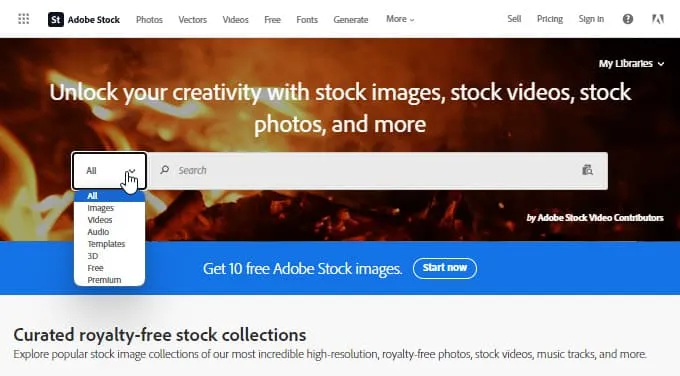
What Adobe Stock Is, Plus the Context That Actually Matters
Adobe Stock is a stock media marketplace and creative asset subscription platform built directly into the Adobe Creative Cloud ecosystem. It covers photos, vectors, illustrations, templates, 3D assets, audio, HD video, 4K video, Premium collections, and Editorial content.
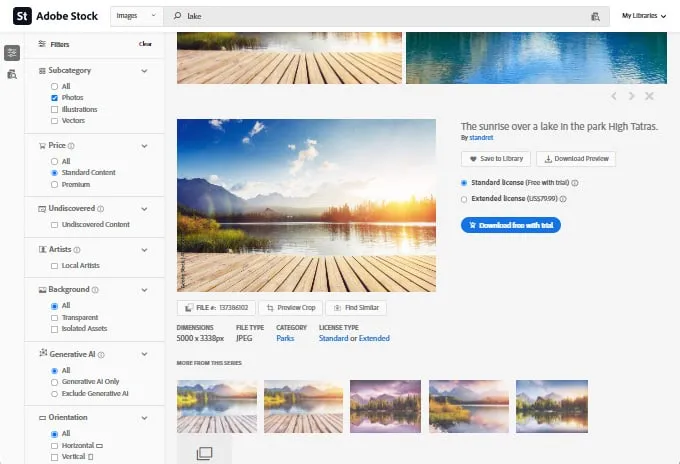
What separates Adobe Stock from standalone stock marketplaces is the workflow layer. Based on Adobe’s own documentation, the in-app integration follows a specific path: open the Libraries panel via Window > Libraries or Window > Adobe Creative Cloud Libraries, search within the panel, switch the dropdown to Adobe Stock, preview a watermarked version of the asset directly in your working file, then license it. The licensed high-resolution file replaces the watermarked preview without requiring you to redo any edits, transforms, or layer adjustments.
That replacement behavior is genuinely useful. It’s also the core reason Adobe Stock exists as a separate product rather than just another stock photo website.
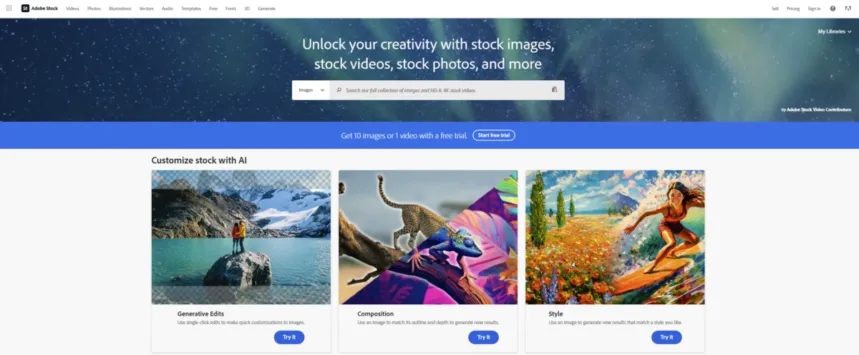
As of April 2026, Adobe launched AI Studio on the Adobe Stock site, adding Type to Edit, Change Mood, Change Color, Animate Image, and Audio Match capabilities. This replaces the older “Customize” features that Adobe sunset explicitly. The direction is clear: Adobe wants you to search, edit, and then license, rather than license and export to another tool.
One thing to understand early: Adobe Stock credits are not the same as Firefly generative credits. Stock credits license assets from the marketplace. Generative credits power Firefly features like Replace Background, Expand Image, and Apply Style. They’re billed separately, they reset differently, and unused generative credits don’t roll over. Based on Adobe’s Generative Credits FAQ, actions like Replace Background and Apply Style cost 1 generative credit per selected generated image, while Remove Background costs 0.
If you’re comparing Adobe Stock to other stock platforms, the real comparison isn’t “library size vs library size.” It’s “workflow integration vs standalone marketplace.” That distinction changes who should buy it and who should walk away.
How We Evaluated Adobe Stock
This review is research-based, not hands-on tested. I did not personally subscribe to, trial, or benchmark Adobe Stock during this evaluation.
Here’s what I did examine:
- Adobe’s official documentation, including the website workflow help, in-app workflow guides, licensing terms, and team/enterprise FAQ pages
- Adobe’s pricing pages, verified on April 15, 2026, including subscription tiers, credit packs, rollover rules, and cancellation terms
- Adobe’s product blog, specifically the April 13, 2026 AI Studio launch announcement
- G2 reviews for pattern analysis of user satisfaction and recurring complaints
- Trustpilot complaints for cancellation and billing experience signals
- Reddit threads for unfiltered buyer sentiment, particularly around AI-content quality and search friction
- Adobe Community forum feature requests and bug reports
- Competitor pricing pages for Envato Elements, iStock, and Shutterstock, verified on April 15, 2026
Every factual claim in this review traces back to one of these source classes. Where community complaints are cited, they’re treated as recurring signals, not universal proof.
Test Results Summary
Quick verdict: Adobe Stock scores well on workflow integration and asset breadth but gets dragged down by pricing complexity, cancellation penalties, and growing AI-content search noise.
Adobe Stock Scorecard
| Category | Weight | Score (out of 10) | Weighted Score |
|---|---|---|---|
| Creative Cloud Integration | 25% | 9.0 | 2.25 |
| Asset Library Breadth | 15% | 8.5 | 1.28 |
| Pricing Transparency | 15% | 5.5 | 0.83 |
| Licensing Clarity | 15% | 6.5 | 0.98 |
| Search & Discovery Quality | 10% | 6.0 | 0.60 |
| AI / Editing Workflow (AI Studio) | 10% | 7.5 | 0.75 |
| Team & Enterprise Governance | 5% | 8.0 | 0.40 |
| Support & Trust Signals | 5% | 6.0 | 0.30 |
| Overall | 100% | 7.4 / 10 |
The integration score pulls the average up. Without it (say, for a buyer outside the Adobe ecosystem), the effective score drops closer to 6.5.
Real-World Use Cases
Scenario 1: The Freelance Graphic Designer in Photoshop
Maya is a freelance designer who works in Photoshop and Illustrator daily. She needs 8 to 12 stock images per month for client projects, mostly standard photos and vectors.
Best plan: Annual 10 standard assets at US$29.99/month, with occasional on-demand assets at the plan discount rate.
Why it works: Maya opens the Libraries panel in Photoshop, searches Adobe Stock from the dropdown, previews watermarked assets directly in her client layouts, and licenses them when approved. The high-res replacement drops in without Maya rebuilding any layer effects.
The catch: Maya is locked into an annual commitment. If a slow month hits and she doesn’t use her credits, they roll over (up to 120 on the 10-asset plan based on official listings), but if she needs to cancel mid-year, she loses all unused credits. And if any client project requires the image on merchandise for resale, she’ll need an extended license on top of her subscription.
Scenario 2: The Agency Creative Director Managing a Team
David runs a 6-person creative team at a marketing agency. They use Photoshop, Illustrator, InDesign, and Premiere across different team members.
Best plan: A Creative Cloud Pro Plus team subscription with unlimited Adobe Stock standard assets and enhanced licensing, but all seats must be on the same plan.
Why it works: According to Adobe’s teams and enterprise documentation, team subscriptions use pooled licensing, meaning downloaded assets can be shared across the team. The company owns the licensed assets, not individual team members. David gets admin-level control and greater indemnification in the enterprise tier.
The catch: Every seat has to be on the same Pro Plus plan. You can’t mix and match. And David needs to be aware that “unlimited standard assets” doesn’t cover Premium content, extended licenses for resale contexts, or separate credit pack needs.
Scenario 3: The Occasional Content Marketer Outside Adobe
Sarah is a content marketer at a B2B startup. She uses Canva and Google Slides, not Adobe tools. She needs maybe 3 to 5 stock images per month for blog posts and social media.
Best plan: Probably not Adobe Stock at all.
Why it doesn’t work: The month-to-month 3-asset plan costs US$29.99/month. If Sarah needs a fourth image, that’s an additional US$9.99 on demand, bringing her to US$39.98 for 4 images. She gets zero benefit from the in-app Creative Cloud integration. The annual 10-asset plan costs the same US$29.99/month but requires a 12-month commitment.
Better fit: Envato Elements at US$16.50/month with unlimited downloads and a lifetime commercial license. Sarah gets more images for less money without being locked into an ecosystem she doesn’t use.
Pros
Quick verdict: Adobe Stock’s strengths are real but almost entirely tied to the Adobe ecosystem. Outside that ecosystem, the advantages thin out quickly.
1. In-App Preview-to-License Workflow Is a Genuine Differentiator
Based on Adobe’s official documentation, the in-app flow is specific and useful: search Adobe Stock from the Libraries panel inside Photoshop, Illustrator, InDesign, Premiere, or After Effects. Preview a watermarked asset directly in your working layout. License it, and the high-resolution version replaces the preview without you redoing edits.
This isn’t marketing language. The replacement behavior means a designer can show a client a comp with watermarked stock, get approval, license it, and move straight to delivery. That saves real rework time (something I could not verify with timing data, but the workflow logic stands on its own from the docs).
The trade-off: this only matters if you work inside Adobe apps. If your workflow is Figma, Canva, or anything outside Creative Cloud, this advantage is worth exactly zero.
2. Broad Asset Library Covering Multiple Media Types
Adobe Stock officially supports standard images, vectors, illustrations, templates, 3D assets, audio, HD video, 4K video, Premium collections, and Editorial content. Recent G2 reviews consistently praise the library size and fast search as positives. For mixed creative teams that need photos for a blog post, templates for social, and 4K video for a brand campaign, having all of this under one subscription reduces vendor sprawl.
The trade-off: library breadth doesn’t mean you can use everything on a standard plan. Premium assets cost more. Videos consume more credits. Editorial content has separate usage restrictions. The “one big library” feeling starts to fragment once you look at the pricing tiers behind each asset type.
3. AI Studio Adds Pre-License Editing (As of April 2026)
Adobe’s AI Studio, launched April 13, 2026, introduces Type to Edit, Change Mood, Change Color, Animate Image, and Audio Match directly on the Adobe Stock site. This moves the workflow closer to “find an asset, refine it, then license it” instead of the traditional “license an asset, then open it in another app to edit.”
This is a meaningful shift. If you can color-correct, animate, or edit text before licensing, you’re less likely to license something that doesn’t quite fit.
The trade-off: AI Studio is new, and Adobe explicitly sunset its predecessor “Customize” feature. Early-stage AI editing tools can have inconsistent output quality. Community perception of AI-generated content on the platform is already mixed (more on that in the Cons section).
4. Strong Team and Enterprise Governance
Adobe’s documentation makes a clear case for business-grade stock management: pooled licensing (so assets are company-owned, not tied to individual accounts), admin-level user control, archiving rights, and greater indemnification at the enterprise tier (which protects the company against licensing disputes at a higher level than individual plans).
For agencies and large creative teams, this matters. It means a departing employee’s licensed assets stay with the company, not with their personal Adobe ID.
The trade-off: individual plans do not support this. If you’re a solo subscriber, you can’t share your licensed assets with a teammate. Adobe’s docs are explicit on this point: individual Creative Cloud users cannot use pooled licensing.
5. Reliable Discovery Loop Inside the App
Right-click options like Find Similar and View Details on Web, documented in Adobe’s in-app workflow help, create a tight discovery loop. You find an image, see similar ones, jump to the web for more detail, and come back. It’s not a revolutionary feature, but it reduces the friction of bouncing between browser tabs and your design application.
Cons
Quick verdict: The cons aren’t minor inconveniences. They’re structural problems in Adobe Stock’s pricing, licensing, search quality, and cancellation terms that directly affect how much you spend and what you can legally do with your assets.
1. Pricing Structure Is Genuinely Confusing
Adobe mixes annual-commitment plans, month-to-month plans, rollover caps, on-demand pricing, Premium asset pricing, extended licenses, and separate credit packs. Some G2 reviewers specifically flagged the credits-vs-subscription setup as confusing. Based on my review of the official pricing page, a new buyer faces at least six different pricing dimensions before they can estimate their actual monthly cost.
Trigger: Trying to figure out what plan to buy.
Consequence: Buyers often choose the wrong tier, either overpaying for unused credits or hitting on-demand surcharges when they run out.
Workaround: None cleanly documented. You can start month-to-month at a higher per-asset cost to gauge usage, then switch to annual, but Adobe’s own FAQ warns that switching involves forfeiting unused credits.
2. Cancellation and Downgrade Penalties Are Real
Adobe’s own FAQ states plainly: you lose unused licenses and plan credits when you cancel or downgrade. Trustpilot complaints confirm this isn’t theoretical. Buyers report surprise at the annual-plan cancellation cost, especially when they signed up through a promotion that didn’t emphasize the commitment terms.
Trigger: Canceling mid-cycle or downgrading to a cheaper plan.
Consequence: Forfeiture of all accumulated unused credits. On the 25-asset annual plan, that could mean losing hundreds of dollars of unused value.
Workaround: Use all your credits before downgrading. But that requires timing your usage precisely, and it doesn’t help if you’re canceling due to budget cuts.
3. Standard License Has Walls That Most Reviews Downplay
Based on Adobe’s documentation and pricing page, the standard license excludes: use in logos, trademarks, or company identity; use in items for resale (so no merchandise, no print-on-demand, no physical products); and print runs exceeding 500,000 copies. These aren’t edge cases for agencies and brand teams. They’re common project requirements.
Trigger: Using a stock image in a client’s logo, on a product for sale, or in a large-print campaign.
Consequence: Licensing violation. You need an extended license, which is priced separately and not universally bundled into subscription plans.
Workaround: Buy an extended license before using the asset. But this adds cost that isn’t visible in the headline subscription price.
4. AI-Generated Content Is Polluting Search Results
Adobe Community feature requests describe Adobe Stock as increasingly overrun with AI-generated graphics. Some users report mislabeled AI assets. Others flag vector editability claims that don’t hold up after download (vectors that are technically SVG files but behave like rasterized images). Reddit complaints echo the AI clutter, with users noting that artifacts and quality issues only become visible after downloading the licensed file.
Trigger: Searching for high-quality stock images or vectors and filtering through AI-generated results.
Consequence: Wasted time, wasted credits on assets that don’t meet quality expectations, and no documented refund workflow for poor-quality AI-labeled vectors.
Workaround: None clearly documented by Adobe. Some users suggest adding negative keyword techniques, but Adobe’s search filters don’t yet offer a reliable “exclude AI-generated” toggle based on currently available community feedback.
5. Search and Browsing Friction Is Documented
Users in the Adobe Community forum report slow searches, clunky scrolling through results, random re-ordering of results after quick query edits, and browser back-button behavior that resets deep search progress. If you’ve spent 15 minutes refining a search and accidentally hit the back button, you may lose your position entirely.
Trigger: Extended browsing sessions or rapid query refinements on the Adobe Stock website.
Consequence: Lost time and frustration, especially on deadline-driven projects.
Workaround: None documented. The in-app search panel may sidestep some website-specific friction, but large catalog browsing is still primarily a web experience.
6. Support Confidence Is Mixed
G2 includes at least one review centered on a double-charging incident with no resolution from support. Treat this as a warning signal, not proof of systemic failure. But for a premium-priced service, even isolated billing errors with poor support response erode trust.
Trigger: Billing errors or account disputes.
Consequence: Financial loss and time spent on resolution attempts.
Workaround: Document everything. Monitor credit card statements. Adobe’s general support channels exist, but the experience quality varies based on available reviews.
Things the Company Won’t Tell You (The Real Disadvantages)
This section exists because the problems below are either buried in FAQ fine print or entirely absent from Adobe’s marketing pages.
Annual Plan Optics Are Misleading
The headline price for the 10-asset annual plan is US$29.99/month. The month-to-month plan for 3 assets is also US$29.99/month. Same price, different commitment level, different asset count. Adobe frames the annual plan as “saving up to 30%,” but what they’re really doing is making the monthly plan look expensive by comparison while locking you into 12 months.
If you realize you don’t need Adobe Stock after month 3, you’re still on the hook. And canceling early means losing every unused credit you’ve accumulated.
Cancellation Forfeits Everything
This is worth stating twice because it’s the single item that triggers the most Trustpilot anger. Adobe’s pricing page says it clearly: “If you cancel or downgrade, you lose unused licenses and plan credits.” There’s no grace period for using up your balance. There’s no cash-out option. The credits vanish.
Premium and Extended Licenses Are a Hidden Cost Layer
The subscription price buys you standard assets. Premium images cost 12 to 50 credits each. Premium 3D runs 2 to 10 credits each. HD and 4K videos cost 8 to 20 credits each. Extended licenses for resale or large print runs are priced separately. These costs aren’t included in the headline subscription price, and they fragment the “one subscription covers everything” impression.
Standard License Boundaries Are Narrower Than You’d Expect
No logos. No trademarks. No company identity use. No merchandise for resale. No print runs over 500,000. These aren’t obscure restrictions for niche users. If you’re a brand designer or an agency that handles physical products, you’ll hit these walls regularly.
AI-Content Search Noise Is Getting Worse, Not Better
Based on both Adobe Community posts and Reddit threads, the volume of AI-generated content on Adobe Stock is increasing. The complaint pattern includes: mislabeled content, poor-quality vectors marketed as editable, and visual artifacts only visible after download and licensing. Adobe has not publicly addressed a filter solution for this based on the sources available for this review.
Pricing
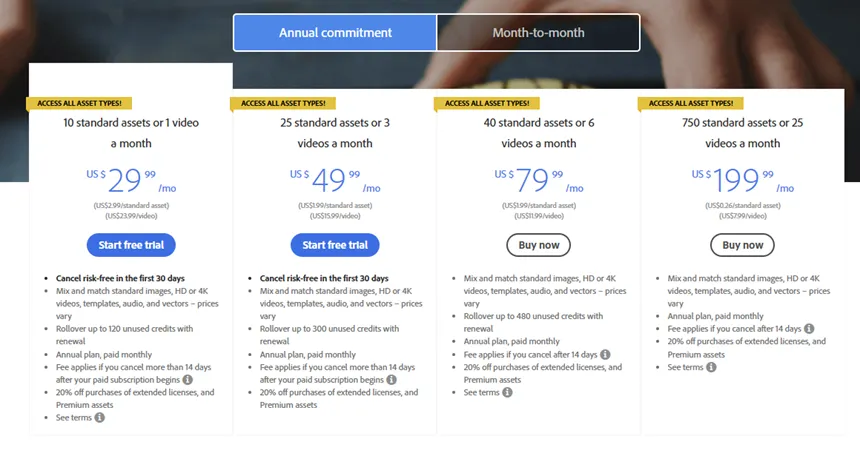
Quick verdict: Adobe Stock pricing makes sense at mid-volume annual commitment levels for Adobe-ecosystem users. It falls apart for occasional buyers, gets expensive for Premium and video-heavy workflows, and becomes genuinely confusing once you factor in credit packs, extended licenses, and generative credits.
Adobe Stock Individual Plans (Verified April 15, 2026)
| Plan | Annual (billed monthly) | Month-to-Month |
|---|---|---|
| 3 standard assets/mo | N/A | US$29.99/mo |
| 10 standard assets or 1 video/mo | US$29.99/mo | N/A |
| 25 standard assets or 3 videos/mo | US$49.99/mo | US$69.99/mo |
| 40 standard assets or 6 videos/mo | US$79.99/mo | US$99.99/mo |
| 750 standard assets or 25 videos/mo | US$199.99/mo | US$249.99/mo |
Rollover caps (on annual plans): up to 120 unused credits on the 10-asset plan, up to 300 on the 25-asset plan, and up to 480 on the 40-asset plan, based on official plan listings.
Credit packs (separate from subscriptions): available in 5, 16, 40, 80, and 150 credit sizes. Credit packs last one year (outside Japan) and cannot be combined with subscription credits.
Real Cost of Adobe Stock by Team Type
| Buyer Type | Likely Plan | Monthly Cost | 6-Month Real Spend | Key Risk |
|---|---|---|---|---|
| Occasional solo buyer (3-5 images/mo) | Month-to-month 3 assets | US$29.99/mo + US$9.99 per extra | ~US$209.94 to US$239.88 | Overpaying per asset. No annual savings, but no lock-in either. |
| Steady freelancer (8-12 images/mo) | Annual 10 assets | US$29.99/mo | US$179.94 + on-demand extras | Annual lock-in. Cancellation forfeits credits. |
| In-house marketer (20-30 assets/mo) | Annual 25 assets | US$49.99/mo | US$299.94 | Savings are real (~US$120 vs month-to-month over 6 months), but commitment is binding. |
| Agency / team (high volume, mixed media) | Creative Cloud Pro Plus (team) | Varies (all seats same plan) | Varies | All seats must match. Premium, video, and extended licenses still cost extra. |
Cost Math: Steady Freelancer (25 Assets/Month)
- Annual plan: US$49.99/month x 6 = US$299.94
- Month-to-month plan: US$69.99/month x 6 = US$419.94
- Six-month savings on annual: US$120.00
- But the annual commitment means if you cancel at month 4, you’ve lost all unused credits from months 5 and 6. That “savings” depends entirely on you staying the full year.
Cost Math: Occasional Solo Buyer (4 Assets/Month)
- Month-to-month 3-asset plan: US$29.99 + 1 on-demand asset at US$9.99 = US$39.98/month
- Annual 10-asset plan: US$29.99/month, but you’re paying for 10 assets when you only need 4. You’ll accumulate rollover credits, but if you cancel, they vanish.
- Effective per-image cost at 4 images/month on the monthly plan: US$9.99 each. That’s not cheap for standard stock photos.
Security, Privacy, Ownership, and Lock-In
Quick verdict: Adobe’s cloud security posture is well-documented at the company level, but these are Adobe-wide signals, not product-specific Adobe Stock certifications.
Adobe provides a Trust Center with compliance certifications including SOC 2 Type 2, SOC 3, ISO 27001:2022, ISO 27017:2015, ISO 27018:2019, and ISO 22301:2019. These cover Adobe’s cloud infrastructure broadly, not Adobe Stock as an isolated product.
Ownership nuance for teams: On individual plans, the licensed user owns the asset rights. On team plans, the company owns the asset rights through pooled licensing. This distinction matters when employees leave. On an individual plan, the assets go with the person. On a team plan, the assets stay with the company.
Lock-in reality: Adobe Stock assets are licensed for perpetual use under the standard license (meaning you can keep using them after your subscription ends for previously licensed assets). But you lose access to the search, preview, and in-app licensing workflow, and you lose all unused credits. The lock-in isn’t about the assets you’ve already licensed. It’s about the workflow dependency and the credit system that penalizes departure.
Also worth noting: 2025 contributor-facing Firefly FAQ documentation confirms commercially released Firefly models were trained on Adobe Stock, openly licensed, and public domain content. So if you’re contributing to or licensing from Adobe Stock, your work exists within the same training ecosystem powering Adobe’s AI tools.
What Most Reviews Miss About Adobe Stock
1. AI Studio is the 2026 story, and most reviews are still writing about “Customize.” Adobe explicitly sunset Customize in favor of AI Studio as of April 2026. If a review still references Customize as a current feature, it’s outdated. AI Studio includes Type to Edit, Change Mood, Change Color, Animate Image, and Audio Match. This is a different product experience than what existed even 12 months ago.
2. Stock credits and Firefly generative credits are completely separate systems. This confusion is real and documented. Stock credits license marketplace assets. Generative credits power Firefly features inside Creative Cloud apps. They don’t pool. They don’t transfer. Generative credits reset monthly and don’t roll over. If you assume your stock subscription covers AI generation, you’ll run into unexpected limitations.
3. Individual plans don’t give you team-sharing rights. Adobe’s documentation is explicit: individual Creative Cloud users cannot use pooled licensing. If you and a colleague are both on individual subscriptions, you can’t share licensed assets between you. You need a team plan with pooled licensing for that. Many reviews gloss over this distinction entirely.
4. Standard license doesn’t cover logos or trademarks. You cannot use an Adobe Stock asset as part of a logo, trademark, or company identity. Full stop. This isn’t a gray area. It’s a stated restriction in Adobe’s licensing terms. For brand designers, this means stock assets are for comps and internal use, not for final identity work, unless you buy an extended license (and even then, check the exact terms).
5. AI-content quality issues are now a documented buyer risk. Community reports describe mislabeled AI assets, vectors that claim editability but behave like rasterized images, and visual artifacts only visible after download. This isn’t a future concern. It’s a current one, based on recent Adobe Community threads and Reddit discussions.
6. Older reviews undercount the hidden pricing layers. Headline subscription prices are just the start. Premium assets, extended licenses, video credit consumption rates (8 to 20 credits each), and separate credit packs create pricing complexity that most “Adobe Stock costs US$29.99/month” summaries completely ignore.
Common Mistakes When Using Adobe Stock
Mistake 1: Buying the 3-asset monthly plan when you need 4 or more images. The 3-asset month-to-month plan costs US$29.99. A fourth image adds US$9.99 on demand. At 4 images per month, you’re at US$39.98. The annual 10-asset plan costs the same US$29.99/month but gives you 10 assets. If you regularly need more than 3 images, the month-to-month entry plan is the most expensive way to buy stock.
Mistake 2: Assuming the standard license covers logo or trademark use. It doesn’t. Adobe’s licensing docs are clear: no logos, no trademarks, no company identity. If your client needs a stock vector adapted into a brand mark, you need an extended license.
Mistake 3: Assuming stock credits cover Firefly AI edits. Stock credits license assets. Generative credits power Firefly features. They’re separate pools with separate rules. Your stock subscription doesn’t fund Firefly generation.
Mistake 4: Assuming an individual plan allows team sharing. Individual Creative Cloud users cannot use pooled licensing. If you want team-wide asset sharing, you need a team subscription.
Mistake 5: Not budgeting for Premium, video, and extended-license costs. Premium images cost 12 to 50 credits each. HD and 4K video cost 8 to 20 credits. Extended licenses for resale or high-volume print are separate charges. These expenses aren’t bundled into the standard subscription price, and they can blow up your monthly budget if you don’t plan for them.
Mistake 6: Trusting AI-labeled vector quality before download. Community reports flag that some AI-generated vectors on Adobe Stock are labeled as editable but behave like raster images after download. Preview carefully, and don’t spend a credit on a vector until you’ve checked similar asset reviews or feedback.
Adobe Stock vs Alternatives
Adobe Stock vs Envato Elements
| Factor | Adobe Stock | Envato Elements |
|---|---|---|
| Starting price | US$29.99/mo (3 assets, monthly) | From US$16.50/mo |
| Download model | Credit-based or per-plan allocation | Unlimited downloads |
| Asset count | 900M+ claimed | 27M+ claimed |
| Adobe app integration | Deep (Photoshop, Illustrator, InDesign, Premiere, After Effects) | Not found in public sources used for this review |
| License type | Standard (with restrictions) or Extended | Lifetime commercial license (highlighted on official page) |
| Video included | Yes (consumes more credits) | Yes (included in unlimited download) |
| Team governance | Pooled licensing, company ownership, admin control | Not clearly documented in public sources |
| Best for | Adobe-centric professionals who value in-app workflow | Volume-first buyers who want broad creative access at low cost |
Where Adobe Stock wins: In-app licensing workflow inside Creative Cloud and stronger documented team governance.
Where Envato Elements wins: Simpler unlimited-download economics, lower entry price, and a clearer commercial license without credit-counting.
Who should choose Envato Elements: Buyers who prioritize volume, simplicity, and low monthly cost over Adobe-specific workflow integration.
Adobe Stock vs iStock
| Factor | Adobe Stock | iStock |
|---|---|---|
| Starting price | US$29.99/mo (US plans) | Varies by region (NZ example: NZ$35 + GST/mo for Basic 10) |
| Download model | Credit-based | 1 download = 1 asset (Premium + Video) |
| Rollover | Up to 120-480 depending on plan | Up to 250 unused downloads |
| Legal protection | Standard license terms | Standard license with legal protection up to $10,000; extended up to $250,000 |
| Adobe integration | Deep, in-app preview-to-license | Dropbox and Sketch plugins; no Adobe in-app licensing |
| Best for | Adobe Creative Cloud workflows | Simpler download logic without Creative Cloud dependency |
Note: iStock pricing varies by region. The NZ prices cited above are localized official examples observed during research and should not be treated as universal.
Where Adobe Stock wins: Deep Creative Cloud in-app integration and broader asset type coverage.
Where iStock wins: Simpler “1 download = 1 asset” logic in Premium + Video plans and clearer upfront legal protection dollar amounts.
Who should choose iStock: Buyers who want straightforward download counting, explicit legal protection language, and don’t need in-app Adobe integration.
Adobe Stock vs Shutterstock
| Factor | Adobe Stock | Shutterstock |
|---|---|---|
| Solo entry pricing | US$29.99/mo | Public business page starts at US$439/mo (team pricing) |
| Plan orientation | Solo and team plans available | Publicly accessible plans are team-focused |
| Team licensing | Pooled licensing on team plans | Business ownership with member add/remove |
| Adobe integration | Deep, in-app | None documented |
| Best for | Solo to team use inside Adobe ecosystem | Small/medium businesses prioritizing centralized team licensing |
Where Adobe Stock wins: Far easier individual entry pricing and Adobe-native workflow.
Where Shutterstock wins: More explicit team-centric business licensing on the public page, with clear member management positioning.
Who should choose Shutterstock: Teams that need a standalone stock platform with strong business licensing and don’t require Adobe Creative Cloud integration.
Is Adobe Stock Worth It in 2026?
That depends entirely on who you are.
If you use Photoshop, Illustrator, InDesign, or Premiere daily and you need stock assets at least 8 to 10 times per month, Adobe Stock is worth it. The in-app preview-to-license replacement behavior genuinely reduces rework. The rollover system gives you monthly flexibility within an annual plan. And the team governance options (pooled licensing, company ownership, enterprise indemnification) are more clearly documented than what most competitors surface publicly.
If you need 3 to 5 images a month, don’t use Adobe apps, or aren’t comfortable with annual commitments, Adobe Stock is not worth it. You’ll pay more per asset than you need to, you won’t use the workflow integration that justifies the premium, and you’ll face cancellation penalties if your needs change.
Here is the thing: Adobe Stock’s value is almost entirely contextual. It’s not a question of “good or bad.” It’s a question of “embedded in Adobe or not.”
Who Should Use Adobe Stock and Who Should Skip It
Buy Adobe Stock if:
- You work inside Photoshop, Illustrator, InDesign, Premiere, or After Effects daily
- You need 10+ standard assets per month consistently
- Your team needs pooled licensing, company-owned assets, or enterprise indemnification
- You value the preview-to-license replacement workflow over raw per-image cost
- You’re comfortable with annual commitment economics
Skip Adobe Stock if:
- You need fewer than 5 images per month
- You don’t use Adobe Creative Cloud apps
- You want unlimited-download economics (look at Envato Elements)
- You want simpler download-count logic without credit complexity (look at iStock)
- You assume an individual plan covers team sharing (it doesn’t)
- You’re price-sensitive and can’t commit to 12 months
- Your projects regularly require logo, trademark, or resale merchandise use and you don’t want to pay for extended licensing on top of your subscription
FAQ
Is Adobe Stock free?
No. Adobe Stock does not offer a free tier. The cheapest entry point is US$29.99/month for either 3 standard assets (month-to-month) or 10 standard assets (annual commitment, billed monthly). Adobe sometimes offers free trial periods, but the standard pricing has no permanent free option based on the pricing page verified April 15, 2026.
How much does Adobe Stock cost per month?
Individual plans range from US$29.99/month (3 standard assets month-to-month, or 10 assets on annual commitment) up to US$249.99/month (750 assets month-to-month). Annual billing saves up to 30%. Credit packs are also available separately in sizes of 5, 16, 40, 80, and 150 credits.
Can I use Adobe Stock images in a logo?
No. Adobe Stock’s standard license explicitly prohibits use of assets as part of a logo, trademark, or company identity. An extended license is required for these use cases, and it’s priced separately from standard subscriptions.
What happens to my credits if I cancel Adobe Stock?
You lose them. Adobe’s FAQ states that unused licenses and plan credits are forfeited when you cancel or downgrade. There is no documented grace period or cash-out option.
Are Adobe Stock credits the same as Firefly generative credits?
No. Stock credits license marketplace assets. Generative credits power Firefly AI features like Replace Background, Expand Image, and Apply Style. They’re separate systems. Unused generative credits don’t roll over. Your stock subscription does not fund Firefly generation.
Can I share Adobe Stock assets with my team on an individual plan?
No. Individual Creative Cloud users cannot use pooled licensing. Team asset sharing requires a team subscription. This is documented in Adobe’s enterprise and teams FAQ.
Does Adobe Stock include video?
Yes. Adobe Stock includes HD and 4K video, but videos consume more credits than standard images. On credit packs, HD and 4K videos cost 8 to 20 credits each. On subscription plans, specific video-to-credit ratios depend on the plan tier (for example, the 10-asset annual plan includes 1 video per month).
Is Adobe Stock better than Shutterstock?
For solo creators and small teams inside the Adobe ecosystem, Adobe Stock typically offers easier entry pricing and deeper Creative Cloud integration. Shutterstock’s publicly accessible business plans start at US$439/month for teams of up to 10, making it a different value proposition entirely. Shutterstock is stronger for team-centric licensing at the business level.
What is AI Studio on Adobe Stock?
AI Studio is Adobe Stock’s new site-level editing layer, launched April 13, 2026. It includes Type to Edit, Change Mood, Change Color, Animate Image, and Audio Match. It replaces the older “Customize” features that Adobe has sunset. AI Studio lets you refine an asset before licensing it.
Does the standard license cover merchandise or products for resale?
No. Adobe Stock’s standard license does not cover items for resale (merchandise, print-on-demand products, physical goods). It also caps print runs at 500,000 copies. An extended license is required for resale contexts and large print runs.
Final Verdict
Adobe Stock is not a universal recommendation. It is a conditional one.
For creative professionals inside Adobe Creative Cloud: Buy it. The in-app preview-to-license workflow, pooled team licensing, and breadth of asset types make it worth the subscription price, especially on the 25 or 40-asset annual plans where the per-asset economics are reasonable. Start with the annual 10-asset plan if you want to test the waters with lower commitment risk, but understand that “annual” means annual.
For occasional buyers, non-Adobe users, or price-sensitive teams: Skip it. You’ll overpay for integration you can’t use, accumulate credits you might forfeit, and face licensing restrictions that catch many buyers off guard. Look at Envato Elements for volume-first value, iStock for simpler download logic, or project-based credit packs only if you have specific, infrequent needs.
Adobe Stock does one thing very well: it removes the gap between finding a stock asset and using it inside your Creative Cloud workflow. Everything else (the pricing layers, the cancellation penalties, the licensing walls, the AI-content noise) is the cost of that convenience.
Whether that cost is worth it depends on whether you’ll actually use the thing it does best.