



If your photo and video collections have got totally out of hand, it’s time to check out Excire Foto 2025 and Excire Search 2026 – powerful photo and video management apps which make searching, keywording and culling all your work so much easier.
Sponsored. Shooting thousands of photos and hundreds of video clips is a pleasure but culling, keywording and managing your output less so – it’s just a time-consuming chore.
Until now, that is. Excire Foto 2025 and Excire Search 2026 are state-of-the-art tools that will make managing your picture collection, regardless of size, an absolute breeze and yes, a pleasure.

The two Excire apps share very similar core photo and video management skills and which one you buy depends on how you prefer to work. Excire Foto 2025 is a standalone app and the ideal workflow partner to sit alongside an image editor.
You can rate, keyword and cull your images in Excire Foto 2025 before calling on Adobe Photoshop, DxO PhotoLab or Capture One to edit your work.
Excire Search 2026 is a plug-in for Adobe Lightroom Classic that means you can enjoy Excire’s powerful AI-assisted skills without having to leave the host app and the seamless integration, which includes the Excire Search Panel, makes for a positive user experience.

Excire’s core benefits
The headline features of the Excire apps are driven by start-of-the-art AI technology, so the apps will suit photographers and videographers of all expertise levels and interests.
Interactive people and face search tools help you find and create collections of people and portrait photos quickly. With Find Faces, the search protocols mean you can look for pictures with one, two or several faces and a magnifier lets you check the expressions and sharpness of the results just by hovering over an image.
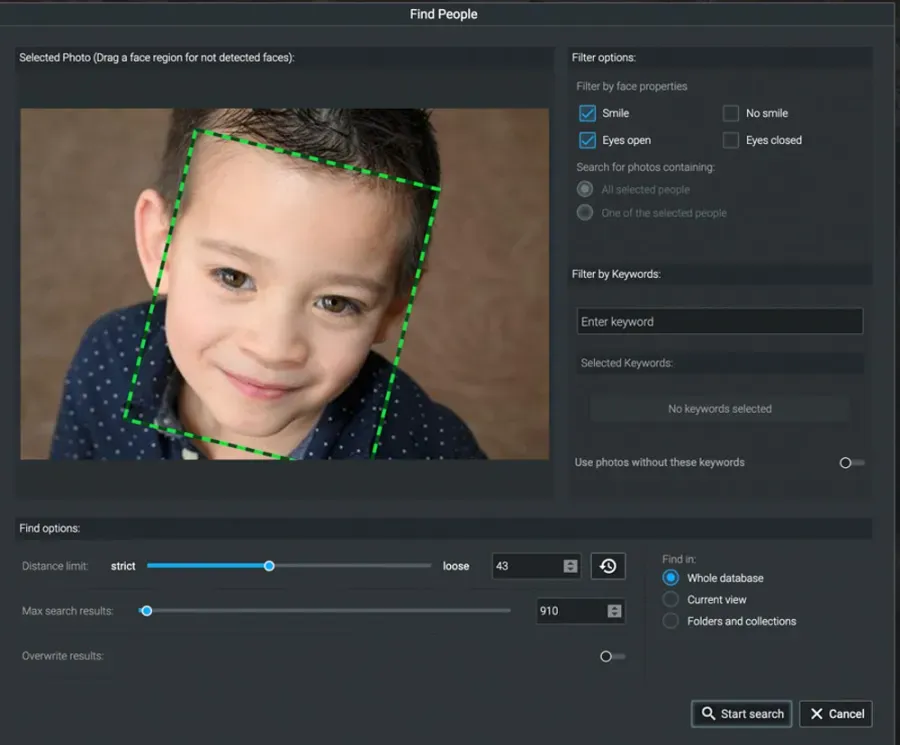
The Find People tool has the ability to search through your entire image database including group shots for your subject, and then you can name everyone you find.
Of all the search options it is the Find by text prompt that’s the most remarkable and truly illustrates the power and talent of these Excire apps. All you do is type in what sort of image you’re looking for. It could be a description of an object, an activity or a phrase that sums up a particular emotion.
Set a limit of how many images you want found and how strict or loose you want Excire to be in its search and hit return. A short time later you’ll have a collection of images to peruse. It’s as simple as that.

Digging deeper into Excire’s tool kit
To use Excire, images must be initialised and a database created. Original files are not altered in any way, and the process is local so no need to upload files or data to the cloud which means there’s no risk to the privacy of your work.
But it is an intensive AI-assisted process and Excire suggests that with large image collections it’s best performed overnight. However, once your archive of images has been initialised you don’t have to repeat the process and adding your new images to keep the database up to date is a fast process.
Speaking of speed, Excire can work with a database of hundreds of thousands of high-resolution Raw files and the speed of rendering thumbnails and large previews is fast. It’s possible to use the scroll bar to skim through thousands of thumbnails with no lag at all and it’s almost as rapid if you prefer to work with full-screen previews.
Automatic keywording
Manual keywording is a long and tedious process and anything that can make life easier is very welcome. With Excire’s AI-assist you don’t even have to lift a finger because it’s done automatically and to a high level of competence regardless of subject matter and it’s especially effective with people photographs.
During initialisation, images are analysed in depth and every single one is automatically keyworded. This is done without reference to existing keywords that might already be assigned to images, although they are imported into Excire.
Being able to shoot lots of pictures very quickly is a major benefit of digital capture but the downside is having to sort through hundreds of near-identical pictures. Excire’s answer to this is its AI-assisted culling module which groups images by various criteria including visual similarity and sequences to speed up the process of sifting through a busy shoot.
In fact, the culling module goes beyond that – you can also have the AI sort images and even select the best shots for you based on face sharpness, eye sharpness, general sharpness, facial expression, and more.

Another Excire feature that can help sort and cull work is choosing the best images based on its Aesthetic score. When files are brought into Excire, every image is AI-assessed and given an Aesthetic score marking images out of 100. In your decision-making process you could simply funnel down your shortlisted images by checking their Aesthetic scores.
The next step
Excire Foto 2025 and Excire Search 2026 are available for outright purchase only – you own them, as there is no subscription option – at the competitive price of £199 / $229 each or £299 / $299 for a bundle of both apps. Compatible with Mac and Windows, fully functional 14-day trial versions are available for download here.
Further reading
Excire Foto 2025 & Excire Search 2026 review