

Amateur Photographer verdict
A good choice for those looking for something simple, straightforward, low-cost (for an iPhone) and brand new. But for most, the iPhone 17 probably represents better value for money.
- Low priced for an iPhone
- Portrait mode has been vastly improved
- High-resolution single camera
- Tough credentials impressive for budget model
- Faster wireless / MagSafe charging
- Single lens only
- No macro mode
- Expensive compared to Android rivals
- Selfie camera not as good as iPhone 17
- Small screen size
- Not the “latest generation” Photographic Styles
When Apple releases a new smartphone, it generally makes it straight to the top of our best iPhones for photographers list.
Models like the iPhone 17 Pro bring a huge amount of photographic prowess, but with a hefty price tag attached. In 2025, Apple introduced the iPhone 16e in an attempt to lure those on a tighter budget into the iOS ecosystem – it was also aimed at those upgrading from much older models.
Following on from that model’s success – commercial if perhaps not critical – the company has announced the iPhone 17e, with a few tweaks which should make it even more appealing. This time, the target upgrader is those who own an iPhone 11 – Apple doesn’t really expect anyone with an iPhone 16e to be swapping phones already.
iPhone 17e At A Glance
- Price as reviewed: from $599/£599
- 48MP 26mm f/1.6 equivalent 1x camera with 2x “optical quality” zooming (at 12MP). Standard output 24MP. OIS
- 12MP selfie camera
- 4K 60fps video
- Super Retina XDR 6.1-inch OLED display, 2532×1170-pixels at 460ppi, 1200 nits max brightness
- IP68 water and dustproofing, Ceramic Shield screen
- A19 Processor
- iOS 26 with Apple Intelligence
How I test the iPhone 17e
I review smartphones from the perspective of choosing one for its photography and camera performance. I look at what the iPhone 17e offers; the features included for photography and video, paying particular attention to the cameras on the phone, and new features, photo editing capabilities, as well as the output from each lens, and how the phone performs overall.
Features
At a starting price point of $599/£599, there are naturally a number of sacrifices to be aware of when compared to higher value models, such as the iPhone 17 or the iPhone 17 Pro.
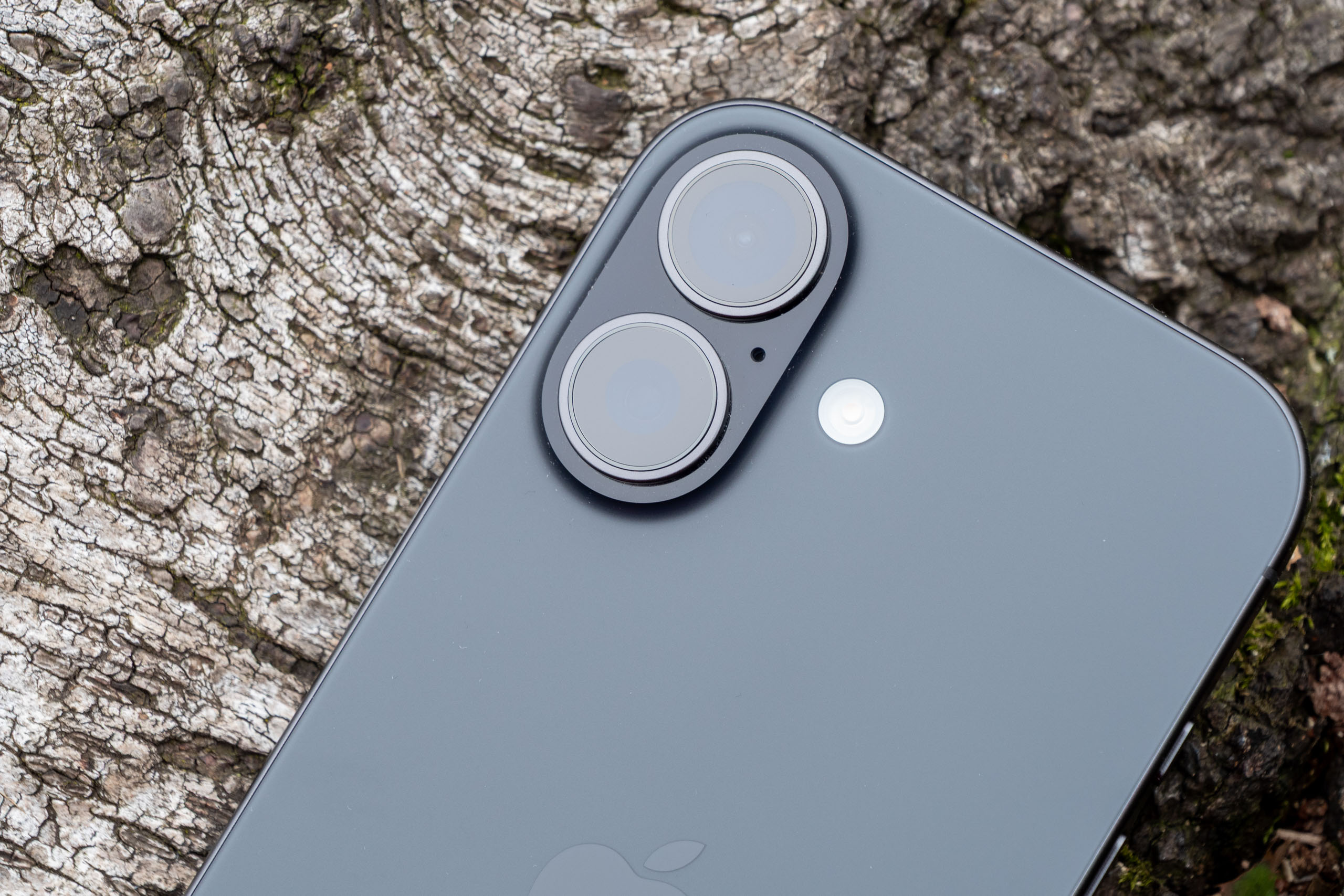
The biggest of those compromises has to be only having a single camera unit – the same as on last year’s 16e. At 48MP 26mm f/1.6 equivalent, it even appears to be the exact same camera too.
It remains true that even sub £300 Android models these days generally have more than one camera unit, but, to give it credit, its an Apple phone and an Apple camera, so although you only get one, it is very good.
Apple itself says that it in fact counts for two cameras since you have 2x in-sensor cropping. It’s not quite the same as having a real additional lens, but Apple claims that it’s optical quality – we’ll see about that later.
If you want an additional lens, such as an ultrawide lens, you’ll need to pay for a more expensive model – the excellent iPhone 17 has a 14mm f/2.2 equivalent lens sitting alongside its 48MP 1x camera.
The selfie camera is the old-style 12MP f/1.9 units we saw in many an iPhone for several years. The other models in the iPhone 17 series have a new 18MP square sensor, with useful additional functions such as “Centre Stage” and the ability to shoot in landscape format without having to turn the phone on its side. None of that is found here – as you’d expect for a budget model.
Other features of note include 4K 60fps video recording, IP68 water and dustproofing and inbuilt Apple Intelligence. So far, all of this is the same as the iPhone 16e – so what’s changed?
iPhone 17e vs iPhone 16e: what’s new?
The short answer here is – not a lot. The camera hardware seems to be identical to the 16e, but one notable upgrade is “next generation portraits”. There are two facets to this upgrade – one is that you can now photograph more subjects with Portrait mode; dogs and cats are now recognised (huzzah!). The second is that Portraits can be created from standard images captured in the Photo mode – all that data is saved at the point of capture so you can switch on the blurred background and change the focus point after the fact to your heart’s content.
Additionally, there’s been an upgrade to the wireless charging capability – it can now do it faster and is MagSafe compatible. There’s a newer A19 processor and the phone’s base storage size is now 256GB, for the same price as the 128GB base storage of the 16e.
One last thing – you can now get the phone in a charming ‘Soft Pink’ colour, rather than just the fairly staid black and white options.
iPhone 17e: Build and Handling
The iPhone 17e uses a fairly staid and straightforward design, whether you like that or not is down to personal taste – but it’s not surprising for a lower-cost option.
That said, Apple has introduced a new colour for the iPhone 17e which is a bit more exciting than the Black and White options from before (though they are still there too).
Perhaps more importantly, considering most people will use a case anyway, is the tough credentials the phone has – quite impressive for a something at this price point. It has an aluminium frame with a Ceramic Shield 2 front, and is also IP68 water and dust resistant. That means, you should be able to drop it on the floor, submerge it in water (2 metres for up to 30 minutes) and rough it about a bit and nothing should happen to it. Apple says it’s done lots of testing on it to make sure that’s the case, too.
The screen size is 6.1-inches, which is a little on the small size for a phone these days. It’s smaller than the iPhone 17, which is 6.3-inches, so if small phones aren’t too your taste then you might want to consider that. It’s also – unsurprisingly not as good a screen as found elsewhere in the iPhone 17 range, with for example a lower refresh rate at 60Hz (both the iPhone 17 and the iPhone 17 Pro have 120Hz) and a dimmer screen at 1200 nits max brightness – the iPhone 17 and the iPhone 17 Pro both offer 3000 nits maximum brightness). That said, it’s still a perfectly good viewing experience for the most part.
On the side of the phone is an Action button, which can be customised to control a number of things including launching the camera. I use this all the time now on my iPhone 17 Pro and couldn’t really imagine operating the phone any differently. You can also use the same button, as well as the volume toggle to release the shutter once the app is open.
You won’t find a Camera Control button here, like on the iPhone 17 Pro, which is not really a surprise – and I so rarely use that button anyway that it doesn’t feel like much of a sacrifice.
iPhone 17e: Native camera app
As with most iPhones, the native camera app is relatively basic, with only a few shooting modes. Photo and Video options are separated into different tabs.
Almost all of the pictures you take will likely be in the standard Photo mode. Here you can access the single lens, as well as the 2x crop option with a simple tap of the button. If you wish to zoom even further, you can pinch to zoom to reach up to 10x digital zooming.
One of the big improvements for the iPhone 17e when compared to the 16e (and indeed, older models such as the iPhone 11) is that whenever you capture an image in Photo mode, if the subject happens to be a person, cat or a dog, it should automatically capture all the data it needs to create a Portrait effect photo later should you wish to do.
There is also an additional Portrait mode if you want to shoot Portraits from the off – and there’s also extra lighting modes which you’ll find here too. Again, this mode now recognises pets (dogs and cats), as well as humans.
Moving back to the standard Photo mode, there are some shooting options which you can choose. For example, you can shoot with a Photographic Style added, but note that this is not the latest generation of Styles, as found on the rest of the iPhone 17 series (and older models such as the iPhone 16 series). That means you don’t get the opportunity to adjust the Style to your own preference, there’s not as many of them, and, more importantly, the Style is permanently embedded in the photo and can’t be changed later.
You can also shoot with Digital Filters (which have in fact been removed from other iPhone models), and these can be swapped or removed later if you like – it’s a bit confusing, but there we are.
You have the opportunity to shoot in HEIF (High Efficiency Image Format) or JPEG formats only. There’s no raw format shooting here – not that I’d expect there to be, and not that most people will ever miss it. If you want that, you need the top-level Pro models, even the iPhone 17 doesn’t offer raw shooting. I generally recommend shooting in HEIF as it saves a lot of storage space, and is easily converted to JPEG should you need it for any reason – almost all apps can recognise HEIF files and use them accordingly these days.
If you find yourself shooting in low light, Night mode should automatically activate. However, since there’s no ultrawide lens here, there’s no macro mode.
The selfie camera is activated with a quick tap. It doesn’t have the square sensor of the other iPhone 17 models, so you can’t shoot in either horizontal or vertical, regardless of the way you’re holding the phone. One change here compared with the 16e is that like with the rear cameras, it captures the data you need to convert selfies into a Portrait effect at the point of capture so you can add that afterwards if you prefer.
For video shooting, there’s 4K 60fps available in the standard video mode, as well as additional Slo-Mo and Time-Lapse modes. Something which is missing here compared to other iPhone models is the Cinematic video – a mode which enables shallow depth of field effects in movies (in all honesty, I have it on my iPhone 17 Pro and never use it, so I don’t feel like this is a big omission).
Apple Intelligence is still relatively new, but it comes in very useful for editing photos – especially to get rid of annoying intruders in your otherwise perfect scene. It’s quick and intuitive to use – but it doesn’t offer the broader scope of editing options that you might find on a Samsung or Google (how much anybody uses all of those is up for debate).
iPhone 17e: Image Quality and Performance
The iPhone 17e may only have one lens, but that lens performs very well in a few different situations.
Colours are rich and vibrant, while the detail is well rendered when looking at normal screen and printing sizes.
You can “crop” to 2x, and Apple claims this is “optical quality”. I might not go quite that far, but it is certainly good enough for most applications and I’d be happy to use it regularly.
Beyond this, the digital zoom isn’t really worth using. If you’re desperate purely for a record shot, then 5x is just about OK, but by the time you get to 10x, it’s smudgy to the point of being fairly unusable.
I miss the ability to shoot ultrawide, but there will be others who miss the ability to shoot at longer focal lengths – if you want more than one lens, you should seriously consider whether the iPhone 17e is the right choice for you.
There is no macro mode here as there’s no ultrawide lens, but you can still get reasonably close to certain subjects, such as flowers and so on. You can’t place the lens almost on top of a subject and expect it to focus – but unless you’re doing that with any big frequency, it’s perhaps not a deal breaker for you.
When it comes to low light, the iPhone 17e does a reasonably good job with the 1x lens, certainly so long as you’re not examining in any fine detail. Of course you only have the one lens – the 2x “crop” is just about OK so long as you’re not expecting too much, but beyond that I would very much avoid.
The Portrait mode, now available after you’ve taken a shot as well as specifically with the mode, produces fairly decent shallow depth of field effects. It can struggle when hair is particularly fussy, and it doesn’t seem to be quite as realistic / natural as Portraits shot with other iPhone models – I’m assuming this is because the other models use the additional lenses to capture that data, where this is purely computational.
Being able to use the Portrait mode for non-humans is a good addition – it helps to make your pet portraits look great. The same issue applies if the outline of the pet is quite fussy, but otherwise the results are very good.
There’s been no upgrade to the selfie camera, unlike the rest of the iPhone 17 series, which is perhaps a bit of a shame, albeit not surprising for a low-cost model. The results are fine, especially in good light, but it’s a selfie unit which is starting to show its age a little bit.
iPhone 17e: Value for Money
There’s not really any getting around the fact that iPhones aren’t cheap. But, the iPhone 17e is the lowest price you’ll pay for a brand new current model.
At $599/£599 for 256GB, it represents better value for money than the iPhone 16e, which was the same price for only 128GB. There’s also been other improvements made too, so it is overall a better deal than before.
But just because something is cheaper, doesn’t necessary make it better value for money. The iPhone 17 is $200/£200 more expensive, but you get a good chunk more for your money – an additional lens, a bigger and better screen and a range of funkier colours. Arguably, it’s better to spend a little bit more – if you can – and feel secure that you’ll be able to keep the phone a bit longer.
You might also want to think about older, second-hand models, too. If you step back to something like the iPhone 15 Pro, you can get a much higher-specced model for around the same price – I would seriously consider the used market rather than buying new for this reason.
We can also compare the iPhone 17e to its Android rivals, such as the Google Pixel 9a and the Samsung Galaxy A56. Both of these are lower cost than the iPhone 17e, yet offer more lenses, a broader range of shooting modes and better screens. But you know, neither of them are iPhones and if that’s what you want, then a cheap Android probably simply isn’t going to cut it for many people.
If you’re less bothered about iOS however, you can get much greater value by looking outside of it.
iPhone 17e: Verdict
It’s fairly hard to get excited about the iPhone 17e, but it’s not really designed as a phone to lust over – it’s just a straightforward, simple phone that does what it needs to do for anybody who wants a lower cost, brand-new iPhone.
From a photography point of view, only having one lens feels rather old-hat in the current climate, but on the plus side it does at least perform very well in most situations.
I’d love to see Apple including two lenses on its budget model, saving the cutbacks for other things such as the screen and so on, but there we go – perhaps next year for the iPhone 18e that’s what we’ll get.
I am pleased however to see some improvement in the functionality of the phone from the point of view of using the native camera app. Being able to use Portrait mode in the same way as other iPhone models is of great benefit – after all it’s my guess that the target market of this phone is likely to be taking lots of pictures of kids, relatives and friends. And dogs, of course, always dogs. Oh yeah, cats too.
It’s always the case that iPhones are expensive, but with the increased storage and better functionality, this feels a little less overpriced than the iPhone 16e. Don’t get me wrong, you’ll still get better value from an Android or a second-hand iPhone, but things have at least gone in the right direction.
Personally, if possible, I’d opt for the iPhone 17. It’s $200/£200 more than the iPhone 17e, but with a lot more going for it. You’re likely to hold onto it for longer, and I would guess it’ll also retain its resale value a bit better too, making it potentially cheaper / better value in the long run.
Overall, if you’re keen to get a brand new iPhone for the cheapest price possible, the iPhone 17e is a reasonable choice, but for many I’d generally recommend something else.