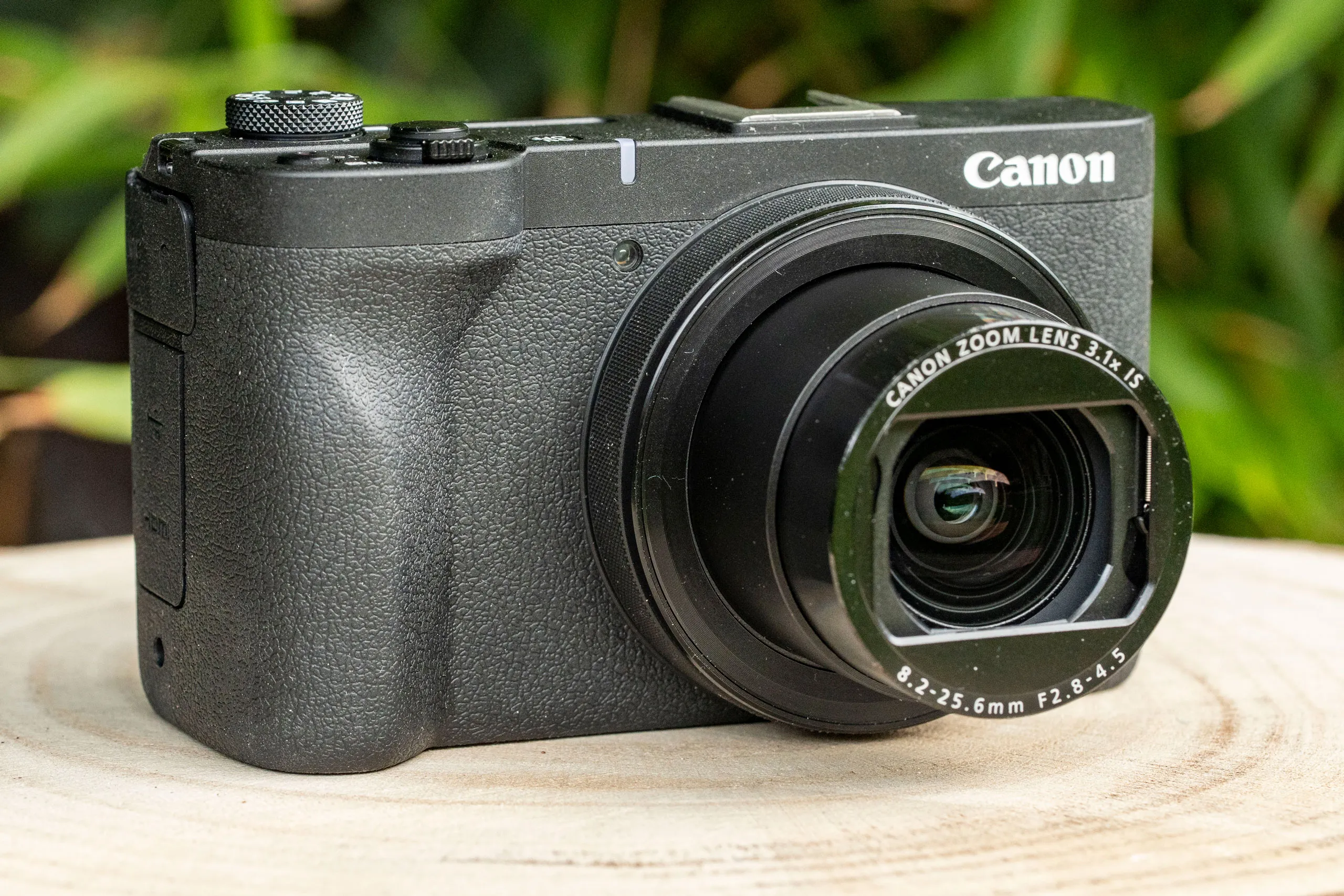
Hugely capable for video and vlogging, the Canon PowerShot V1 is the compact camera to beat. With a wide zoom lens and a large 1.4in sensor, it comprehensively covers the basics.
Pros
Relatively large sensor
Built-in ND filter
Optical and digital stabilisation
Cons
More expensive than Pocket 3
Some odd stabilisation effects
Specifications at a glance:
Camera type
Compact with 16-50mm equivalent f/2.8-4.5 lens
Sensor
22.3MP 1.4in-type CMOS
ISO
ISO 100-32,000 (ISO 51,200 extended)
Video
4K 60p (cropped); 4K 30p (full width); Full HD 120p
Screen
3in 1.04m-dot vari-angle touchscreen
Maximum recording time
Unlimited
This is the new vlogging compact to beat. It’s an expensive option – considerably more so than the popular DJI Pocket 3, at a starting price of 899.99 / £959.99. However, the Canon PowerShot V1 is an impressively fully featured camera for vlogging that will suit the dedicated content creator. With a 16-50mm equivalent f/2.8-4.5 zoom lens, it offers the ideal level of shooting versatility for day-to-day vlogging, and its new 1.4-inch sensor is a cut above the 1-inch sensors found in more comparable premium compacts, including not just the Pocket 3 but also Sony’s ZV-1 Mark II.
As you might expect, the PowerShot V1 is stacked up and down with video-friendly features. These include a built-in ND filter over the lens, which you can activate in situations where you want to use a larger aperture (for shallow depth of field) without overexposing the image. There’s also a built-in three-capsule mic and included windshield, as well as headphone and mic sockets for those who prefer to take control over their own audio. It shoots in Canon’s flat C-Log3 profile, maximising dynamic range for footage to be colour-graded later. The screen flips around to face the front, and an unmistakeable tally lamp on the front lets you know when you’re recording. All great stuff as far as video is concerned.
In our testing, the PowerShot V1 acquitted itself very well indeed. Its ability to record all footage in 4:2:2 10-bit quality gives you a suite of recording options to choose from, and the advanced cooling system means its recording times are essentially unlimited – curtailed only by battery and card. The autofocus works reliably well, with automatic subject recognition doing a reliable job of finding human subjects to focus on. The optical and digital stabilisation systems work well in tandem, though I did experience a few strange stabilisation effects in certain situations in my review. In any case, as good as the stabilisation is, it’s nothing on the gimbal mechanism of the Pocket 3.
All in all though, the PowerShot V1 is unquestionable one of the best and most fully featured vlogging cameras you can buy right now. If it fits your budget, it’s one to strongly consider.
Best hybrid stills and video camera: Fujifilm X-S20
Fujifilm X-S20 with 18-55mm lens. Photo credit: Joshua Waller
Amateur Photographer verdict
A handy EVF and excellent stills potential, alongside superb 6.2K open-gate video, makes the Fujifilm X-S20 one of the best hybrid cameras for video AND photos.
Pros
6.2K open-gate video
Advanced AI subject-detection AF
Battery lasts very well
Viewfinder adds versatility
Cons
VIewfinder is fairly small
On the pricier side
Specifications at a glance:
Camera type
Mirrorless
Sensor
26.1MP APS-C X-Trans CMOS 4 (BSI) sensor
ISO
160 – 12,800 (standard), ISO 80 – ISO 51,200 (extended)
Video
6.2K/30P, 4K/60p, 1080/240p video
Screen
3in 1.84m-dot fully articulated touchscreen
Maximum recording time
95 minutes
While we’re focusing on video-centric vlogging cameras in this guide, content creators may well get more use out of a camera that shoots both stills and video to a high standard. Video thumbnails, promo shots, behind the scenes imagery – there are loads of reasons a vlogger might want a decent stills camera. If you prefer the idea of a camera that’s equally capable for stills as it is for video, then my recommendation is the superb, sublime Fujifilm X-S20. On the video side, you have 6.2K open-gate footage, recorded at 4:2:2 10-bit internally. For stills, meanwhile, you get 26MP images that benefit from Fujifilm’s rich and colourful Film Simulation modes.
There are also plenty of features that will benefit both uses, such as the high-performing, AI-powered subject-detection autofocus system, which can identify and lock onto distinct subjects such as people and animals. The phase-detection AF also works in conditions as dim as -7.0 EV, making this an excellent camera for low-light work, and the battery really proved itself in our testing, lasting and lasting for a long day’s shooting. Photographers may find the viewfinder a little small, but as you’ll see from a glance through this list, most vlogging cameras don’t offer one at all.
You can quickly access the new Vlog mode on the X-S20, which is designed to facilitate self-recording, and provides quick on-screen access to useful shooting functions for content creators, such as product priority focus and background defocus mode. There’s also livestreaming functionality, and there’s raw video output for those who have advanced beyond Vlog mode.
This is definitely an expensive camera, currently retailing for $1,499 / £1,149 body-only – Fujifilm doesn’t really do cheap. But if you’ve got the budget, it is unquestionably worth it for content creators shooting photos and videos.
While the price hike from the ZV-E10 is an undeniable (if inevitable) wrench, the Sony ZV-E10 II raises the game for filmmakers with LUT support and an improved battery.
Pros
LUT support for filmmaking
Focus Breathing Compensation
NP-FZ100 battery improves longevity
Cons
No physical sensor stabilisation
No auto-framing functionality
Specifications at a glance:
Camera type
Mirrorless vlog camera
Sensor
26-million-pixel APS-C Exmor R CMOS sensor
ISO
ISO 100-32000 (standard), 100-102,400 (extended)
Video
4K 60fps, Full HD 120fps
Screen
3in articulated touchscreen
Maximum recording time
130 minutes
The original Sony ZV-E10 was the first mirrorless member of Sony’s vlogger-focused ZV line-up, allowing for the use of E-mount lenses. In July 2024, Sony released its successor, the ZV-E10 II. The good news is that it borrows its APS-C sensor from the cine specialist Sony FX30. This enabled a slew of filmmaker-focused features for the new model. The bad news? You’ve guessed it – the ZV-E10 II costs much more than the original ZV-E10 – is it worth it?
The ZV-E10 II can capture 4K 4:2:2 10-bit All-Intra footage at 60fps, oversampled from 5.6K (or drop to 30fps to oversample from 6K). The footage looks brilliant, with 10-bit colour depth, and you can zhuzh it up as you like with Sony Picture Profile settings like S-Cinetone. More significantly though, the ZV-E10 II now has a LUT import feature, allowing you to import colour profiles as you see fit and apply them to your footage. As we said in our first-look review, this is a brilliant feature in particular for up-and-coming filmmakers who want to experiment with different looks and emulate the styles of their heroes.
Video autofocus is as excellent as we’ve come to expect from Sony – make sure to pair the camera with one of the best Sony lenses (it can be bought with an upgraded version of the serviceable PZ 16-50mm f/3.5-5.6 kit lens) to take full advantage of it. The improved battery also means better recording times than the original ZV-E10, while also necessitating a larger handgrip that adds a bit to the bulk, but makes the camera much more comfortable to hold. An acceptable trade-off, in our view.
This is an excellent mid-range vlogging camera for those who can afford it. For others, the original ZV-E10 represents excellent value for money.
Best vlogging camera for location shooting: Panasonic Lumix GH7
Thanks to its large grip and well-placed controls, the GH7 is great to shoot with. Credit: Andy Westlake
Amateur Photographer verdict
A superb camera for shooting outdoors, thanks to its weather-sealing. It offers the same excellent handling and advanced video features as the GH6, but gains significantly improved autofocus.
Pros
Vast range of video formats and high-end features
Practically unlimited video recording times
Superb in-body image stabilisation
Transformed autofocus thanks to phase detection and updated subject recognition
Excellent handling and control layout
Cons
No automatic subject-type selection
Lower dynamic range than larger-sensor cameras
Slightly bulky body
Specifications at a glance:
Camera type
Micro Four Thirds
Sensor
25.2MP BSI-CMOS Four Thirds-type sensor
ISO
ISO 100-25,600 (standard)
Video
5.7K 60fps, C4K 120fps, FHD 240fps video
Screen
3in, 1.84m-dot fully articulated/tilting LCD
Maximum recording time
Unlimited recording time
The Panasonic Lumix GH7 is the latest in the firm’s long-running line of video-centric Micro Four Thirds cameras. Fifteen years after releasing the original GH1 – the first ever mirrorless model capable of recording video – the GH7 finally gains the update that users have been requesting for ages: phase detection autofocus, providing faster and more accurate focusing and tracking. This has had a transformational effect on the firm’s other recent cameras, so its inclusion in the GH7 is genuinely exciting and should make it one of the best Panasonic cameras yet.
The sensor includes Panasonic’s Dynamic Range Boost, which employs parallel readouts to deliver a promised dynamic range of 13 stops in both stills and video. This goes some way to alleviating one of the perceived disadvantages of the Micro Four Thirds sensor. However, this feature isn’t active when shooting at 60fps or faster, or at shutter speeds slower than 1/15sec.
It is equipped with one of the best image stabilisation, and also offers perspective correction when enabling the new E-stabilisation mode. This mode provides an almost gimbal-like stabilisation, where footage can be stabilised even when running with the camera. The weather-sealed body means it’s a camera that’s well-suited to outdoor work, so if your vlogging often takes you out on location, it could be the best choice – as long as you remember to equip it with correspondingly weather-sealed lenses.
For video, the GH7 offers a vast range of options in resolution, frame rate, aspect ratio, colour depth, encoding schemes and file formats. You can shoot anything from 5.8K at 30fps ‘open gate’ with a 4:3 aspect ratio, though 17:9 5.7K at 60fps and C4K at 120fps, and 16:9 Full HD at 240fps is at hand too. If there’s any option in between you want to use, it’s sure to be available – Panasonic’s spec sheet lists no fewer than 160 possible combinations. Thanks to the excellent heat management system in place, the GH7 has unlimited recording times, as you can extend your regular battery life nearly indefinitely by using USB-C power delivery – another reason it works well for location shoots.
Best vlogging camera for action and adventure: DJI Osmo Action 6
Image credit: Jon Stapley
Amateur Photographer verdict
With GoPro-beating video quality thanks to a larger sensor and variable aperture, the DJI Osmo Action 6 is the new standard to beat when it comes to action-packed vlogging.
Pros
Larger sensor enables suite of video modes
Hardy, waterproof build
SuperNight mode works really well
50GB internal storage
Cons
No 5.7K
Lacks GoPro’s modular lenses
Specifications at a glance:
Camera type
Action camera
Sensor
38MP 1/1.1-inch
ISO
Photo: 100-25600, Video: 100-51200
Video
4K 120p
Screen
Dual OLED High-Brightness touchscreens
Maximum recording time
Four hours (est.)
Thanks to GoPro not releasing a flagship action camera in 2025, DJI has consolidated its lead, and the DJI Osmo Action 6 is the best action camera you can buy right now. With a large 1/1.1-inch sensor and a lens sporting an f/2.8-f/4.0 variable aperture (a first for action cameras), its low-light performance is absolutely class-leading among action cameras (see our DJI Osmo Action 6 vs GoPro Hero 13 Black breakdown for an illustration of just how stark the difference is), and in general it offers an impressively well-rounded video-shooting package that make it the ideal choice for vloggers shooting action and adventure.
With 20m of native waterproofing and a full ecosystem of mounts and accessories, the Osmo Action 6 can be used to record extreme watersports, bike rides and more. It offers a digital zoom for getting a bit closer to the action, as well as a selection of digital lenses and Film Tone modes to give your footage a specific look. There’s no 5.7K – which GoPro does offer, to be fair – but the 4K footage is available at up to 120p, and looks brilliant in a range of situations. It’s bright and punchy, with great colour depth compared to other action cameras.
Current tariff situations do mean that you can’t get hold of the Osmo Action 6 very easily in the US at the moment – and wherever you are, the GoPro is almost certainly going to be a cheaper option. However, the DJI Osmo Action 6 is undoubtedly the best action camera for vlogging right now, and if you can get one, you won’t regret it.
Best-value video camera for 4K: Panasonic Lumix S5 II
The Panasonic Lumix S5 II, complete at long last with phase-detection autofocus. Photo credit: Andy Westlake
Amateur Photographer verdict
Phase detection and unlimited video recording are two key features sure to appeal, alongside an excellent viewfinder and screen and effective image stabilisation
Pros
Smart, fast autofocus system
Excellent video quality and options
Integrated cooling fan
Cons
Default setup under-uses control dials
Metering errs towards underexposure
Specifications at a glance:
Camera type
Mirrorless
Sensor
24.2MP full-frame sensor
ISO
ISO 100-51,200 (standard)
Video
6K 30p, C4K 60p
Screen
3.0″ 1.84m-dot LCD
Maximum recording time
30 minutes. 6K/30p, Unlimited 6K/25p
Starting 2023 with a bang, Panasonic unveiled an updated full-frame mirrorless camera we’d long been waiting for – a Lumix model with phase-detection autofocus. That’s right, the trusted but dated contrast-detect Depth from Defocus system was finally cast away into the annals of history. The Lumix S5 II is all the better for it. It’s so much faster than previous Lumix S cameras, in both video and stills.
While full-frame cameras from Sony et al climb vertiginously in price, Panasonic is being canny in keeping this model below the $2000 / $2000 mark. It makes for a hugely compelling option for vloggers and videographers with a budget, but not the funds commanded by the likes of the Sony A7S III or the Sony A1.
As we noted in our review, the flexibility and versatility offered by the Lumix S5 II for video is simply staggering. And thanks to a clever built-in fan mechanism, it can effectively record indefinitely without overheating (which feels like a response to the much-publicised heating travails of the Canon EOS R5). You’re really only limited by card space or battery power, which is great for a hard day of intense recording.
The aforementioned autofocus system also benefits from the must-have feature in all new cameras – subject-detection that can recognise humans and animals and lock onto them. The in-body stabilisation is rated up to five stops of compensation, and the Lumix S5 II can output 6K 30p video in addition to its suite of 4K options.
Without a doubt, this is a highly capable vloggers’ and videographers’ camera, ideal for shooting in pristine 4K.
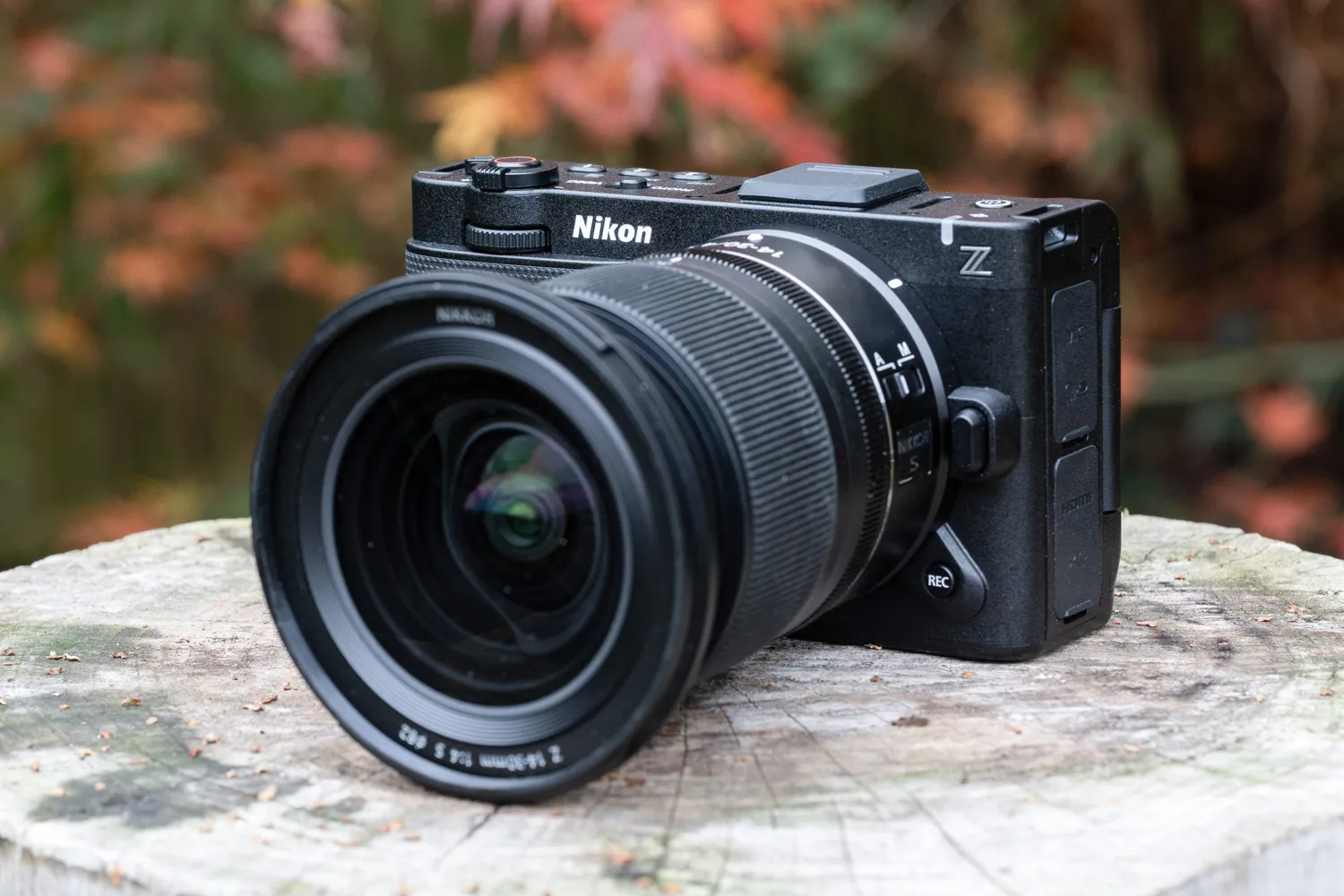
Blending the ergonomics and handling of Nikon’s mirrorless Z series with internal tech from RED cinema cameras, the Nikon ZR is a truly outstanding camera for filmmakers – at a competitive price.
Pros
6K 60p RAW at entry-level price
Excellent 4-inch 1000 nit screen
Internal 32-bit float audio
Compact, gimbal-friendly design
Cons
MicroSD backup slot can’t handle 6K RAW
Micro HDMI connector
Specifications at a glance:
Camera type
Mirrorless
Sensor
24.5MP full-frame sensor
ISO
ISO 100-51200 (standard); ISO 50-204800 (extended)
Video
6K 60p RAW; 4K 120p; Full HD 240p
Screen
4.0in, 3.07m-dot vari-angle touchscreen
Maximum recording time
125 minutes on a single battery charge
Released following Nikon’s acquisition of RED, the Nikon ZR is a fully kitted out mirrorless cinema camera that’s ideal for budding filmmakers – and best of all, it comes at a price that undercuts the competition. Costing $2,199 / £2,199, the Nikon ZR is expensive for a vlogging camera, but is significantly cheaper than the majority of cinema cameras, and as I said in my full review, it genuinely resets expectations of what we can expect to see at this price point.
For that money, you get 6K 60p RAW recording, internal 32-bit float audio, a brilliant 4-inch screen with 1,000 nits of brightness, and excellent video autofocus – all wrapped up in a sleek mirrorless body that takes its cues from the full-frame all-rounder Nikon Z6 III. That means the body is lightweight and compact, and balances brilliantly on a gimbal, which is exactly what vloggers and filmmakers want to hear.
In terms of video – frankly, you’re spoiled. As well as that topline 6K 60p RAW resolution, you have an enormous raft of codecs and resolution options at your disposal, including excellent 10-bit H.265 footage for those who don’t need RAW, and 4K at up to 120p, and Full HD at up to 240p, and… well, I could go on. Suffice to say, this is a fully featured video camera. Audio-wise it’s also kitted out, making use of Nokia’s OZO spatial audio technology with a directional mic system, and offering both a 3.5mm jack and digital hotshoe for attaching external mics.
I also have to devote some time to praising the screen. The 4-inch vari-angle touchscreen is a thing of beauty, offering 1,000 nits of peak brightness that makes it useable in bright sunlight, with a 16:10 aspect ratio that’s perfect for video. I was genuinely sorry to go back to using a 3-inch screen after using this camera – that extra room really does make a difference.
The main card slot of the Nikon ZR is a CFexpress Type B. Unusually, the backup slot is a microSD UHS-I, which isn’t fast enough to keep pace with 6K 60p RAW video – so those working at the camera’s full capacity effectively don’t have a backup slot. This is a little annoying – but you also have to be realistic. Just like the absent electronic viewfinder (which most vloggers won’t be bothered about anyway), this is one of a few cunning sacrifices that allows the ZR to be as compact and affordable as it is. The cuts have to come somewhere.
Autofocus is excellent, with subject-detection powered by Nikon’s AI, and reliable tracking that I found performed basically flawlessly in stills and video alike. The in-body stabilisation works well enough for gentle movement, but I did notice some micro-movements in the corners when working in 4K and 6K. For serious work at these resolutions, you’re really going to want a gimbal – which, as mentioned, this camera is ideal for.
I’m truly impressed by the Nikon ZR. It’s the camera I would recommend first and foremost to budget-conscious filmmakers right now.
Additional budget and beginner vlogging cameras to consider
The team at AP tests and reviews loads of vlogging cameras – more than we could comfortably fit into this guide! If you’re on a budget, or are just starting out, here are a few extra wallet-friendly and beginner friendly options that our review team think are particularly worth your consideration.
Best vlogging camera for beginners: Panasonic Lumix G100 with 12-32mm lens
The Panasonic Lumix G100 in hand. Photo credit: Richard Sibley
Amateur Photographer verdict
Image quality for both stills and video is good, while nothing revolutionary. The crop when shooting stabilised 4K footage will deter some people.
Pros
Impressive Audio
Impressive EVF
Good price point
Cons
Heavy Crop in 4K with electronic stabilisation
Slightly more noise compared to APS-C competitors
10min record time when shooting 4K
Specifications at a glance:
Camera type
Mirrorless
Sensor
20.3MP Four Thirds sensor
ISO
ISO100-ISO25600 available (extended)
Video
4K30p
Screen
3in 1.84M dot vari-angle touchscreen
Maximum recording time
10 minutes in 4K, 20 minutes Full HD 60p, 30 min Full HD 30p
Panasonic designed the Lumix G100 with vlogging specifically in mind. Consequently, it has a 3-inch 1.8M-dot vari-angle touchscreen that can be flipped around to face forward and OZO Audio tracking by Nokia. The latter can work in tandem with the camera’s face-detection system to track a subject around the frame and decide which of the three internal microphones to use. The microphones can also be set to Auto, Surround, Front or Back depending upon where the most important sounds are coming from. It works well provided that there’s no wind around but there’s also a 3.5mm mic port.
Other nice features include a Rec Frame Marker, that shows the framing for different aspect ratios to help you to compose footage for a variety of platforms including Instagram stories; in-body stabilisation; and V-Log L that produces low-contrast, low-saturation footage.
As well as making the footage more gradable, it’s easier to match it to video from other cameras. There’s a slight crop applied to 4K footage on top of the 2x focal length magnification factor caused by the G100’s Four Thirds type sensor. That means that the 12-32mm lens actually looks a little longer than the 24-64mm effective length that it is for stills photography. However, it’s just about okay for handheld vlogging, especially if you mount the camera on Panasonic’s optional DMW-SHGR1 Shooting Grip. Angela Nicholson.
Best budget vlog camera: Canon PowerShot G7 X Mark III
The pocket-sized Canon PowerShot G7 X Mark III is popular with YouTubers.
Amateur Photographer verdict
The Canon PowerShot G7X Mark III is a lovely pocket camera that
will give you more advanced control and better results than a smartphone.
Pros
Very good image quality
Plenty of useful features
Small, light and easily pocketable
Capable of 4K video capture and YouTube live streaming
Cons
Display can be hard to see clearly in bright sunlight
Touchscreen could be fiddly for larger fingers
Specifications at a glance:
Camera type
Compact camera with 24-100mm equiv f/1.8-2.8 lens
Sensor
20.1MP 1.0 type stacked CMOS
ISO
ISO 125 – 25,600 (extended)
Video
4K 120p
Screen
3in 1.04M dot tilting touchscreen
Maximum recording time
30 minute in HD, 10 minute in 4K
The Canon PowerShot G7 X Mark II was a surprise success amongst YouTubers, so for the Mark III version, Canon made vlogging a key focus. Consequently, the G7X Mark III can shoot 4K (3840 x 2160) video at 29.97/25fps without cropping. That means when you get the full width of the 24-100mm (equivalent) stabilised lens, which is important if you’re holding the camera at arm’s length and pointing it towards yourself.
Further good news is that the maximum aperture range is f/1.8-2.8, which enables some blurring of the background when you shoot wide open. Handily, there’s also a 3-stop ND filter built-in that helps you to use the widest apertures in bright conditions. A collection of autofocus modes enables you to get the subject sharp. Significantly, these include Face Select and Track which works well in video mode, putting a box around your face when spotting you. You can see this as the 3in 1,040,000-dot touchscreen tilts up through 180° making it visible from in front of the camera.
There’s no viewfinder though. As usual, there’s Wi-Fi and Bluetooth connectivity onboard, but uniquely, the G7 X Mark III can live-stream direct to your YouTube channel. To do this, you need to create a free image.canon account, then input the relevant information and tap the connection details into your camera.
Then, provided that you have a decent Wi-Fi signal (or a hotspot from your network-connected smartphone), you’re free to stream. All of this would count for nothing if the PowerShot G7 X Mark III didn’t produce high-quality results but thanks to its 20.1MP 1in type stacked CMOS sensor, it delivers excellent stills and video. It has a sensitivity range of ISO 125-25,600, but ideally, keep to ISO 3200 or lower. Angela Nicholson.
For video, nearly every camera on the market should be shooting at 4K resolution, there are some with 8K, however if you are beginning to vlog or shoot for YouTube 8K is complete overkill. Do you even need 4K for social media? Probably not, since a lot of social video is shared at full HD 1920 x 1080 resolution. However, shooting in 4K does allow you to crop for any social media platform and will give you editing flexibility later.
What frame rate should I use?
Frame rate is how many images, or frames of video, the camera can record in a second. Hollywood movies are typically shot at a frame rate of 24fps, so this is a good base to start. Whilst PAL TV is 25fps with the US NTSC format at 30fps. Higher frame rates are a multiplier of these, so you will commonly find 50fps and 60fps and 100 and 120fps.
What frame rate should I use for slow-motion footage?
By recording at 120fps and then creating a video that is shown at 30fps, you will have a 4x slow-motion effect. So, if you are interested in shooting slow-motion footage, the higher the frame rate, the greater the slow-motion effect. For an excellent slow-motion effect, look for at least 120fps.
What kind of stabilisation do I need?
For static videos you can use a tripod. For handheld vlogging or filmmaking, however, you’ll need lens or sensor-based stabilisation. Some cameras also use digital stabilisation that crops into the frame and shifts the recorded area to smooth out the video. For cameras without stabilisation, a motorised three-axis stabiliser, also known as a gimbal, is a great way to create smooth footage.
Do I need a microphone for better audio?
Almost all cameras have built-in microphones, but these are only ideal in a quiet environment. However, for the best possible audio, use an external microphone. Make sure your camera has a microphone input socket (usually 3.5mm). This will allow you to add a microphone, which usually slides onto the hotshoe on top of your camera. Keep in mind this may block the view of a front-facing screen.
What about the screen?
To film yourself, you will need a camera with an articulated or tilting screen that flips up top. Top-facing screens give a natural look when you look at the screen, but a microphone or other accessories may prevent you from using it. Side-facing articulating screens leave the top free for accessories. If you don’t film yourself, a simple tilting articulation screen helps shoot at different angles. For a larger view, you can use external camera screens.
Power and battery
Shooting video drains the battery very quickly. It’s good practice to have additional batteries if you are out shooting video all day. Most cameras will also charge through a microUSB or USB-C connection, so a simple USB power bank could give you hours more recording by either charging the extra battery or powering your camera.
What about sensor size?
Does sensor size matter for video? As a (very) general rule, the larger the sensor, the better the image quality will be. A full-frame sensor will have a greater dynamic range, lower noise levels and better image quality at higher ISO sensitivities than a smaller sensor of the exact resolution. The downside is that a larger sensor will mean a bigger camera and larger lenses, which may not be ideal if you want something small for vlogging.
What lens do I need for video?
The best lens for video can be a zoom lens that covers everything, or a variety of fast primes or cine lenses that you can swap between. Fast aperture lenses are a must for shallow depth of field shots and creating a cinematic style. Also, keep in mind the size of the focus ring for better control, a de-clicked aperture ring, built-in stabilisation, advanced coating to deal with high contrast scenes, and a fast and quiet motor to be able to keep up with movement.
Can I use a smartphone for vlogging?
The best phones for video are all capable of recording in 4K resolution, some even in 8K, but you have a much smaller sensor, which results in lower dynamic range, more noise and lower image quality compared to larger camera sensors. Phones are however, super compact and a great entry option if you are not ready to commit to a dedicated camera yet.
Which video editing app should I use?
For editing on a computer, we have a list of free and paid options in our best video editing software guide. For smartphones, there are video editing apps like CapCut and Canva with social media-friendly features, or KineMaster or Adobe Premiere Rush, which are geared towards more professional video editing.
Most microphones connect via a 3.5mm socket and sit on top of the camera hot shoe. Image: AP
How we test vlogging cameras
Testing the top vlogging cameras isn’t just about comparing specs or shooting a few clips — it’s about seeing how they perform in real-world situations. Each camera is thoroughly tested across a range of lighting conditions, shooting scenarios to reflect how vloggers and content creators actually use them day to day.
As ease of handheld use is crucial, so we evaluate their portability and ergonomics, with attention to grip comfort, button placement, and how intuitive the controls feel when filming yourself. Most models on this list have an articulating touch screen so we check their touch responsiveness, manageability and sturdiness, as well as brightness and visibility outdoors — crucial when recording in varying light.
Autofocus is a major consideration too, so we test tracking performance with moving subjects and if they have special features like the Sony ZV-1 Mark II’s Product Showcase or Background Defocus options, we pay particular attention to putting it to the test. Face and eye detection accuracy is assessed, along with how smoothly the camera transitions focus between subjects during a clip. We also test in-body and digital stabilisation to see how steady footage looks when walking or shooting handheld.
Audio quality is another important factor. We test the internal microphones as well as compatibility with external mics. Video quality testing includes checking for sharpness, dynamic range, and colour accuracy straight out of the camera. We also measure low-light performance to see how well each camera handles noise and detail in dimly lit conditions.
Finally, we take into account other features like livestreaming support, battery life, connectivity options, and ease of transferring footage to a phone or laptop. We then take all these factors into account along with overall performance, usability, lens systems and value to give our final verdict. You’ll find the full breakdown of how each vlogging camera has performed in our full reviews.
Recent updates:
March 2026: Specifications checked and frequently asked questions updated for clarity.
January 2026: The Nikon ZR replaces the Blackmagic Pocket Cinema 4K as the best camera for filmmakers, following the completion of our full review.
November 2025: Canon PowerShot V1 replaces the Sony ZV-1 II as the best compact for vlogging, following our full review, and the upgraded DJI Osmo Action 6 replaces the Osmo Action 5 Pro as the best action camera.
October 2025: Added Fujifilm X-S20 as the new best camera for hybrid shooters (i.e. photos and video). Removed several cameras deemed no longer suitable for the list, including the Canon PowerShot V10, Fujifilm X-M5, Nikon Z30, OM System OM-5 and Canon EOS R10.
Text by Richard Sibley, with contributions from Jon Stapley, Angela Nicholson.
Richard Sibley was formerly Deputy Editor of Amateur Photographer. He now writes about cameras, lenses, editing and photography. Find him on Instagram at @richsibley