


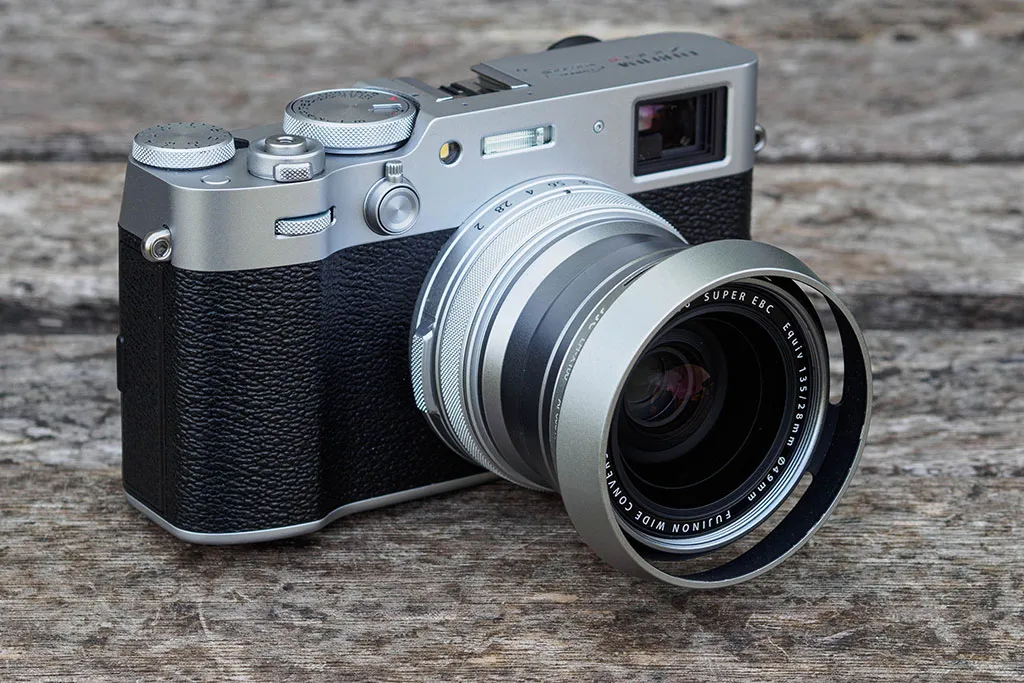


Let’s look at the WCL-X100 II first. On the face of it, this one makes the more sense of the two. It’s pretty small, at 55mm in diameter, 37mm in length and 150g. It also accepts the same 49mm filters as the camera’s lens, and has a bayonet mount for Fujifilm’s own X100 hood. It doesn’t look ridiculously out-of-place on the camera either. If you really want an X100VI but would like the option of that 28mm view, it’s genuinely worth having.

In comparison, the TCL-X100 II looks quite bulky, at 70mm in diameter and 46.5mm long, although it’s not actually much heavier (180g). Unsurprisingly, it also accepts larger diameter 67mm filters. If you want to provide a bit of protection to the front element, it can be used with screw-in lens hoods.

As both converters are specifically matched to the X100’s lens, they’re actually pretty good optically. They won’t satisfy pixel-peepers photographing brick walls at f/2, but I’ve been quite happy with real-world results, especially when stopped down to f/4 or smaller.
Of course if you really want to be able to change focal lengths easily, the X100VI is probably the wrong camera anyway.
Best filter adapters and lens hoods for the Fujifilm X100VI
Like all the previous models in the line, the X100VI doesn’t accept lens filters or a hood directly. Instead, you have to unscrew a cosmetic ring from the end of the lens and then attach an adapter ring. Screw a UV filter on top, and in principle, the camera becomes weather-sealed.

Fujifilm’s own solution is a two-part filter adapter/hood kit that costs £75, or alternatively a ‘weather resistant kit’ comprising the adapter and a UV filter for £100. The ‘vented’ hood design might look it’s a retro affectation, but it minimises obstruction of the optical viewfinder. If you’re put off by how much the Fujifilm kit costs, the JJC LH-X100 kit is a perfect clone for a fraction of the price.

There’s a huge variety of third-party alternatives available, too. The choice between them depends on multiple factors, such as whether you shoot with the OVF, use add-on filters, overall size, and of course aesthetics. Let’s look at a few options.

For the slimmest and most protective lens hood, the Haoge LH-X51W is a great choice, and very affordable at £18. It’s a two-piece kit with a 49mm filter adapter and a screw-on lens hood, and you can add a UV filter inside for weather-sealing, too. It accepts the camera’s lens cap and doesn’t excessively block the OVF. The main drawback is that you can’t readily use a polariser at the same time as the hood.

For the best compact all-in-one weather-sealing kit, consider the Haoge LUV-X54. This is a UV filter that screws directly onto the X100VI’s lens thread, with a shallow built-in hood. It accepts 52mm diameter filters via a front thread, and the original lens cap fits on, too. It slightly obscures the bottom corner of the optical viewfinder, but not too badly. It comes in a choice of five colours and costs £25.

For a combination of weather-sealing, build-quality and style, I like the NiSi X100 series UV Filter, Lens Hood and Cap Kit. This also includes a high-quality UV filter that screws directly onto the camera, and which is threaded to accept further 49mm filters. It then accepts a rather natty rectangular push-on hood and a push-on metal cap. It’s quite pricey, though, at £80.

Any hood will block part of the lower right of the camera’s optical viewfinder. The only real question is by how much. The comparison above shows the OVF view with each of the hoods mentioned, with the Haoge LH-X51W blocking the view least, while the NiSi UV Filter and Hood kit is particularly obtrusive. Of course, you won’t see any of this if you switch to the electronic viewfinder.
Best circular filters for the Fujifilm X100VI
Once you’ve got a 49mm filter adapter for your X100VI, you might well ask which filters might be worth buying, aside from the obvious of a UV filter to protect the lens and seal the camera. The answer, really, is the usual suspects.

Firstly, a circular polariser (PL-C) filter can be extremely handy for deepening blue skies, saturating colours, or controlling reflections off glass or water. Neutral density filters can be used to slow shutter speeds for creative effect – not forgetting that there’s a switchable 4-stop ND already built into the camera. For those who like shooting at night, a light pollution filter (variously dubbed Nightscape, Natural Night, or Neutral Night etc) can be effective at removing the yellow glow of many artificial light sources.
It can be tempting to skimp on filters and go for cheapest one you can find, but this is a false economy. Filters sit in front of your lens, and there’s always some risk of them introducing flare and spoiling your images. But this can be minimised by using high quality multi-coated filters from a trustworthy brand such as Hoya.

Another filter type that’s very popular, especially for video, is the black mist or black diffuser filter. This softens and diffuses highlight areas, adding a slight ‘glow’ to images that’s flattering to your subjects. Lots of companies, including K+F Concept, SmallRig and NiSi, make versions which screw directly onto the camera’s adapter thread. The one shown above is from Neewer.
Best square filter kit for the Fujifilm X100VI
For a cost-effective and versatile means of using lens filters with the X100VI, the NiSi Fujifilm X100 Series Professional Filter Kit is difficult to beat. This employs a small holder for 40mm-wide rectangular filters that screws on the lens thread.

For just £53, you get the holder, four filters (Polariser, 3-stop Neutral Density, 3-Stop Medium Graduated ND, and Natural Night) all of which fit neatly into a small hard pouch. There’s also an even cheaper Starter kit, which does without the ND or Natural Night filters, and costs £42.

Various additional filters are available for £15 each, including 6-stop and 10-stop NDs for creative long-exposure photography.
Best eyecup for the Fujifilm X100VI
If you have trouble seeing the viewfinder in bright light, the KiwiFotos KE-X100V eyecup might be worth considering. While this was designed for the X100V, it also fits the X100VI perfectly. It slides onto the hot shoe, which means it can’t be used at the same time as a thumb grip.

The eyecup is very deep, which is great for shielding your eye. But it means you’re unlikely to be able to see the entire viewfinder if you wear glasses.
Best cable releases for the Fujifilm X100VI
If you want to use the X100VI on a tripod and release the shutter without touching the camera itself, there are multiple options. Firstly, you can screw a 1970s-style cable release onto the shutter button. But while this is great for retro cool, it doesn’t provide much feel for the two-stage focus/shutter release process.

So a better bet is to use a wired electronic release, via a 2.5mm TRS connector found under a door on the handgrip. This is shared with a number of other brands, including Canon, Pentax and Olympus/OM System, which means it’s compatible with a huge array of both branded and third-party shutter releases. I use the Canon Remote Switch RS-60ES, just because I have one to hand.
Best flashguns for the Fujifilm X100VI
While external flash units seem to have fallen out of favour with many photographers, they can still be useful for adding extra light when shooting indoors, or as fill-light in sunlight. The X100VI’s size means that it’s not well suited for use with large flashes, though. So I’d go for a relatively compact unit with an articulated head, which lets you bounce the flash off the ceiling for softer, more diffused light.

Here there’s one outstanding option, the Godox iT32 with the X5F transmitter. This clever unit looks like a conventional flashgun, if a distinctly petite one. However it’s actually two parts, the iT32 flash unit and the X5 hot shoe / transmitter, which snap together magnetically. So you can either use it conventionally on top of the camera, or remove the flash and place it off to one side for more flattering lighting while retaining full TTL metering. Despite all this, it’s remarkably affordable, costing £89.
If you’d rather have something smaller and lighter, but more powerful than the camera’s built-in flash, then the excellent little Godox iT30Pro is the way to go. Like the iT32 it employs a built-in rechargeable battery for convenience, so you can top it up anywhere via its USB-C port. The flash coverage perfectly matches the X100VI’s 35mm equivalent lens, with a built-in switchable wide panel if you wanted to use it with the WCL-X100 wide converter.

Another really nice feature of the iT30Pro is that it works within Godox’s 2.4GHz wireless system as both a transmitter and a receiver, so you could use it to trigger off-camera flash units if you wanted a more sophisticated lighting setup. But it only costs £67. There’s also an optional Godox TTL Hot Shoe Riser for £17 that adds bounce capability.
Best microphones for the Fujifilm X100VI
Traditionally the X100 series has been all about shooting still photographs, not video. However, thanks to the addition of in-body image stabilisation and its improved subject detection AF, the X100VI promises to be more useful in this respect. Like any camera, you’ll get better audio if you’re prepared to use an external mic.

Given that serious videographers are unlikely to use the X100VI, it seems inappropriate to suggest a big, expensive on-camera mic. Something compact and affordable would make more sense. I’d recommend the Rode VideoMicro II, which delivers excellent audio in a simple, straightforward package, especially for speech.
Alternatively, if you might be recording a conversation between the presenter and shooter, the Deity V-Mic D4 Duo stands out for having both a second rear microphone capsule, and an audio input for a wireless microphone. Or if you’d just like a really compact unit, the Sennheiser MKE-200 is also worth a look.

However with the X100VI, the real irritation lies with the adapters or dongles required for audio. The camera has a 2.5mm mic input socket, rather than the standard 3.5mm. So you’ll either need a suitable adapter, or an audio cable with a 3.5mm plug at one end 2.5mm at the other.

Also, while the camera can output audio for monitoring via headphones, it does so via its USB-C port. So for this, you’ll need to get hold of a USB-C to 3.5mm adapter. I’ve found that an adapter for an Android phone works perfectly, but an identical-looking Apple one doesn’t work at all.
Don’t forget your phone!
Perhaps the single most versatile accessory for the Fujifilm X100VI is something you’ve already got – your smartphone. Via Fujifilm’s XApp, you can use your phone as either a simple remote release via Bluetooth, or a comprehensive remote control over Wi-Fi, complete with a live view feed. Naturally, you can also copy your images to your phone for sharing.

Other handy functions include the ability to geotag your images via your phone’s GPS, and to backup your camera’s settings to your phone. The app will also tell you when a firmware update is available for the camera, and then download and install it without any need for a computer.
Follow AP on Facebook, Instagram, YouTube and TikTok.