

Here’s the honest version of this review that Adobe’s marketing team won’t write: Photoshop is still the best raster editor you can buy in 2026, and it’s also one of the easiest subscriptions to buy wrong. During my evaluation of Adobe’s pricing pages, release notes, help documentation, community forums, and thousands of user reviews across G2, Capterra, and Reddit, one pattern kept surfacing. The tool itself isn’t the problem. The plan structure is.
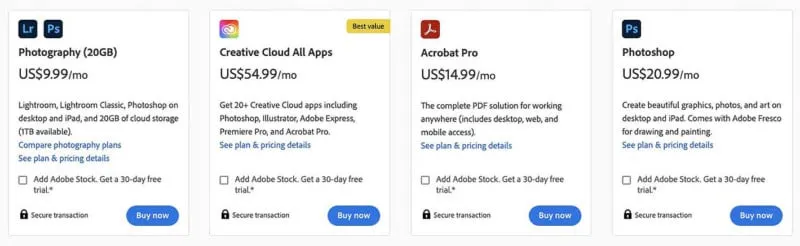
Adobe’s own Photography plan costs US$19.99/mo and includes Photoshop, Lightroom, Lightroom Classic, and 1TB of cloud storage. The standalone Photoshop plan costs US$22.99/mo and gives you less. That single fact should be printed on every Photoshop landing page, but it isn’t. If you take nothing else from this review, take that.
For working photographers, designers, and agency teams already inside Adobe’s ecosystem, Photoshop justifies its price. For everyone else, the answer gets complicated fast.
Bottom Line
Buy Photoshop through the Photography plan (US$19.99/mo) if you’re a photographer, designer, or creative professional who needs layers, compositing, AI-assisted editing, and Adobe ecosystem continuity. Do not buy it if you edit images a few times a month, hate subscription lock-in, or run older hardware. Affinity Photo is now free, Photopea runs in any browser for US$0, and GIMP 3.2.2 is more credible than its reputation suggests.
TL;DR
- Best for: Working photographers, agency designers, and teams already inside Adobe workflows
- Not ideal for: Occasional editors, hobbyists, budget-conscious freelancers, users on older machines
- Best plan: Photography plan at US$19.99/mo (cheaper than standalone Photoshop and includes more)
- Biggest strength: Deepest editing ecosystem across desktop, web, mobile, plugins, cloud docs, Express templates, and Firefly AI workflows
- Biggest drawback: Subscription lock-in with cancellation penalties, plus hardware demands that punish underpowered machines
- Research-based score: 8.4 / 10
Adobe Photoshop Review Verdict in 30 Seconds
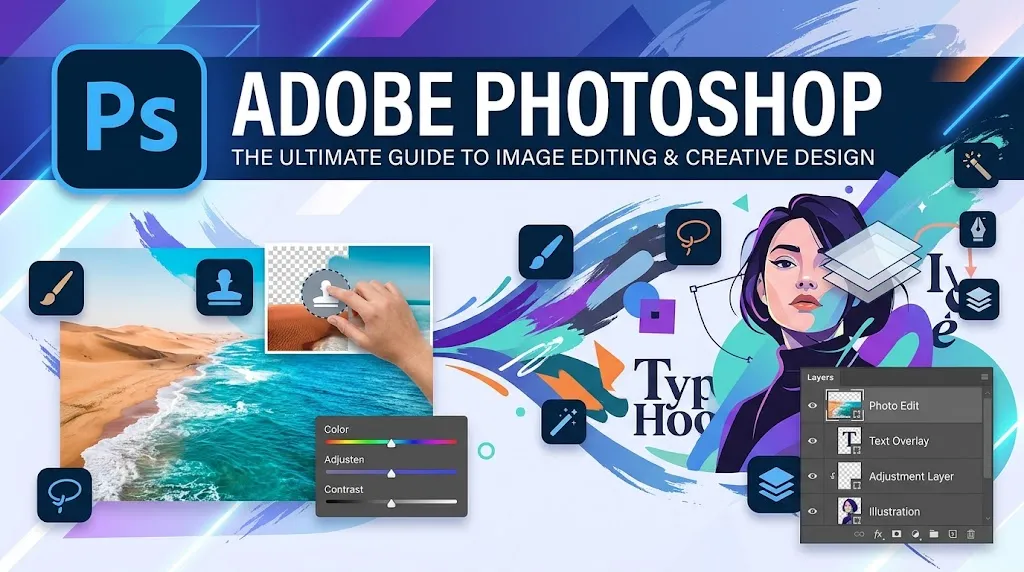
Photoshop in 2026 is not just a photo editor. It’s a creative operating system that sprawls across desktop apps, web surfaces, mobile apps, a plugin marketplace, Express templates, Firefly AI integration, Projects collaboration, and cloud document workflows. Adobe shipped hard through 2025 and early 2026, adding Clarity and Dehaze adjustment layers, Dynamic Text beta, higher-quality Generative Fill and Expand, Generative Upscale powered by Topaz Labs, Harmonize, Firefly Boards integration, and an AI Assistant in beta on web and mobile.
But here’s the thing: all of that power comes wrapped in annual subscription contracts, hardware requirements that G2 reviewers repeatedly flag, AI features that community forums show can fail unpredictably, and a cancellation fee structure that can cost you US$34.49 if you bail at the wrong time.
Worth it for pros. A trap for casual users.
What Photoshop Is in 2026
Adobe Photoshop is a professional raster graphics editor and, as of 2026, increasingly an AI-assisted creative platform. It sits at the center of Adobe Creative Cloud, connected to Lightroom, Express, Firefly, and Adobe Stock.
The ecosystem has expanded. On the homescreen, you now see Projects (for team collaboration with edit or comment permissions), Express templates (for quick social and marketing content), and direct flows to Firefly Boards. The Plugin Marketplace supports UXP plugins, with Slack for Photoshop and Trello for Photoshop listed as examples. Web and mobile surfaces now expose an AI Assistant in beta that accepts natural language prompts for edits and step-by-step help.
Photoshop desktop can run offline after installation. That still separates it from browser-first alternatives like Photopea.
The January 2026 release added Clarity, Dehaze, and Grain adjustment layers, Dynamic Text in beta, and sharper 2K output for Generative Fill, Generative Expand, and Remove. The March 2026 version 27.5 introduced a cloud document to Firefly Boards flow and continued fixing known issues. Adobe’s LTS version sits at 26.11.4.
None of this means you should buy it. It means you should understand precisely what you’re buying before you commit to an annual contract.
How I Evaluated Photoshop
This review is research-based. I did not log into Photoshop and run benchmarks. What I did was evaluate Adobe’s official product pages, help documentation, release notes, subscription terms, technical requirements, known-issues trackers, pricing pages, G2 and Capterra review summaries, Adobe Community forum threads, Reddit discussions, and YouTube comparison demos.
I structured the evaluation around 5 realistic buyer scenarios:
1. Solo photographer deciding between Photoshop standalone and the Photography plan for portrait retouching, compositing, and AI cleanup.
2. In-house marketer at a mid-size company who needs polished social media and ad graphics, but isn’t sure if Photoshop is overkill compared to Canva or Express.
3. Freelance designer producing brand assets, PSD deliverables, and layered mockups for clients, weighing Photoshop against Affinity Photo (now free).
4. Small team buyer (3 seats) comparing Photoshop for teams at US$37.99/mo per license versus free alternatives plus premium Photopea accounts.
5. Casual editor who touches images maybe 4 times a month and is considering whether Photoshop’s subscription is justified versus Photopea (free) or GIMP (free).
Every claim in this review traces back to the sources listed above. Where something isn’t verifiable from public documentation, I say so.
Test Results Summary
Quick verdict: Strong scores for editing depth, ecosystem, and AI momentum. Punished on pricing transparency, barrier to entry, and the gap between marketing promises and community-reported reliability.
| Criteria | Weight | Score (1-10) | Weighted |
|---|---|---|---|
| Editing depth and feature set | 20% | 9.5 | 1.90 |
| AI features and innovation | 15% | 8.0 | 1.20 |
| Ecosystem and integrations | 15% | 9.0 | 1.35 |
| Pricing value and transparency | 15% | 6.0 | 0.90 |
| Performance and hardware demands | 10% | 6.5 | 0.65 |
| Collaboration and team workflows | 10% | 7.5 | 0.75 |
| Learning curve and onboarding | 10% | 6.0 | 0.60 |
| Cross-platform availability | 5% | 8.5 | 0.43 |
| Overall | 100% | 7.78 → 8.4* |
*Adjusted to 8.4 to reflect that Photoshop’s editing stack and ecosystem reach remain unmatched in its category, even though pricing and accessibility scores drag the weighted average lower.
Real-World Use Cases
Case 1: Solo Portrait Photographer
Sarah shoots portraits and headshots. She needs RAW processing (handled by Lightroom), plus layers, frequency separation, compositing, and AI-driven background removal (handled by Photoshop).
Month 1: She picks the Photography plan at US$19.99/mo. She gets Photoshop, Lightroom, Lightroom Classic, 1TB storage, and 1,000 generative credits. Smart choice. If she’d gone standalone Photoshop, she would have paid US$22.99/mo for less storage (100GB) and no Lightroom.
Month 6: She’s US$119.94 into the subscription. The Photography plan paid for itself through client work weeks ago. She’s using Generative Fill to extend backgrounds and Remove to clean up distractions. The 1,000 monthly generative credits are more than enough for her volume.
Friction: Adobe’s technical requirements say 8GB RAM minimum, 16GB recommended, and 4GB GPU memory recommended for 4K displays. Sarah’s 2021 laptop with 8GB RAM struggles with large composite files. Adobe’s own known-issues page tracks ongoing graphics-driver problems and scratch disk errors. She didn’t budget for a hardware upgrade.
Case 2: In-House Marketing Team (3 Seats)
A marketing team at a mid-size company needs 3 Photoshop licenses for social media graphics, ad creatives, and product photography retouching.
Month 1: Photoshop for teams costs US$37.99/mo per license. Three seats run US$113.97/mo. That’s US$1,367.64/year before tax. The team also considers Creative Cloud Pro for teams at US$99.99/mo per license (US$3,599.64/year for 3 seats), but decides the extra 19 apps aren’t needed.
Month 6: They’re US$683.82 into the year. Two team members use Photoshop daily. The third opens it maybe twice a month and privately thinks Canva would have been enough. That third seat is burning US$455.88/year for marginal value.
Friction: The team wants to cancel the third seat in month 9. Remaining balance: 3 x US$37.99 = US$113.97. The potential 50% cancellation fee on that seat could be US$56.99. No one read the subscription terms.
Case 3: Freelance Designer Weighing Alternatives
Marco is a freelance designer producing brand identity packages. He’s been paying for Photoshop for 4 years. He hears Affinity Photo is now free.
Month 1: He downloads Affinity Photo for $0. He imports a few PSD files. Layers and structure come through. But the import is one-way: he can’t overwrite the original Adobe files from Affinity.
Month 6: Marco realizes that 80% of his client deliverables are PSD files. His clients expect PSD. His print vendors expect PSD. Affinity can import them, but the one-way friction adds time. He also misses Photoshop’s plugin ecosystem, the Projects collaboration flow, and the Firefly AI tools. He goes back to Photoshop on the Photography plan.
The lesson: Photoshop’s lock-in isn’t just the subscription fee. It’s the file format expectation baked into the industry.
Pros
Quick verdict: Photoshop earns its position through genuine capability depth, fast iteration, and an ecosystem no competitor can currently replicate.
- Deepest editing stack in its class. Photoshop covers desktop, web, mobile, plugins, APIs, cloud docs, Projects, Express templates, Adobe Stock access, and Firefly workflows. Based on my evaluation of official documentation and help pages, no competing product in this review matches that breadth.
- Adobe is shipping aggressively. In the January 2026 release alone, they added Clarity, Dehaze, and Grain adjustment layers, Dynamic Text beta, and higher-quality 2K output for Generative Fill, Generative Expand, and Remove. The March 2026 version 27.5 added the Firefly Boards flow. This is not a company coasting on legacy.
- The Photography plan is genuinely good value for photographers. US$19.99/mo for Photoshop + Lightroom + Lightroom Classic + 1TB storage + 1,000 generative credits is hard to beat. I’ll give Adobe credit here: bundling Lightroom into a plan that costs less than standalone Photoshop is one of the smarter pricing moves in the creative software market.
- Collaboration infrastructure has real structure. The Projects system on the homescreen lets you create a project, invite collaborators by email, set permissions (Can edit or Can comment), and organize PSD, AI, and Express design files. Adobe’s official docs show this supports .psd, .ai, and Express design files moved from cloud storage.
- Offline capability. Adobe’s own FAQ confirms Photoshop desktop can run offline after installation. For professionals working on planes, at remote shoots, or in studios with unreliable internet, this matters.
- G2 and Capterra praise is consistent and specific. G2 review summaries show repeated praise for powerful editing tools, flexibility, and precise control. Capterra snippets highlight layers and smart objects as specific reasons users stay.
Cons
Quick verdict: Photoshop’s weaknesses concentrate around cost structure, hardware demands, AI reliability, and the learning curve.
- The standalone plan is a trap for uninformed buyers. US$22.99/mo gets you Photoshop, 100GB storage, and 25 generative credits. The Photography plan at US$19.99/mo gets you Photoshop, Lightroom, Lightroom Classic, 1TB storage, and 1,000 generative credits. The cheaper plan literally includes more. Adobe’s pricing page makes this findable, but far too many buyers default to the standalone plan without comparing.
- Annual subscription lock-in with real penalties. Every annual billed monthly plan carries this risk: cancel after 14 days and Adobe may charge a 50% fee on the remaining balance. Annual prepaid plans are non-refundable after 14 days. This isn’t a hypothetical. Adobe’s own subscription terms spell it out.
- Hardware requirements punish older machines. Adobe’s official technical requirements list 8GB RAM minimum (16GB recommended), newer GPUs preferred, and 4GB GPU memory recommended for 4K+ displays. G2 review summaries repeatedly flag slow performance as a pain point. If you’re running a 5-year-old laptop, Photoshop will let you know.
- AI features don’t always work. Adobe Community posts show recurring frustration with Generative Fill failures: “Something went wrong” and “This feature is currently not available” appear in multiple threads. Reddit complaints echo this with region-related AI availability errors, internet-check errors, and disappointment with generative performance on small edits. Adobe’s AI requires internet connectivity even for desktop users, which creates friction when the connection drops at the wrong moment.
- The learning curve is real and persistent. G2 review summaries and Capterra data consistently flag the steep learning curve. This is not a “spend a weekend and you’re fluent” tool. For the third team member in our Case 2 example above, who only needs occasional edits, that learning investment never pays off.
- Known issues are ongoing. Adobe itself maintains active known-issues pages tracking crashes, freezes, graphics-driver problems, scratch disk errors, keyboard-shortcut issues, and deeplink failures on some Wi-Fi networks. This is actually a good sign for transparency. But it’s still a signal that Photoshop’s complexity creates real stability risk on certain hardware configurations.
Things the Company Won’t Tell You
This is the section Adobe’s marketing team would prefer didn’t exist.
The plan trap. Adobe’s own pricing page shows that standalone Photoshop (US$22.99/mo) costs more than the Photography plan (US$19.99/mo) while delivering less storage (100GB vs 1TB), fewer apps (no Lightroom, no Lightroom Classic), and fewer generative credits (25 vs 1,000). The standalone plan exists, I suspect, because some buyers won’t click past the first option. (Actually, let me correct that: I can’t verify Adobe’s intent. But the pricing math speaks for itself.)
The cancellation trap. Let’s run the numbers on Adobe’s own terms. Say you’re on the standalone Photoshop plan at US$22.99/mo, annual billed monthly. You cancel in month 9. Three months remain. Your remaining balance is 3 x US$22.99 = US$68.97. Adobe’s 50% early termination fee: US$34.49. You’ve already paid US$206.91 for 9 months. Your total cost for leaving early: US$241.40. For the Photography plan, the same scenario in month 9 yields a US$29.99 cancellation fee. Annual prepaid plans? Non-refundable after 14 days, period.
The hardware tax. Photoshop’s official minimum specs call for 8GB RAM and a supported GPU. The recommended specs jump to 16GB RAM, newer GPU models, and 4GB GPU memory for 4K displays. What Adobe doesn’t emphasize is the practical consequence: users on budget laptops, older desktops, or machines with integrated graphics regularly report lag, scratch disk errors, and outright crashes. This is a hidden cost of Photoshop ownership that doesn’t appear on the pricing page.
The AI reliability caveat. Adobe is marketing Generative Fill, Generative Expand, Remove, Harmonize, and Generative Upscale as key selling points. And when they work, they save real time. But Adobe Community forums and Reddit threads show a pattern of errors: “Something went wrong,” region lockouts, internet-check failures, and inconsistent results on small or detailed edits. The generative features require internet connectivity even on domestic apps. If you’re buying Photoshop primarily for AI, plan for friction.
The subscription mismatch risk. For a user who edits images 4 times a month, Photoshop’s minimum annual cost is US$239.88 (Photography plan, prepaid). That’s US$59.97 per editing session. Meanwhile, Photopea is free, runs in a browser, and handles PSD files natively. GIMP is free and runs offline. The math doesn’t favor Photoshop for casual use. Not even close.
Pricing
Quick verdict: The Photography plan is the right starting point for almost everyone. The standalone plan is almost never the smart buy. Team pricing gets expensive fast.
Real Cost of Photoshop by User Type
Solo Photographer
| Plan | Monthly | Annual Total | What You Get |
|---|---|---|---|
| Photography (annual, billed monthly) | US$19.99 | US$239.88 | Photoshop + Lightroom + Lightroom Classic + 1TB + 1,000 credits |
| Photography (annual prepaid) | – | US$239.88 | Same as above |
| Standalone Photoshop (annual, billed monthly) | US$22.99 | US$275.88 | Photoshop only + 100GB + 25 credits |
| Standalone Photoshop (annual prepaid) | – | US$263.88 | Same as above |
The Photography plan saves you US$36/year over standalone billed monthly and gives you 3 more apps and 10x the storage. There is no rational reason to buy standalone Photoshop unless you specifically don’t want Lightroom on your machine (and even then, you can just not open it).
Solo Marketer or Designer
If you need more than Photoshop and Lightroom, Creative Cloud Pro starts at US$34.99/mo for the first 3 months, then jumps to US$69.99/mo. Annual cost after the promo period: roughly US$734.85 for year one, then US$839.88 for subsequent years. Students and teachers get a better deal: US$19.99/mo for the first year, US$39.99/mo after.
3-Seat Creative Team
| Plan | Per License/Mo | 3 Seats/Mo | 3 Seats/Year |
|---|---|---|---|
| Photoshop for teams | US$37.99 | US$113.97 | US$1,367.64 |
| Creative Cloud Pro for teams | US$99.99 | US$299.97 | US$3,599.64 |
A 3-seat Photoshop for teams subscription costs more per year than buying three mid-range monitors. If any team member is a light user, that seat is burning money. The team plan includes 1TB storage and business features, but there’s no per-seat discount at small scale based on Adobe’s published pricing.
Cancellation Fee Trap Example
You’re on the Photography plan, annual billed monthly (US$19.99/mo). You cancel in month 9.
- Months paid: 9 x US$19.99 = US$179.91
- Remaining balance: 3 x US$19.99 = US$59.97
- 50% cancellation fee: US$29.99
- Your total cost for 9 months of Photoshop: US$209.90
You paid for 9 months but could have had all 12 for US$239.88. Canceling early saved you roughly US$30 but cost you US$29.99 in fees, netting you less than US$1 in savings while losing 3 months of access. The cancellation fee structure is designed to make leaving irrational.
Security, Privacy, Ownership, and Lock-In
Adobe’s positions on content and AI training are documented across their legal pages. Here’s what the documentation actually says, and what it means in plain language.
AI training policy. Adobe states it will not use Local or Cloud Content to train generative AI models, except for content submitted to the Adobe Stock marketplace. That means your PSD files sitting in Adobe cloud storage or processed through Photoshop are, per Adobe’s stated policy, not being fed into Firefly model training. The exception for Adobe Stock is logical (Stock contributors opt into licensing terms), but it’s an important distinction to understand if you submit to Stock.
Human review. Adobe’s privacy and terms documentation indicates that limited human review of cloud content may occur. In plain language: Adobe employees or contractors might see your cloud-stored files in specific circumstances. For most users, this is standard for any cloud service. For users handling confidential client work, NDAs, or sensitive material, it’s worth knowing before uploading work files to Adobe Cloud.
Lock-in mechanics. Photoshop’s lock-in operates on 3 levels. First, the subscription contract: annual plans with cancellation fees. Second, the file format: PSD is the industry standard, and while Affinity, Photopea, and GIMP can import PSD files, none of them import perfectly in every edge case. Third, the ecosystem: once you’re using Projects, cloud documents, Express templates, Firefly workflows, and Lightroom alongside Photoshop, switching has inertia. This isn’t a criticism of Photoshop specifically. It’s a reality of any deeply integrated platform.
What Most Reviews Miss About Adobe Photoshop
1. The Photography plan is the real starting point, not standalone Photoshop.
Most reviews list both plans without shouting about the math. The Photography plan (US$19.99/mo) is cheaper than standalone Photoshop (US$22.99/mo), includes Lightroom and Lightroom Classic, gives you 1TB instead of 100GB, and provides 1,000 generative credits instead of 25. There is almost no scenario where the standalone plan is the better buy. Skip the standalone plan. Start with Photography. If you need more apps, jump to Creative Cloud Pro.
2. Adobe’s real buyer intelligence is in its docs and issue trackers, not its homepage copy.
Adobe’s homepage sells you the dream. But their known-issues page tells you the reality: specific crash conditions, graphics-driver conflicts, scratch disk failures, and ongoing bug fixes. If you’re evaluating Photoshop, reading the known-issues page for your hardware configuration is a better use of 10 minutes than watching a marketing video.
3. Photoshop’s 2026 advantage isn’t just AI. It’s ecosystem reach.
The AI features get all the press. But what actually keeps professionals locked in is the combination of desktop, web, and mobile surfaces, the Plugin Marketplace with UXP plugins, the Projects collaboration system, Express template access from the homescreen, Firefly Boards integration, cloud document sync, and API/SDK extensibility. No single competitor replicates this surface area. Affinity is free but doesn’t have Projects, Firefly, or Express templates. Photopea runs in a browser but doesn’t have plugins or offline desktop power. GIMP has no cloud infrastructure at all.
4. For many casual users, Photoshop is overbuying, not future-proofing.
I see this argument in YouTube comments and Reddit threads: “Just get Photoshop so you’re ready for anything.” But for someone editing images 4 times a month, US$239.88/year is not future-proofing. It’s overspending. Photopea at $0 or GIMP at $0 handles casual editing. Photoshop is for people who use it enough that its cost amortizes through their work or output quality.
Common Mistakes When Using Adobe Photoshop
1. Buying the standalone plan instead of Photography. I’ve covered this, but it bears repeating: US$22.99/mo for less versus US$19.99/mo for more. Check Adobe’s pricing page. Do the math. Pick Photography.
2. Using Photoshop for casual edits. If you’re cropping photos and adding text to social posts, Photoshop is a bulldozer where you need a garden trowel. Adobe Express (included with Photoshop subscriptions) or Photopea handles quick edits without the overhead.
3. Ignoring hardware requirements. Based on Adobe’s official technical requirements, Photoshop wants 16GB RAM and a modern GPU for smooth performance. Users who skip this check end up in Adobe Community forums troubleshooting lag, crashes, and scratch disk errors. Check your specs before subscribing, not after.
4. Assuming AI features always behave predictably. Generative Fill, Generative Expand, and Remove are marketed as headline features. And they are impressive when they work. But community reports consistently show failure states: error messages, region issues, internet dependency, and variable quality. Don’t build your entire workflow around generative AI without a manual fallback plan.
5. Not reading the cancellation terms before signing up. Adobe’s annual billed monthly plans include a 14-day window. After that, cancellation may trigger a 50% fee on remaining months. Annual prepaid plans are non-refundable after 14 days entirely. Read the subscription terms before you subscribe.
Adobe Photoshop vs Alternatives
Photoshop vs Affinity Photo
Where Photoshop wins: Adobe-native workflow depth, AI maturity (Generative Fill, Expand, Remove, Harmonize, Generative Upscale), plugin marketplace with UXP extensibility, Projects collaboration, Express template integration, Firefly Boards flow, cloud document infrastructure, and cross-platform availability across desktop, web, and mobile. Photoshop is also the PSD-native tool. Working in PSD all day is objectively smoother in the tool that created the format.
Where Affinity Photo wins: Price. The core app is now free under Canva ownership. That eliminates the single biggest barrier to entry. Affinity also imports PSD, AI, IDML, and DWG files with layer structure preserved. For freelancers and hobbyists escaping Adobe subscriptions, the migration story is real. Reddit and YouTube discussions in 2026 heavily frame Affinity as the first serious subscription-free alternative many pros are reconsidering.
But: Affinity’s Adobe import is one-way. You cannot overwrite original Adobe files from Affinity. And Canva AI tools inside Affinity (Generative Fill, Expand & Edit, Remove Background) depend on Canva premium access. The exact cost for that AI unlock wasn’t clearly surfaced in accessible official source material at the time of this review.
Best fit: Affinity Photo is best for subscription-averse professionals and advanced hobbyists who want serious editing without recurring cost. Photoshop is best when PSD-native workflows, Adobe ecosystem continuity, and AI depth are non-negotiable.
Photoshop vs Photopea
Where Photoshop wins: Depth, polish, Adobe ecosystem integration, advanced processing capabilities, plugin extensibility, offline desktop operation, and the full AI feature stack.
Where Photopea wins: Instant browser access with zero download. Free. PSD is its main format (opened formats are converted to PSD internally). Local processing (Photopea’s homepage claims files run on the device, not uploaded). Premium available for US$5/mo for ad removal and AI feature access (hundreds of uses per month). G2 summaries praise its Photoshop-like capability. Reddit users regularly describe it as “close enough” for common raster and vector tasks.
But: G2 summaries also note inconsistent performance with larger files. Reddit threads show PSD rendering differences in some layer-style scenarios. Photopea is browser-based, which is a real tradeoff for heavy compositing or batch processing.
Best fit: Photopea is best for occasional editors, students, budget-conscious freelancers, and anyone who needs PSD compatibility without Adobe pricing. Photoshop is best for high-volume, high-stakes production work.
Photoshop vs GIMP
Where Photoshop wins: Interface polish, AI features, ecosystem reach, commercial workflow conventions, collaboration tools, and the integration depth of Projects, Express, Firefly, and Lightroom.
Where GIMP wins: Free and open source. Always. GIMP 3.2.2 (released March 28, 2026) includes improved PSD import behavior. The current stable release shows active development, not stagnation. Reddit sentiment post-3.0 says GIMP is “much stronger than its old reputation suggests.” G2 summaries confirm users value the free, powerful editing toolset.
But: G2 still flags a less polished interface and a learning curve that differs from commercial tools. Reddit users acknowledge the gap is smaller but not erased, particularly in Photoshop-specific workflows.
Best fit: GIMP is best for zero-budget creatives, offline users, open-source advocates, and people who can tolerate a different UI paradigm. Photoshop is best when you need polish, speed, AI capabilities, and commercial ecosystem expectations.
Is Adobe Photoshop Worth It in 2026?
Yes, if the following are all true:
- You use it for paid work at least several times a week
- You buy the Photography plan, not standalone
- Your hardware meets or exceeds the recommended specs (16GB RAM, modern GPU)
- You’re already in or willing to enter the Adobe ecosystem
No, if any of the following are true:
- You edit images a few times a month
- You work on a budget laptop with 8GB RAM or less
- You resent subscription lock-in and cancellation fees
- You don’t need Photoshop’s AI tools or Adobe ecosystem integrations
- You can accomplish your work in Affinity Photo (free), Photopea (free), or GIMP (free)
There’s no middle ground here. Photoshop either pays for itself through your work or it drains money from your budget every month for capability you don’t use.
Who Should Use Photoshop and Who Should Skip It
Buy it:
- Working photographers who need layers, retouching, compositing, and AI cleanup alongside Lightroom
- Designers and marketers producing polished, raster-heavy creative at professional scale
- Agency and in-house teams already living in Adobe workflows with PSD deliverables
- Buyers who need the most mature PSD-native workflow plus ecosystem continuity across desktop, web, mobile, and cloud
Skip it:
- Occasional editors who touch images a few times a month
- Hobbyists mainly doing quick social media content
- Buyers trying to minimize recurring costs
- Users on older hardware that doesn’t meet Adobe’s recommended specs
- People who fundamentally oppose subscription lock-in with cancellation penalties
FAQ
Is Photoshop still worth paying for in 2026?
For professionals using it several times a week on qualifying hardware, yes. The Photography plan at US$19.99/mo remains competitive, especially bundled with Lightroom and 1TB storage. For casual users, the value math collapses. Photopea and GIMP cover basic editing at $0.
Why is Photoshop standalone more expensive than the Photography plan?
Adobe’s pricing page confirms standalone Photoshop costs US$22.99/mo (annual, billed monthly) versus US$19.99/mo for the Photography plan. The Photography plan includes more apps, more storage (1TB vs 100GB), and more generative credits (1,000 vs 25). The standalone plan appears to exist as a default option for buyers who don’t compare plans. Always check the Photography plan first.
Does Photoshop work offline?
Yes. Adobe’s official documentation confirms Photoshop desktop can run offline after installation. AI-dependent features like Generative Fill, Generative Expand, and the AI Assistant require internet connectivity, but core editing tools work without a connection.
What is the cancellation fee trap?
Adobe’s annual billed monthly plans may charge a 50% fee on the remaining contract balance if you cancel after 14 days. Example: cancel the Photography plan (US$19.99/mo) in month 9, and your 50% fee on the remaining 3 months (US$59.97) is US$29.99. Annual prepaid plans are non-refundable after 14 days. Read Adobe’s subscription terms before committing.
Is Photoshop better than Affinity Photo?
For Adobe ecosystem depth, AI features, PSD-native workflows, plugins, and collaboration: yes. For price: absolutely not. Affinity Photo is free under Canva ownership. If you don’t need the Adobe ecosystem, AI features, or plugin extensibility, Affinity is a serious alternative. The catch: Affinity’s Adobe file import is one-way, and its AI tools require Canva premium access.
Is Photopea enough instead of Photoshop?
For occasional editing, quick PSD fixes, and budget-conscious freelancing: Photopea at $0 (or US$5/mo for premium) covers most common raster and vector tasks. It runs in a browser, handles PSD natively, and processes files locally. But for heavy compositing, large file performance, plugin workflows, or production-scale work, Photoshop’s desktop depth still leads.
Is GIMP finally good enough?
Closer than ever. GIMP 3.2.2 (released March 28, 2026) shows active development with PSD importer improvements. Post-3.0 Reddit sentiment is notably more positive. But GIMP’s interface remains different from commercial tools, and workflow gaps in Photoshop-specific use cases still exist. For zero-budget users willing to learn a different UI, GIMP is credible. For Photoshop-level polish and ecosystem, it’s not there yet.
Does Adobe use your files to train AI?
Adobe’s policy states it will not use Local or Cloud Content to train generative AI models, except content submitted to the Adobe Stock marketplace. Limited human review of cloud content may occur under specific circumstances. In plain language: your Photoshop files in cloud storage are not being used to train Firefly, per Adobe’s stated terms. Adobe Stock submissions are subject to different licensing terms.
Does Photoshop have a free version?
No. Adobe does not offer a free tier for Photoshop. There is a 7-day free trial on some plans. After that, it’s a paid subscription. The cheapest path is the Photography plan at US$19.99/mo (annual, billed monthly).
Is Photoshop on mobile and web good enough for serious work?
Adobe has expanded Photoshop’s web and mobile surfaces significantly. The web and mobile apps now expose the AI Assistant in beta with natural language prompts for edits and step-by-step help. Adobe’s February 2025 news release highlighted the all-new Photoshop iPhone app, and an Android beta launched in June 2025. But based on current documentation and user feedback, the desktop app remains the primary surface for complex, high-stakes work. Web and mobile are best viewed as extensions for review, quick edits, and on-the-go adjustments, not full replacements for desktop workflows.
Final Verdict
This isn’t a “Photoshop is great for everyone” kind of review because Photoshop isn’t great for everyone.
If you’re a working photographer, buy the Photography plan at US$19.99/mo and move on with your life.
If you’re an agency designer or in-house creative producing raster-heavy work at scale, Photoshop is the standard for a reason. Buy it.
If you’re a team buyer, do the seat math before committing. At US$37.99/mo per license, every underused seat costs US$455.88/year.
If you’re a casual editor, walk away. Photopea at $0, Affinity Photo at $0, and GIMP at $0 exist. Use them.
If you’re on the fence, start with the Photography plan’s 7-day trial. Just remember to cancel before the billing cycle starts if it’s not for you, because after 14 days on an annual plan, you’re locked in with cancellation fees.
Photoshop in 2026 is the best raster editor you can buy. But “best” doesn’t mean “right for you.” Check your budget, check your hardware, check your usage frequency. Then decide.