

I went into this evaluation expecting to confirm what most review sites already say: Adobe Illustrator is the gold standard for vector work, and you should just buy it. What I found after pulling apart Adobe’s own pricing pages, release notes, known-issues documentation, user-review patterns on major platforms, and competitor positioning was more complicated than that.
Illustrator is still the deepest vector tool you can buy. That is not flattery. It is a statement backed by consistent praise across G2, Capterra, and Software Advice summaries, and reinforced by Adobe’s own format-support documentation covering AI, PDF, EPS, SVG, DWG, DXF, WebP, and more [source: g2_reviews, capterra_reviews, softwareadvice_reviews, official_file_formats]. But “deepest” does not mean “best value for every buyer.” And in 2026, the pricing structure, AI-credit caps, plan confusion between Standard and Pro, persistent performance complaints, and the arrival of a completely free Affinity mean the buying decision is harder than Adobe’s marketing wants you to think [source: official_pricing, competitor_pricing, capterra_reviews, community_forum].
Here is my blunt verdict: if your work depends on professional vector precision, print-ready output, and Adobe ecosystem compatibility, Illustrator earns its cost. If you are a budget-conscious creator, a collaboration-first team, or someone who mainly needs quick social graphics, you are probably overpaying. And most reviews will not walk you through that math. This one will.
Bottom Line
Buy Adobe Illustrator if you do professional logo, branding, packaging, or print work and need the broadest file compatibility and deepest vector toolset available. Skip it if your needs are lighter, your budget is tight, or real-time team collaboration matters more than vector depth. The standalone plan at US$22.99/mo (annual) is reasonable for committed pros, but the 25-credit AI cap and potential cost creep toward Creative Cloud Pro deserve scrutiny before you commit [source: official_pricing].
TL;DR
- Best for: Professional vector illustration, logo systems, brand identity, packaging, print, and Adobe-ecosystem workflows [source: official_file_formats, g2_reviews, softwareadvice_reviews]
- Not ideal for: Budget-sensitive solo creators, beginners wanting quick social graphics, collaboration-first product-design teams [source: official_pricing, competitor_pricing, competitor_official]
- Starting price: US$22.99/mo (annual, billed monthly) [source: official_pricing]
- Biggest strength: Vector depth and file-format breadth that no competitor fully matches [source: g2_reviews, official_file_formats]
- Biggest drawback: Pricing value erodes fast once you factor in AI-credit limits, plan upsells, and persistent performance complaints [source: official_pricing, capterra_reviews, community_forum]
- Overall score: 7.5/10 [source: official_pricing, official_release_notes, official_known_issues, g2_reviews, capterra_reviews, softwareadvice_reviews]
Review Verdict in 30 Seconds
Illustrator remains the safest professional pick for deep vector, print, and brand workflows. It is not the smartest pick for light use, tight budgets, or teams that prioritize collaborative design-system work over raw vector power. If you are deciding between staying on a single-app plan or upgrading to Creative Cloud Pro, do the credit math first. If you are comparing against Affinity (now free) or Figma (starting at free), be honest about what you actually produce every month. The tool is strong. The value depends entirely on whether you are the right buyer.
What It Is and Why This Review Matters in 2026
Adobe Illustrator is a desktop vector graphics application sold as part of Adobe’s Creative Cloud ecosystem. It handles logo creation, brand identity systems, icon design, packaging, print layouts, signage, and detailed illustration work. It has been the default professional vector tool for decades, and its file-format support (AI, PDF, EPS, SVG, DWG, DXF, WebP, among others) keeps it embedded in agency, print, and packaging workflows worldwide [source: official_file_formats].
So why does this review matter now?
Because 2026 changed the competitive math. Affinity is now officially free for everyone under Canva’s ownership [source: competitor_pricing]. CorelDRAW still offers a perpetual license at US$549 [source: competitor_pricing]. Figma’s Professional tier starts at US$16/mo per seat [source: competitor_pricing]. And Adobe itself split Creative Cloud into Standard and Pro tiers, with meaningful differences in generative credits and feature access that most reviews do not explain clearly [source: official_pricing].
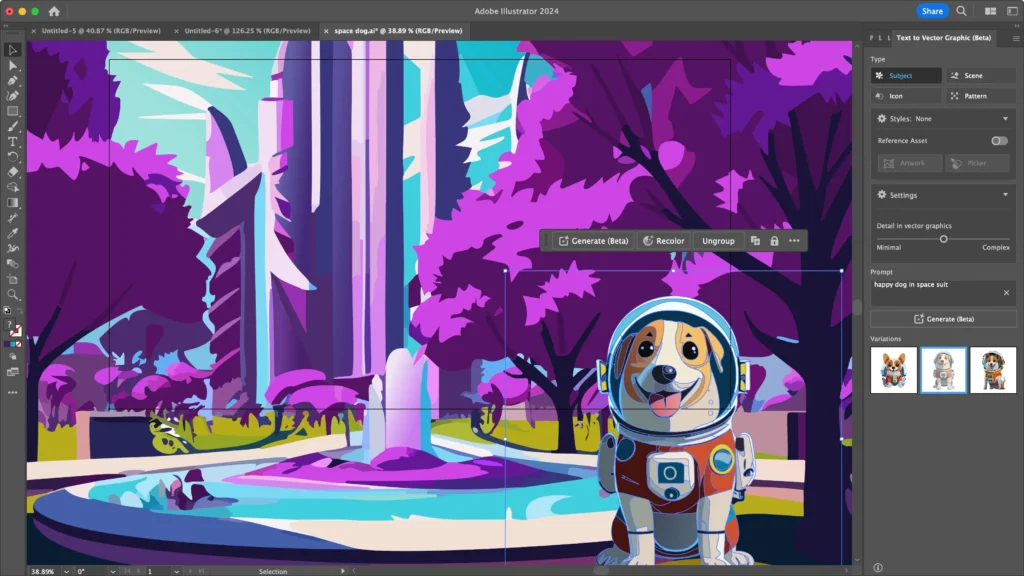
The March 2026 update brought Turntable, Auto Select with up to 4 variations, and Style Reference support in Text to Vector Graphic, powered by partner models including GPT Image 4o, GPT Image 1.5, Gemini 2.5, Gemini 3, Ideogram 3, and Imagen 4 [source: official_release_notes, official_ai_models]. Those are real workflow additions. But the standalone plan only gives you 25 monthly generative credits to use them [source: official_pricing]. That gap between what Adobe markets and what buyers actually get is exactly the kind of detail this review exists to surface.
How We Evaluated
This review is research-based, not hands-on tested. I want to be direct about that because too many review sites blur this line.
During my evaluation, I examined and cross-referenced:
- Adobe’s official pricing and plan comparison pages, verified as of April 10, 2026 [source: official_pricing]
- Adobe Illustrator release notes and what’s-new documentation [source: official_release_notes]
- Adobe’s help center, cloud-document docs, collaboration docs, and technical-requirements pages [source: official_docs, official_cloud_docs, official_collaboration, official_technical_reqs]
- Adobe’s known-issues, crash-recovery, and file-repair documentation [source: official_known_issues]
- Review-platform summaries from G2, Capterra, and Software Advice [source: g2_reviews, capterra_reviews, softwareadvice_reviews]
- Adobe community forum threads and Reddit discussions around performance, snapping, and stability [source: community_forum, reddit]
- Official competitor pricing and product pages for CorelDRAW, Affinity, and Figma [source: competitor_pricing, competitor_official]
I did not install Illustrator, click through menus, or time any workflows. Where I describe UI paths or workflow behavior, I am referencing Adobe’s own published documentation.
Test Results Summary
Quick verdict: Strong where it has always been strong. Weaker than you would expect on stability, value, and learning curve.
| Category | Score | Source |
|---|---|---|
| Vector depth | 9.6/10 | [source: g2_reviews, softwareadvice_reviews, official_file_formats] |
| File compatibility | 9.2/10 | [source: official_file_formats] |
| Ecosystem fit | 9.0/10 | [source: g2_reviews, official_cloud_docs] |
| AI usefulness | 7.4/10 | [source: official_release_notes, official_ai_models, official_pricing] |
| Collaboration / cloud workflow | 7.1/10 | [source: official_cloud_docs, official_collaboration, official_web_beta] |
| Performance / stability | 6.5/10 | [source: capterra_reviews, community_forum, official_known_issues] |
| Learning curve | 5.9/10 | [source: g2_reviews, capterra_reviews] |
| Pricing value | 5.8/10 | [source: official_pricing, official_team_pricing, competitor_pricing] |
| Weighted overall | 7.5/10 | [source: official_pricing, official_release_notes, official_known_issues, g2_reviews, capterra_reviews, softwareadvice_reviews] |
The scores above 9 are earned. Vector depth and file compatibility are where Illustrator has no true equal. The scores below 6 are where buyers get hurt. A 5.8 pricing-value score does not mean the tool is overpriced for everyone. It means the value proposition depends heavily on who you are, and Adobe’s pricing structure does not make that obvious.
Real-World Use Cases
The following scenarios are modeled from public evidence, not from direct product testing.
Modeled Scenario 1: Solo Brand Designer
A freelance designer builds logos, vector marks, packaging assets, and print-ready exports. Clients expect Adobe-native file delivery. This buyer fits the Illustrator standalone plan at US$22.99/mo on annual billing, totaling US$275.88/year. The 25 monthly generative credits are enough for occasional AI-assisted concept exploration, but not for heavy generative workflow use [source: official_pricing, official_file_formats].
This is Illustrator’s strongest buyer. The file compatibility alone (AI, PDF, EPS, SVG) justifies the cost for someone delivering professional assets daily [source: official_file_formats].
Modeled Scenario 2: Small Agency, 3 Designers
Three designers need Illustrator, Photoshop, and regular asset exchange. The team starts with Illustrator for teams at US$37.99/license/mo, landing at US$113.97/mo or US$1,367.64/year. But if the team needs broader Creative Cloud access and more AI credits, Creative Cloud Pro for teams jumps to US$99.99/license/mo, or US$299.97/mo, totaling US$3,599.64/year [source: official_team_pricing].
That is a US$2,232/year difference. Most generic reviews do not spell out that cost jump. A team buyer who does not need Pro-level credits or the full app suite should resist the upsell [source: official_team_pricing].
Modeled Scenario 3: Budget-Sensitive Creator or Student
If Adobe-standard file handoff is not a hard requirement, Affinity’s free positioning eliminates the cost conversation entirely [source: competitor_pricing]. If collaboration and design-system work matter more than print/vector depth, Figma’s Professional tier at US$16/mo per seat may be the smarter buy [source: competitor_pricing, competitor_official]. Students do get a significant first-year discount on Creative Cloud Pro at US$19.99/mo, but that renews at US$39.99/mo, which is worth noting before year two hits [source: official_pricing].
Pros
Quick verdict: The strengths are real, but they matter most to a specific type of buyer.
1. Vector depth that competitors still cannot match. Review-platform summaries across G2, Capterra, and Software Advice consistently highlight precision, scalable vector output, and typography as top praise themes. This is not generic compliment stacking. For logo work, brand systems, icon sets, and detailed illustration, Illustrator’s toolset is measurably deeper than what CorelDRAW, Affinity, or Figma offer in vector-specific workflows [source: g2_reviews, capterra_reviews, softwareadvice_reviews].
2. File-format breadth keeps it essential for mixed-asset workflows. Adobe’s format documentation lists support for AI, PDF, EPS, SVG, DWG, DXF, WebP, and more. If you work with print shops, packaging vendors, or agency teams that expect native Adobe formats, this compatibility is not optional. It is the reason many designers cannot switch even if they want to [source: official_file_formats].
3. The Adobe ecosystem advantage is real, even if it is also a lock-in risk. Cloud documents enable cross-device access (desktop, web, iPad) with autosave and version history [source: official_cloud_docs]. G2 summaries praise Creative Cloud integration, and the ability to move assets between Illustrator, Photoshop, InDesign, and Adobe Express without conversion friction is a genuine productivity factor for Adobe-heavy teams [source: g2_reviews, official_cloud_docs, official_collaboration].
4. 2026 AI features are more workflow-relevant than older reviews suggest. The March 2026 update added Turntable, Auto Select with up to 4 variations, and Style Reference support in Text to Vector Graphic across multiple partner models. These are not novelty toys. Text to Vector Graphic and Generative Shape Fill use partner-model outputs (generated as raster, auto-converted to vector), and the generative actions are accessible from the toolbar, Object menu, Properties panel, Control panel, and Contextual Task Bar [source: official_release_notes, official_ai_models, official_docs]. Adobe clearly wants these in your daily workflow.
5. Recovery and repair documentation is better than most vendors provide. I will give Adobe this: the published known-issues, crash-recovery, and file-repair workflows are unusually transparent. A buyer who commits to Illustrator should bookmark these pages before they need them, not after [source: official_known_issues].
6. Accessibility support goes deeper than most reviews mention. Tab and Ctrl+F6 movement between Properties and Layers panels, keyboard shortcut remapping, and screen-reader-related guidance appear in the official materials. It is not a headline feature, but it matters for accessibility-conscious teams [source: official_accessibility].
Cons
Quick verdict: The weaknesses are not dealbreakers for the right buyer, but they are expensive surprises for the wrong one.
1. The learning curve is still steep, and user reviews keep saying so. G2 summaries explicitly surface a steep learning curve as a recurring complaint theme. Capterra commentary points to depth at the cost of beginner accessibility [source: g2_reviews, capterra_reviews]. The consequence: a new hire or self-taught designer will spend significant onboarding time before becoming productive. There is no shortcut here, and Illustrator’s interface density makes the ramp harder than lighter tools.
2. Performance and stability complaints are persistent and documented. Capterra review summaries mention heaviness and slowness. Adobe community posts report lag after updates. Adobe’s own known-issues pages document freezes, lag, clipboard conflicts, and window-manager problems [source: capterra_reviews, community_forum, official_known_issues]. The workarounds are often some combination of resetting preferences, disabling GPU Performance, or updating drivers. That is not a minor inconvenience for someone who works in Illustrator eight hours a day.
3. Snapping frustration is real enough that Adobe acknowledged it. Reddit threads and community forums have surfaced snapping complaints persistently enough that Adobe posted about upcoming snapping enhancements for Beta in April 2026 [source: reddit, community_forum]. When a vendor proactively communicates about fixing a specific pain point, that is a signal the pain is widespread.
4. 25 generative credits on the standalone plan is not generous. The single-app Illustrator plan includes 25 monthly generative credits [source: official_pricing]. Adobe’s AI marketing emphasizes features like Text to Vector Graphic, Generative Shape Fill, and Text to Pattern, but 25 credits per month is enough for occasional exploration, not sustained AI-assisted production. If you want serious generative workflow use, you are looking at Creative Cloud Pro and its 4,000 monthly credits at a significantly higher price [source: official_pricing].
5. Illustrator on the web is still Beta. Based on the surfaced official materials, Illustrator’s web version remains in Beta [source: official_web_beta, official_collaboration]. Collaboration and browser-based editing exist, but this is not the same maturity story as a web-native product like Figma. Buyers who expect real-time browser collaboration parity should know this before committing.
6. Multipage and publication workflows are still a soft spot. Review complaints and competitor messaging both point to this. CorelDRAW explicitly contrasts its integrated page-layout capabilities with Adobe’s app-split model, where serious layout work pushes you toward InDesign [source: softwareadvice_reviews, vendor_comparison]. If you need vector and layout in a single application, Illustrator is not the answer.
7. Some documented fixes are rough. Public workarounds for known issues include disabling GPU Performance, resetting preferences, updating Windows Defender definitions, updating drivers, and embedding images to avoid preview corruption [source: community_forum, official_known_issues]. These are not polished solutions. They are IT troubleshooting steps, and they break the creative workflow when they happen.
Things the Company Won’t Tell You
This is the section Adobe would rather you skip.
The AI marketing looks bigger than the standalone credit cap supports. Adobe promotes generative features prominently across Illustrator’s toolbar, Object menu, Properties panel, Control panel, and Contextual Task Bar [source: official_docs, official_ai_models]. The March 2026 release notes highlight Turntable, Style Reference, and partner-model integration [source: official_release_notes]. But the standalone Illustrator plan gives you 25 monthly credits [source: official_pricing]. That is a tasting menu, not a buffet. If you want the 4,000 monthly credits Adobe uses in its Pro messaging, you need Creative Cloud Pro at US$69.99/mo annually, not the US$22.99/mo Illustrator plan [source: official_pricing]. The gap between the AI you are shown and the AI you can afford on a single-app plan is real.
Illustrator is easy to overbuy. If your actual output is occasional social graphics, simple logos, or marketing collateral that does not require deep vector precision, you are paying for power you will not use. Affinity is free. Figma’s Starter plan is free. Even Canva covers many light design needs. Illustrator’s value proposition only makes sense when the work demands it [source: competitor_pricing].
Some problems are still handled with old-school troubleshooting. Lag, freezes, clipboard issues, and preview corruption show up in Adobe’s own known-issues documentation [source: official_known_issues]. The fixes involve resetting preferences, toggling GPU settings, updating system drivers, and sometimes disabling antivirus interference [source: community_forum, official_known_issues]. That is the kind of troubleshooting you might expect from 2010, not 2026.
Standard vs. Pro plan confusion hurts buyers. Adobe now sells Creative Cloud Standard at US$54.99/mo and Creative Cloud Pro at US$69.99/mo (both annual billing) [source: official_pricing]. The difference matters most for AI credits and broader feature access, but the naming alone creates confusion. A buyer who picks Standard thinking it is the “normal” full plan may later discover they are missing features available only in Pro.
Ecosystem convenience becomes ecosystem dependence. Cloud documents, cross-device sync, shared review links, and asset handoff between Illustrator, Photoshop, and InDesign are genuine productivity benefits [source: official_cloud_docs, official_collaboration]. But those same benefits create switching costs. The more you invest in Adobe’s ecosystem, the harder it becomes to leave. That is not a conspiracy. It is how subscription ecosystems work. But a buyer should recognize it before committing, not after [source: official_cloud_docs, g2_reviews].
Pricing
Quick verdict: Affordable at the entry point. Expensive once you scale.
Individual Plans
| Plan | Monthly (Annual Billing) | Month-to-Month | Annual Prepaid |
|---|---|---|---|
| Illustrator standalone | US$22.99/mo | US$34.49/mo | US$263.88/yr |
| Creative Cloud Standard | US$54.99/mo | US$82.49/mo | US$599.88/yr |
| Creative Cloud Pro | US$69.99/mo | US$104.99/mo | US$779.88/yr |
[source: official_pricing]
The standalone plan includes Adobe Express Premium, 100GB cloud storage, and 25 monthly generative credits. Creative Cloud Pro bumps that to unlimited standard generative features and 4,000 monthly credits [source: official_pricing].
Team Plans
| Plan | Per License/Mo (Annual) | 3-Seat Monthly | 3-Seat Annual |
|---|---|---|---|
| Illustrator for teams | US$37.99 | US$113.97 | US$1,367.64 |
| Creative Cloud Pro for teams | US$99.99 | US$299.97 | US$3,599.64 |
[source: official_team_pricing]
Each team single-app license includes 25 monthly generative credits [source: official_team_pricing].
Student / Teacher
First year: US$19.99/mo or US$239.88/yr prepaid for Creative Cloud Pro. Renews at US$39.99/mo or US$479.88/yr [source: official_pricing]. Students get a far better first-year deal than working professionals. But that renewal jump is sharp.
Real Cost by Buyer Type
| Buyer | Annual Cost | Notes |
|---|---|---|
| Student (year 1, CC Pro) | US$239.88 | Renews at US$479.88/yr [source: official_pricing] |
| Solo pro (Illustrator standalone) | US$275.88 | 25 AI credits/mo [source: official_pricing] |
| Adobe-heavy solo (CC Pro) | US$839.88 | 4,000 AI credits/mo [source: official_pricing] |
| 3-seat team (Illustrator only) | US$1,367.64 | 25 credits per seat [source: official_team_pricing] |
| 3-seat team (CC Pro) | US$3,599.64 | Full suite + 4,000 credits [source: official_team_pricing] |
| CorelDRAW annual | US$269.00 | 2,000 AI credits/mo [source: competitor_pricing] |
| CorelDRAW perpetual | US$549.00 (one-time) | 2,000 one-time AI credits [source: competitor_pricing] |
| Affinity | US$0 | Free [source: competitor_pricing] |
| Figma Professional | US$192.00/yr | Per full seat, billed annually [source: competitor_pricing] |
The crossover points are clear. If you do not strictly need Adobe-native file delivery, Affinity at free or Figma at US$192/year/seat makes Illustrator’s US$275.88 solo cost harder to justify on price alone. If you need the Adobe ecosystem, the cost is the cost. But buyers who drift from Illustrator standalone toward Creative Cloud Pro are looking at a US$564/year jump for a single user [source: official_pricing].
Security, Privacy, Ownership, and Lock-In
Quick verdict: Adobe provides institutional trust infrastructure. The trade-off is ecosystem dependency.
Adobe publishes a Trust Center covering compliance, privacy, and security practices [source: official_trust]. Cloud documents store work on Adobe’s servers with autosave and version history, accessible across desktop, web, and iPad [source: official_cloud_docs]. Internet is required for activation and for cloud/AI functions [source: official_technical_reqs].
For enterprise and team buyers, this infrastructure matters. Adobe’s compliance and governance positioning is more developed in the public materials than what I found for Affinity’s launch documentation (though that is an evidence-gap observation, not proof Affinity lacks these features) [source: official_trust, competitor_official].
But here is the lock-in reality. Cloud documents, shared review links, Creative Cloud asset libraries, and cross-app workflows like Illustrator-to-InDesign or Illustrator-to-Photoshop all tighten your dependency on Adobe’s platform [source: official_cloud_docs, official_collaboration]. Files saved in AI format are most useful inside Adobe’s ecosystem. You can export to SVG, PDF, and EPS, but the full round-trip fidelity is highest when you stay within Adobe tools.
That is not a criticism. It is a buying fact. The deeper you go, the harder it is to leave. Budget-conscious buyers should factor in switching costs before year two, not after.
What Most Reviews Miss About Adobe Illustrator
1. The standalone plan’s 25 generative credits are not enough for heavy AI use. Most reviews mention that Illustrator “has AI features.” Few mention that the single-app plan caps you at 25 monthly credits. If you want to explore Text to Vector Graphic, Generative Shape Fill, or Text to Pattern seriously, you will burn through 25 credits quickly. The 4,000-credit tier requires Creative Cloud Pro at nearly triple the standalone price [source: official_pricing, official_ai_models].
2. Standard vs. Pro is a real buying decision, not just a label change. Adobe’s split between Creative Cloud Standard (US$54.99/mo) and Creative Cloud Pro (US$69.99/mo) is poorly communicated in most reviews. Pro includes unlimited standard generative features and 4,000 monthly credits. Standard does not. A buyer who picks Standard without understanding the difference may feel shortchanged later [source: official_pricing].
3. Illustrator on the web is still Beta in the surfaced official materials. Reviews that describe Illustrator’s collaboration story rarely mention this. Browser-based editing and review exist, but the web experience is not at the same maturity level as Figma’s or even CorelDRAW’s subscriber web access [source: official_web_beta, official_collaboration].
4. Adobe’s crash-recovery and file-repair docs are part of the real ownership experience. Serious buyers should look at Adobe’s known-issues and troubleshooting pages before buying, not after a file corrupts. These pages document freeze causes, clipboard issues, repair workflows, and recovery steps. Their existence is both a strength (transparent vendor) and a signal (these problems happen) [source: official_known_issues].
5. Snapping and lag complaints are persistent enough to shape buying risk. Snapping frustration keeps surfacing in community forums and Reddit threads. Adobe’s own communication about upcoming snapping enhancements in the April 2026 Beta confirms the company knows this is a problem [source: reddit, community_forum]. Lag during panning, zooming, and dragging is similarly documented. For a tool that costs US$275.88/year at minimum, operational smoothness should not be a recurring question.
Common Mistakes When Using Adobe Illustrator
1. Buying Creative Cloud Pro without needing it. The jump from Illustrator standalone (US$22.99/mo) to Creative Cloud Pro (US$69.99/mo) is significant. If you only use Illustrator and your AI usage is light, 25 monthly credits may be enough. Buying Pro “just in case” costs an extra US$564/year for a solo user [source: official_pricing]. Do the math on your actual credit consumption first.
2. Assuming 25 standalone credits are generous for AI exploration. They are not. Text to Vector Graphic, Generative Shape Fill, and Text to Pattern all consume credits. Twenty-five per month is a taste, not a workflow. If you plan to use AI features in production, budget for the Pro tier or accept that AI will be a rare-occasion tool [source: official_pricing, official_ai_models].
3. Treating Illustrator as a page-layout replacement. Illustrator handles artboards and basic multipage setups, but it is not a layout tool. Review complaints and competitor messaging consistently point to this gap [source: softwareadvice_reviews, vendor_comparison]. If your work involves multipage documents, catalogs, or publication-style layouts, InDesign (another Adobe cost) or CorelDRAW’s integrated layout tools are better fits.
4. Ignoring recovery and repair workflows until something breaks. Adobe publishes detailed crash-recovery and damaged-file repair documentation [source: official_known_issues]. Bookmarking these pages and understanding cloud-document version history before a crisis is significantly better than scrambling after a file corrupts. Cloud documents with autosave and version history reduce the risk, but only if you are actually using them [source: official_cloud_docs].
5. Assuming Illustrator’s collaboration maturity equals Figma’s. Illustrator supports cloud documents, shared review links, and cross-device access [source: official_cloud_docs, official_collaboration]. But the web version is still Beta [source: official_web_beta]. Figma was built for real-time collaborative design-system work with centralized libraries, design tokens, and developer handoff as core plan features [source: competitor_official, competitor_pricing]. If team collaboration is your primary buying criterion, comparing these two tools as equals is a mistake.
Adobe Illustrator vs. Alternatives
Adobe Illustrator vs. CorelDRAW Graphics Suite 2026
Where Illustrator wins: Ecosystem gravity and industry familiarity. If your clients, vendors, or team expect Adobe-native files, Illustrator’s format support and Creative Cloud integration are hard to replace. The breadth of the plugin ecosystem through Adobe Exchange is also wider [source: g2_reviews, official_docs, official_file_formats].
Where CorelDRAW wins: All-in-one workflow. CorelDRAW bundles vector illustration, page layout, image editing, and font management in a single suite. It still offers a US$549 perpetual license, which no Adobe product does. Integrated Pantone access at no extra cost and 2,000 monthly AI credits for subscribers (vs. Illustrator standalone’s 25) are genuine advantages for print and signage buyers [source: competitor_official, competitor_pricing, vendor_comparison].
Who should choose which: Pick Illustrator if Adobe ecosystem compatibility is non-negotiable. Pick CorelDRAW if you want vector plus layout in one package, or if you want a perpetual license option. But know that Corel’s perpetual license excludes many subscriber-only features and does not guarantee future OS support [source: competitor_official].
Adobe Illustrator vs. Affinity
Where Illustrator wins: Ecosystem depth, enterprise familiarity, format breadth, and the sheer volume of industry-standard workflows built around Adobe files [source: official_file_formats, g2_reviews].
Where Affinity wins: Price. Affinity is now completely free under Canva ownership [source: competitor_pricing]. It combines vector, photo editing, and page layout in one platform and emphasizes speed and real-time responsiveness [source: competitor_official]. For a budget-sensitive designer who does not need Adobe-native handoff, the value proposition is hard to argue with.
Who should choose which: Pick Illustrator if your work requires Adobe-standard deliverables and you need the deepest vector toolset. Pick Affinity if cost is a primary factor and you can work outside the Adobe ecosystem. Be aware that Affinity’s enterprise admin, compliance, and team governance story is not as developed in the public materials I reviewed, so large teams with security requirements should evaluate that gap [source: competitor_official, official_trust].
Adobe Illustrator vs. Figma
Where Illustrator wins: Deep vector work, print and production output, packaging, and file-format support. Illustrator is the better tool for detailed illustration, logo systems, and anything headed to a press or physical production [source: official_file_formats, g2_reviews].
Where Figma wins: Collaboration, design systems, team libraries, developer handoff, and centralized admin. Figma was built for teams working on interfaces and design systems, not for press-ready vector production [source: competitor_official, competitor_pricing]. The Starter plan is free with up to 500 AI credits per month, which already exceeds Illustrator standalone’s 25 [source: competitor_pricing].
Who should choose which: Pick Illustrator for production vector work. Pick Figma if your primary job is collaborative UI/UX design and design-system management. These tools overlap less than most comparison articles imply. The real question is whether your work is print-and-brand-first or collaboration-and-interface-first.
Is Adobe Illustrator Worth It in 2026?
Yes, if you are the right buyer. No, if you are not. That is not a hedge. It is the honest answer.
For a professional who builds logos, brand identity systems, packaging, print assets, or detailed illustrations and needs reliable Adobe-ecosystem compatibility, Illustrator at US$275.88/year is a defensible cost. The vector depth is unmatched. The file-format support is the broadest available. The ecosystem integration, while also a lock-in mechanism, genuinely reduces friction across multi-app Adobe workflows [source: official_pricing, official_file_formats, g2_reviews, official_cloud_docs].
For a budget-sensitive creator, a beginner, a team that prioritizes real-time collaboration, or someone whose output is primarily digital social content, the value case weakens. Affinity is free. Figma starts free. CorelDRAW offers a perpetual option. And Illustrator’s own pain points (learning curve, performance complaints, 25-credit AI cap) become harder to accept when cheaper alternatives cover your actual needs [source: competitor_pricing, g2_reviews, capterra_reviews, official_pricing].
Who Should Use It / Who Should Skip It
Buy it if:
- You are a professional brand, logo, or packaging designer whose clients expect Adobe-native deliverables [source: official_file_formats, g2_reviews]
- You work across multiple Adobe apps and need frictionless asset movement between Illustrator, Photoshop, and InDesign [source: g2_reviews, official_cloud_docs]
- Your output requires deep vector precision for print, signage, or production work [source: g2_reviews, softwareadvice_reviews]
- You already know Illustrator and the learning-curve cost is behind you [source: g2_reviews, capterra_reviews]
- You need the broadest file-format support in a single vector tool [source: official_file_formats]
Skip it if:
- Your budget is tight and you do not need Adobe-native handoff. Affinity is free and covers vector, photo, and layout [source: competitor_pricing]
- Your primary need is collaborative design-system work. Figma is built for that job [source: competitor_official, competitor_pricing]
- You mainly produce social graphics or light marketing content. Illustrator is overkill, and the subscription cost adds up for work that simpler tools handle [source: official_pricing]
- You want vector and multipage layout in one application without app-hopping. CorelDRAW bundles both [source: competitor_official]
- You are a true beginner with no vector experience. The learning curve is steep, and cheaper tools let you learn the fundamentals without the subscription pressure [source: g2_reviews, capterra_reviews]
FAQ
Q1: How much does Adobe Illustrator cost in 2026? Illustrator standalone costs US$22.99/mo on an annual plan (billed monthly), US$34.49/mo month-to-month, or US$263.88 prepaid annually. It includes 25 monthly generative credits, Adobe Express Premium, and 100GB cloud storage [source: official_pricing].
Q2: Is there a free version of Adobe Illustrator? No permanent free version. Adobe offers a free trial, but full use requires a paid subscription [source: official_pricing].
Q3: What is the difference between Creative Cloud Standard and Pro? Standard costs US$54.99/mo (annual). Pro costs US$69.99/mo (annual). Pro includes unlimited standard generative features and 4,000 monthly generative credits, compared to the more limited standard tier [source: official_pricing].
Q4: How many AI credits do you get with Illustrator? The standalone Illustrator plan includes 25 monthly generative credits. Creative Cloud Pro includes 4,000 [source: official_pricing].
Q5: Can I use Illustrator on iPad and web? Yes, through cloud documents. Desktop, iPad, and web access are supported with autosave and version history. But Illustrator on the web is still Beta in the surfaced official documentation [source: official_cloud_docs, official_web_beta].
Q6: Is Adobe Illustrator hard to learn? G2 and Capterra review summaries consistently identify a steep learning curve as a top complaint. The tool is deep, and that depth comes at the cost of beginner accessibility [source: g2_reviews, capterra_reviews].
Q7: Does Illustrator have stability or performance issues? Public evidence says yes. Capterra summaries mention heaviness and slowness. Adobe’s own known-issues documentation lists freeze, lag, and clipboard-related problems. Community forums report lag after updates. Workarounds include resetting preferences, disabling GPU Performance, and updating drivers [source: capterra_reviews, official_known_issues, community_forum].
Q8: Can I buy Illustrator without a subscription? No. Adobe does not offer a perpetual (one-time purchase) license for Illustrator. CorelDRAW offers a perpetual option at US$549 if that matters to your buying decision [source: official_pricing, competitor_pricing].
Q9: Is Affinity a real alternative to Illustrator? For many buyers, yes. Affinity is now completely free and combines vector, photo editing, and layout tools [source: competitor_pricing, competitor_official]. It lacks Illustrator’s ecosystem depth and file-format breadth, but for cost-sensitive designers who do not need Adobe-native deliverables, it is the most obvious alternative in 2026.
Q10: What are the system requirements for Illustrator in 2026? Internet is required for activation and cloud/AI features. Minimum 3GB free disk space. Minimum 1024×768 display (1920×1080 recommended). GPU/VRAM requirements vary by platform [source: official_technical_reqs].
Final Verdict
This is not a tool I can give one blanket recommendation for. So here is the split.
If you are a professional vector, brand, packaging, or print designer who delivers Adobe-native files and needs the deepest vector toolset available: Illustrator is still the right buy at US$22.99/mo on an annual plan. Nothing else matches its vector depth, file-format breadth, and ecosystem integration. Score the performance headaches against those strengths, do the credit math before upgrading to Pro, and bookmark the recovery docs.
If you are a budget-sensitive creator, a collaboration-first team, or someone whose work does not require Adobe-specific deliverables: skip it. Affinity is free and competent. Figma is stronger for team design-system work and starts free. CorelDRAW bundles layout with vector and offers a perpetual license. Illustrator’s strengths are real, but they do not justify the cost for buyers whose work does not demand them.
The score is 7.5/10 [source: official_pricing, official_release_notes, official_known_issues, g2_reviews, capterra_reviews, softwareadvice_reviews]. Strong where it matters. Weaker than the price suggests in areas most reviews do not talk about. And that is exactly the kind of honest answer a buyer closing in on a decision actually needs.