



I expected to find another overpriced Adobe add-on. I was wrong, but not in the way you’d think.
After spending weeks evaluating Adobe’s pricing pages, official documentation, public walkthroughs, community forums, and user reports across G2 and Reddit, what I found is that Adobe Firefly in 2026 is no longer just “Adobe’s AI image generator.” It’s a multi-model creative workspace that routes prompts through Adobe’s own models and partner models from Google, OpenAI, Runway, and others. That’s a genuine shift. But it still doesn’t automatically make Firefly the right purchase for everyone reading this.
If you already live inside Adobe’s ecosystem and care about commercial safety, provenance metadata, and on-brand asset generation, Firefly is probably worth paying for. If you mainly want the highest raw image quality for the lowest predictable spend, or you plan to burn through premium video experiments at scale, you should compare Midjourney or Leonardo.Ai first.
That’s the binary. The rest of this review explains why.
Bottom Line
Adobe Firefly earns a 7.8/10 in this review. It’s the strongest option for Adobe-native teams that need commercially safer, editable, on-brand creative assets with access to 30+ premium AI models in one interface. But credit-burn economics, temporary “unlimited” promos, and weaker raw image output compared to Midjourney keep it from being a universal recommendation. The buying decision depends almost entirely on whether you’re already paying Adobe.
TL;DR
- What it is: A web-based generative AI workspace and model family embedded across Adobe products. Also acts as a model hub for partner models from Google, OpenAI, Runway, and more.
- Starting price: $9.99/month (Firefly Standard). Free tier available with limited access.
- Best for: Designers inside Adobe, marketing teams producing on-brand assets, agencies wanting one interface for multiple AI models, enterprise brand teams needing provenance.
- Skip it if: You want raw image wow-factor for cheap, you hate credit systems, or you need predictable low-cost premium video experimentation.
- Biggest trap: Current “unlimited” generation promos expire April 22, 2026. Post-promo credit math changes everything.
- Overall score: 7.8/10
Review Verdict in 30 Seconds
Adobe Firefly is the right tool if your creative workflow already runs through Photoshop, Illustrator, or Adobe Express and you need AI generation that feeds directly into production files. The partner-model layer (Sora 2, Veo 3.1, Runway Gen-4.5, FLUX, GPT Image 1.5, and others) makes Firefly feel less like a single generator and more like a creative model marketplace with Adobe’s commercial-safety wrapper around it.
But Firefly’s credit system is still confusing, the “unlimited” promos are time-boxed, video generation can burn credits on weak outputs, and raw image quality still trails what many users report getting from Midjourney. The verdict: buy it for Adobe workflow continuity and commercial safety, not for cheap experimentation or pure aesthetic output.

What Adobe Firefly Actually Is in 2026
Forget what you knew about Firefly in 2023. The product has changed significantly.
Based on Adobe’s current documentation and public product pages, Firefly is now three things at once:
- A standalone web app where you generate images, videos, audio, and sound effects through Adobe’s own models and partner models.
- A set of generative features embedded inside Photoshop, Illustrator, Adobe Express, InDesign, Lightroom, Substance 3D, and Adobe Stock.
- A model hub that routes to 30+ models from Adobe, Google (Veo 2, Veo 3.1, Veo 3.1 Fast, Imagen 3, Imagen 4, Gemini 2.5 Flash Image), OpenAI (Sora 2, GPT Image, GPT Image 1.5), Runway (Gen-4.5, Gen-4 Image), Pika 2.2, Kling 2.5 Turbo, FLUX variants, and Ideogram 3.0.
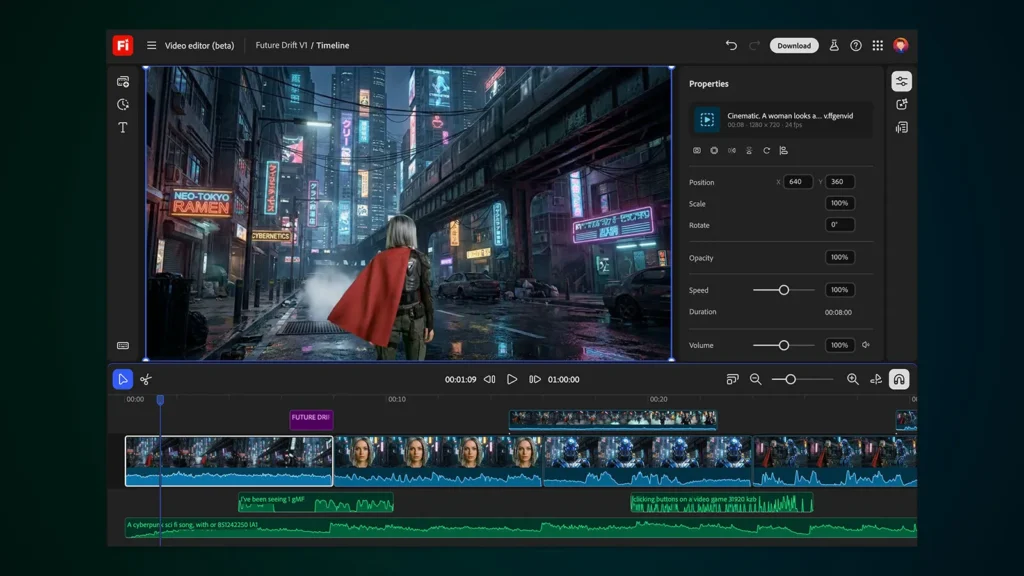
The current Firefly homepage frames the product as “one login, multiple top AI models.” That’s a marketing line, but it’s also accurate. The operator-facing workflow now centers on three areas: Generate, Boards (mood-board-style workspaces), and Edit video (beta). This makes Firefly closer to a creative workspace than a prompt box.
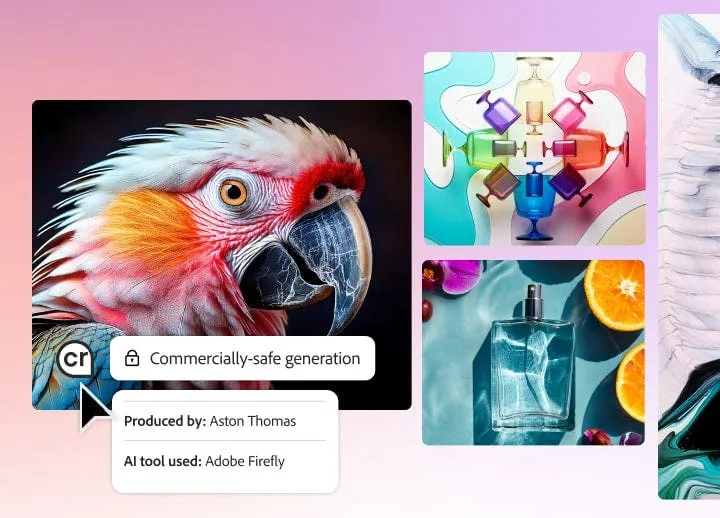
Adobe states the first Firefly commercial model was trained on licensed Adobe Stock images and public-domain content where copyright has expired. Adobe also says it does not train on Creative Cloud subscribers’ personal content. That training-data positioning matters if you’re producing assets for clients or brands.
How I Evaluated Adobe Firefly
I want to be clear about how this review was built. I did not have private hands-on access to Adobe Firefly for original testing. What I did was:
- Evaluate Adobe’s current pricing pages, official documentation, and product help pages in detail (verified April 10, 2026).
- Review public product walkthroughs and demo videos.
- Analyze community reports on Adobe’s official forums and Reddit.
- Cross-reference public review-platform sentiment from G2.
- Compare competitor pricing and feature gates using official sources from Midjourney, Leonardo.Ai, and Canva.
Every factual claim in this review ties back to the sources above. Where I make editorial judgments, I’ll say so.

Test Results Summary
Here’s how Adobe Firefly scores across 8 weighted criteria:
| Criteria | Score | Quick Take |
|---|---|---|
| Workflow Integration | 9.1/10 | Firefly’s connection to Photoshop, Illustrator, Express, and Figma (via GenStudio plugin) is its strongest card. No competitor matches this Adobe-native production path. |
| Commercial Safety & Transparency | 8.8/10 | Content Credentials, documented training-data policy, and IP indemnification for non-beta outputs. Stronger provenance story than Midjourney or Leonardo. |
| Image Generation Quality | 7.5/10 | Solid but not best-in-class. Community reports consistently suggest Midjourney produces more visually striking raw output for the same prompt effort. |
| Video Generation Value | 6.6/10 | Partner models (Sora 2, Veo 3.1, Runway Gen-4.5) are genuinely useful. But premium credits burn fast, and community reports cite weak outputs still consuming hundreds of credits. |
| Cost Predictability | 6.0/10 | The biggest weakness. Standard vs premium credit splits, promo “unlimited” windows, add-on packs, and Creative Cloud Pro overlap make total cost hard to predict. |
| Usability & Learning Curve | 8.2/10 | The web interface is well-documented. Model dropdowns, aspect ratios, and resolution options are clear. But non-English prompt translation issues and premium-only Prompt to Edit create friction. |
| Advanced Control & Flexibility | 7.8/10 | Boards, custom models (enterprise beta), Firefly Services APIs, and partner-model selection give serious operators real creative control. Still behind Midjourney’s generation-volume flexibility. |
| Team & Enterprise Readiness | 8.7/10 | Content Credentials, enterprise custom models, Firefly Services, and commercial-use clarity put Firefly ahead of competitors for brand-governed teams. |
Weighted Overall Score: 7.8/10
Real-World Use Cases
Solo Designer Inside Adobe
You open Photoshop, need a background element, use Generative Fill powered by Firefly, and the result drops directly into your PSD layer. No export, no re-import, no format conversion. Based on Adobe’s documentation, this workflow continuity is real and extends to Illustrator (vector generation) and Adobe Express (template-based design). For a solo designer already paying for Creative Cloud, this is where Firefly earns its keep.
Marketing Team Producing Social Assets
A 3-person marketing team needs on-brand social graphics. Firefly’s Boards feature lets them build mood-board-style workspaces, generate variations using multiple AI models, and then push results into Adobe Express templates. The partner-model layer means they can compare outputs from FLUX, GPT Image 1.5, and Firefly Image without switching apps. During my evaluation of the current documentation, I found that this multi-model routing in a single interface is something none of the direct competitors offer at this level.
Enterprise Brand Team Needing Governance
A brand team at a regulated company needs AI-generated assets with provenance tracking and commercial-use clarity. Adobe’s Content Credentials attach metadata directly to generated outputs. Custom models (currently in public beta expansion) let enterprise buyers train Firefly on their own brand assets in a separated environment. Firefly Services provide API-level access for programmatic generation. For teams that care about these things, Firefly has a real lead.
Video Creator Experimenting at Scale
This is where Firefly gets shaky. The generate video path (Firefly homepage > Generate > Generate video) gives access to partner video models including Kling 2.5 Turbo, Pika 2.2, Runway Gen-4.5, Sora 2, Veo 2, Veo 3.1, and Veo 3.1 Fast. But premium video generations consume credits. Community reports include complaints about 1080p video outputs that looked like still images consuming 500 credits and random artifacts wasting credits on unusable outputs. If you’re a video-heavy creator hoping to experiment cheaply, this math gets painful fast.

Pros
Quick verdict: Firefly’s advantages are real but specific. They reward Adobe-native workflows and brand-safe production, not raw generation volume.
- Best-in-class Adobe workflow continuity. Generative Fill in Photoshop, vector generation in Illustrator, template workflows in Adobe Express, and a Figma/GenStudio plugin that Adobe publicly documents down to the exact setup path (Actions icon > Plugins & widgets > search Adobe GenStudio > Save > Run > sign in). No competitor comes close to this ecosystem integration.
- Transparent commercial-safety positioning. Adobe publicly documents that Firefly’s commercial model was trained on licensed Adobe Stock images and public-domain content. Outputs from non-beta generative AI features can be used commercially. Beta outputs can also be used commercially but are not eligible for indemnification while in beta. That’s more clarity than Midjourney or Leonardo provide.
- Partner-model hub is a genuine differentiator. Access to 30+ models from Adobe, Google, OpenAI, Runway, and others in one interface. You don’t need 5 separate subscriptions and 5 different UIs to compare outputs from Sora 2 vs Veo 3.1 vs Runway Gen-4.5.
- Provenance infrastructure is ahead of the market. Content Credentials, enterprise custom-model separation, and Firefly Services support Adobe’s “safer for teams” positioning. According to a March 2026 Gartner survey, 50% of consumers prefer brands that avoid using GenAI in consumer-facing content, which makes transparency tools like Content Credentials strategically valuable.
- High product velocity. Adobe’s public “What’s New” pages show new image models, a video editor beta, sound effects generation, custom models expansion, partner-model additions, and an iOS app rollout across late 2025 through March 2026. This is not a stagnant product.
Cons
Quick verdict: The weaknesses are concentrated around cost predictability, output reliability, and the gap between marketing promises and post-promo reality.
- Credit system is the biggest buyer trap. Adobe now separates standard vs premium usage. Firefly plans include unlimited standard generations, but premium features (including partner models, video, and advanced editing) consume credits. The current promo messaging looks “unlimited,” but that access is selective and time-boxed until April 22, 2026. After that, every premium generation eats your monthly credits.
- Video generation can waste credits on bad outputs. Community reports cite still-image video outputs at 1080p consuming 500 credits and random artifacts wasting credits. When each failed experiment costs you credits you can’t recover, the experimentation model breaks down for video-heavy users.
- Raw image quality trails competitors. Public review-platform data and Reddit sentiment consistently suggest that for pure image aesthetics, Midjourney produces more visually striking output. Firefly’s strength isn’t raw magic; it’s production-safe integration.
- Prompt reliability has documented issues. Adobe Community reports point to prompt declines with Firefly Image 5 plus uploaded reference images. Adobe staff acknowledged this as an escalated issue in March 2026. When your prompts just get declined without clear explanation, that’s workflow-breaking.
- Non-English prompting is weakened by machine translation. Adobe documents that non-English prompts are machine translated to English and can be inaccurate. For the 100+ languages Firefly supports, that’s a meaningful caveat.
- Favorites and history are browser-dependent. Adobe’s own documentation warns that some favorites and history items are browser-dependent and may be deleted unless saved or downloaded. For a product at this price point, that’s a strange operational gotcha.
Things the Company Won’t Tell You
This section exists because Adobe’s marketing tells a confident story, and some of it deserves harder scrutiny.
1. “Unlimited” Expires and No One is Shouting About It
The Firefly Pro, Pro Plus, and Premium plans currently advertise limited-time unlimited generations on select models and resolutions. Based on Adobe’s own pricing page (verified April 10, 2026), this promo runs until April 22, 2026. After that date, eligible plans revert to normal credit consumption. If you sign up today because it looks unlimited, your bill stays the same but your generation capacity could drop dramatically next month.
2. Your Creative Cloud Pro Subscription Might Already Cover You
Creative Cloud Pro at $69.99/month includes unlimited standard generative features and 4,000 monthly generative credits for premium features. Existing Firefly plan credits stack on top. So if you’re already paying for CC Pro and you buy Firefly Standard at $9.99/month for its 2,000 credits, you’re really just buying a credit top-up. Adobe doesn’t make this overlap obvious on the Firefly pricing page.
3. Beta Outputs Don’t Get Indemnification
Adobe says outputs from non-beta features can be used commercially. Beta outputs can also be used commercially unless otherwise designated, but are not eligible for indemnification while in beta. The video editor is currently in beta. So if you’re generating video in Firefly’s video editor and expecting IP protection, you’re not covered the same way.
4. Credit Add-On Plans Are the Hidden Expansion Path
Adobe’s public docs list credit add-on plans at 2,000, 4,000, 7,000, 10,000, and 50,000 credits. Most reviews don’t mention these exist. For heavy users who exhaust their base credits mid-month, these add-ons become the quiet cost escalator.
5. Firefly Won’t Generate Certain Content, and It’s Not Always Obvious Why
Adobe’s known limitations page documents that Firefly will not generate certain famous people, brands, or music-by-artist requests. Distorted text in images is still a known issue. Unrealistic body and facial features can still happen. These aren’t edge cases for professional use; they affect everyday commercial production.
Pricing
Quick verdict: Firefly’s pricing structure looks simple on the surface. It’s not. The real cost depends on your existing Adobe subscriptions, your premium generation volume, and whether you’re buying during or after a promo window.
Current Firefly Plans (Verified April 10, 2026)
| Plan | Monthly Price | Credits | Key Inclusions |
|---|---|---|---|
| Free | $0 | Limited | Limited access to standard and premium features. Exact free-tier credit amount is not consistently emphasized on the pricing page. |
| Firefly Standard | $9.99 | 2,000 | Premium features via credits. Unlimited standard image features. Boards. |
| Firefly Pro | $19.99 | 4,000 | Adobe Express Premium. Full Photoshop on web/mobile. Limited-time unlimited on select models until Apr 22, 2026. |
| Firefly Pro Plus | $49.99 (or $24.96/mo first year) | 10,000 | Limited-time unlimited on select models/resolutions until Apr 22, 2026. |
| Firefly Premium | $199.99 (or $99.86/mo first year) | 50,000 | Limited-time unlimited on most models/resolutions until Apr 22, 2026. |
| Creative Cloud Pro | $69.99 | 4,000 | Full Creative Cloud apps. Unlimited standard generations. Firefly credits stack on top. |
Real Cost of Adobe Firefly by Team Type
Solo Creator
Firefly Standard at $9.99/month gives you 2,000 credits, but you don’t get Adobe Express Premium or Photoshop on web. That makes it the “just credits” tier. Firefly Pro at $19.99/month is the more realistic entry point if you actually want to work across Adobe tools. But here’s the wrinkle: if you already pay for Creative Cloud Pro at $69.99/month, you already have 4,000 premium credits and unlimited standard generations. A separate Firefly plan is redundant unless you need more premium credits, and even then, a credit add-on pack might be cheaper than a full plan.
Small Agency (3 Seats)
Three seats of Firefly Pro = $59.97/month. Three seats of Firefly Pro Plus = $149.97/month at regular price, or $74.88/month during the first-year promo. The trap here is assuming the promo-period “unlimited” partner-model access will still apply after April 22, 2026. It won’t. Plan your per-seat credit budget based on post-promo rates, not current rates.
Video-Heavy Team
Firefly Premium at $199.99/month (or $99.86/month for the first year) gives 50,000 credits. That sounds like a lot until you factor in that premium video generation can consume 500 credits per output. At that burn rate, 50,000 credits buys you roughly 100 video generations per month before you’re tapping credit add-ons. For comparison, Midjourney’s Pro plan at $60/month includes unlimited video generations in Relax Mode.
Creative Cloud Pro Subscriber Deciding on a Firefly Add-On
You’re already paying $69.99/month. You have 4,000 premium credits. Buying Firefly Standard for $9.99/month adds 2,000 more credits, so you’re paying $9.99 for 2,000 credits, which is about $0.005 per credit. An official 2,000-credit add-on pack may accomplish the same thing. Check Adobe’s credit add-on pricing before committing to a separate plan.
Security, Privacy, Ownership, and Lock-In
Quick verdict: This is where Firefly genuinely leads its competitors. But “leads” doesn’t mean “flawless.”
Training Data and Privacy
Adobe states the first Firefly commercial model was trained on licensed Adobe Stock images and public-domain content where copyright has expired. Adobe also says it does not train on Creative Cloud subscribers’ personal content. This is publicly documented in Adobe’s generative AI approach page.
Commercial Use and Indemnification
Outputs from non-beta generative AI features can be used commercially. Beta outputs can also be used commercially unless otherwise designated, but are not eligible for indemnification while in beta. If you’re building a commercial workflow around Firefly’s video editor (which is beta), understand that the IP protection layer has a gap.
Content Credentials
Adobe offers Content Credentials for provenance and transparency. These attach metadata to AI-generated outputs showing how they were made. For enterprise buyers, brand teams, and anyone building in regulated industries, this is a competitive advantage that Midjourney and Leonardo don’t match.
Lock-In Considerations
Here is the thing: if you build your creative pipeline around Firefly’s genome of Adobe integrations (Photoshop layers, Illustrator vectors, Express templates, Figma plugin, Firefly Services APIs), switching to a competitor means rebuilding those connections. The model hub approach gives you model flexibility within Adobe’s walls, but the walls themselves create lock-in. Your generated assets are portable. Your workflow isn’t.
Enterprise Custom Models
Adobe’s custom models feature (currently in public beta expansion as of March 2026) lets enterprise buyers train Firefly on their own brand assets. These models operate in a separated environment. For large brands needing consistent visual identity across AI-generated content, this is real infrastructure, not a gimmick.

What Most Reviews Miss About Adobe Firefly
1. Firefly Is Now a Model Marketplace, Not Just One Adobe Model
Most review pages still describe Firefly as “Adobe’s AI image generator.” That’s outdated. Based on Adobe’s current documentation, Firefly routes to partner image models (FLUX variants, GPT Image / GPT Image 1.5, Imagen 3/4, Ideogram 3.0, Gemini 2.5 Flash Image, Runway Gen-4 Image) and partner video models (Kling 2.5 Turbo, Pika 2.2, Runway Gen-4.5, Sora 2, Veo 2, Veo 3.1, Veo 3.1 Fast). The selection interface includes model dropdowns, aspect ratios, durations, and resolution options. This is a model marketplace with Adobe’s commercial-safety wrapper, and treating it as a single-model tool undersells it.
2. Creative Cloud Pro Overlap Changes the Buying Decision Entirely
If you’re already paying $69.99/month for Creative Cloud Pro, you already get unlimited standard generations and 4,000 premium credits. Many reviews compare Firefly pricing in isolation, as if the buyer starts from zero. For a huge portion of Adobe’s customer base, the correct question isn’t “Should I buy Firefly?” It’s “Do I need more than 4,000 premium credits per month?”
3. Browser-Dependent Favorites/History Is a Real Operational Risk
Adobe’s own documentation says that some favorites and history items are browser-dependent and may be deleted unless saved or downloaded properly. If you generate something valuable and don’t explicitly save it, switching browsers or clearing cache could mean losing it. For a paid creative tool, this is a surprising fragility that most reviews skip entirely.
4. Known Limitations Are Not Edge Cases
Adobe publicly documents that distorted text in images is still a known issue, non-English prompts are machine translated and can be inaccurate, Prompt to Edit supports premium models only, and Firefly will not generate certain famous people, brands, or music-by-artist requests. These limitations affect everyday commercial production, not just corner cases.
5. Premium Video Economics Matter More Than Image Economics
Most reviews focus on image generation quality. But the real cost conversation for teams in 2026 is premium video. If a single 1080p video generation can consume 500 credits (as community reports suggest), then video-heavy users burn through monthly allocations far faster than image-only users. Image generation with standard features is unlimited on paid plans. Video is where the credit math gets dangerous.

Common Mistakes When Using Adobe Firefly
1. Buying Firefly When Creative Cloud Pro Already Covers Your Needs
The mistake: Purchasing Firefly Standard or Pro without checking whether your existing Creative Cloud Pro subscription already gives you enough credits and unlimited standard generations.
The consequence: You’re paying $9.99 to $19.99/month for capacity you already have.
The fix: Check your Creative Cloud plan details first. If you’re on CC Pro with 4,000 credits and unlimited standard generations, only buy Firefly if you consistently exceed that credit ceiling.
2. Assuming “Unlimited” Is Permanent
The mistake: Signing up for Firefly Pro, Pro Plus, or Premium during the current promo and budgeting as if unlimited partner-model access will continue indefinitely.
The consequence: After April 22, 2026, eligible plans revert to credit-based premium generation. Your costs stay flat, but your output capacity may drop significantly.
The fix: Budget based on the post-promo credit allocation listed in your plan, not the current unlimited messaging.
3. Using Vague Non-English Prompts and Blaming the Model
The mistake: Writing prompts in your native language and expecting the same precision as English prompts.
The consequence: Adobe documents that non-English prompts are machine translated to English and can be inaccurate, even though Firefly supports over 100 languages. Mistranslations produce unexpected or irrelevant outputs, and you’ve just burned credits on unusable results.
The fix: Write critical prompts in English when precision matters, or test non-English prompts on standard (credit-free) features before spending premium credits.
4. Burning Premium Credits on High-Resolution Video Experiments Too Early
The mistake: Testing video ideas at maximum resolution and duration using premium models before establishing what works with lower-cost options.
The consequence: Community reports cite 500 credits consumed per video output, including outputs that were essentially still images or contained random artifacts.
The fix: Start experiments with lower resolutions or shorter durations. Test your prompt logic before committing premium credits to high-resolution renders.
5. Assuming Beta Output Has the Same Indemnification as Non-Beta Output
The mistake: Using Firefly’s video editor (beta) outputs in client-facing commercial work and assuming the same IP protection applies.
The consequence: Adobe states beta outputs can be used commercially but are not eligible for indemnification while in beta. That’s a legal gap for commercial users.
The fix: For high-stakes commercial assets, use non-beta features or confirm the beta status of each tool before delivery.
6. Expecting Firefly to Behave Like Midjourney for Pure Image Aesthetics
The mistake: Buying Firefly because you want the most visually impressive AI images and assuming Adobe’s brand guarantees superior output.
The consequence: Public user reports and review-platform sentiment consistently suggest Midjourney produces more striking raw image output. Firefly’s strength is production integration and commercial safety, not aesthetic shock value.
The fix: If raw image wow is your primary goal, compare Midjourney’s Standard plan at $30/month (unlimited images in Relax Mode) before committing to Firefly.
Adobe Firefly vs Alternatives
The right comparison depends on what you’re actually buying for. Here’s how each competitor fits different buyer profiles.
Adobe Firefly vs Midjourney
Choose Firefly if: You work inside Adobe’s ecosystem, need commercial-use clarity with Content Credentials provenance, want multi-model access in one interface, or need enterprise governance features.
Choose Midjourney if: You’re an image-first creator who wants unlimited generations in Relax Mode, simpler pricing, and you don’t care about Adobe workflow continuity. Midjourney’s Standard plan at $30/month includes unlimited image generations in Relax Mode and 15 hours of Fast GPU time. The Pro plan at $60/month adds unlimited video in Relax Mode and Stealth Mode.
Key difference: Midjourney’s pricing logic centers on generation volume and GPU time. Firefly’s centers on ecosystem integration and commercial safety. They’re solving different problems. If you just want to make beautiful images fast and cheap, Midjourney’s economics are simpler. If you need those images to flow into Photoshop layers with provenance metadata attached, Firefly wins.
Watch out: Midjourney paywalls Stealth Mode to Pro ($60) and Mega ($120). If privacy matters before you generate, that’s a $60/month minimum. Firefly doesn’t have this specific gate because generation happens within Adobe’s authenticated workspace.
Adobe Firefly vs Leonardo.Ai
Choose Firefly if: You need Adobe-native production workflows, commercial-safety documentation, or enterprise custom models.
Choose Leonardo.Ai if: You’re an independent creator who wants the most experimentation flexibility for the money. Leonardo’s free plan gives 150 fast tokens per day (public creations). The Essential plan at $12/month provides 8,500 tokens with private creations. Premium at $30/month gives 25,000 tokens and unlimited relaxed image generation for select models.
Key difference: Leonardo is built for prompt-heavy experimentation. Personal AI models (10 on Essential, up to 50 on Ultimate), token banks, and top-ups give creators more customization control. Firefly gives you model breadth through its partner layer, but the credit system is less forgiving for rapid experimentation. For indie creators who iterate heavily and don’t need Adobe integration, Leonardo’s economics make more sense.
Watch out: Leonardo’s unlimited relaxed generation only applies to select models, and simultaneous generation caps vary by tier. It’s not unlimited everything.
Adobe Firefly vs Canva Magic Studio
Choose Firefly if: You need direct model access, multi-model generation, advanced creative editing, or Adobe-native production workflows.
Choose Canva Magic Studio if: Your team mainly produces template-based marketing content, presentations, and social creative. Canva Business at $20/person/month targets teams that need collaborative design with AI assistance baked in.
Key difference: Canva positions Magic Studio as AI built into an existing design/collaboration workflow, not as a standalone model playground. It’s the better fit for teams producing lots of lightweight marketing content quickly. But it’s not a direct substitute for Firefly’s model breadth, Adobe-native integration, or enterprise-grade provenance features. Use Canva as a workflow choice, not as an AI model comparison.
Watch out: Canva’s AI usage is tiered and capped by plan. Free users get significantly lower limits than paid users.
Quick Comparison by Buyer Type
| Buyer Type | Best Fit | Why |
|---|---|---|
| Adobe-native designer | Firefly | Direct integration with Photoshop, Illustrator, Express. No competitor matches this. |
| Image-first creator (output quality focus) | Midjourney | Unlimited Relax Mode images. Stronger raw aesthetic output per community consensus. |
| Budget-conscious indie experimenter | Leonardo.Ai | Free tier. Flexible token system. Personal AI models. Lower entry cost. |
| Template-heavy marketing team | Canva Magic Studio | Collaborative design with AI. Simple team pricing. Brand kit workflows. |
| Enterprise brand governance team | Firefly | Content Credentials. Custom models. Firefly Services. Commercial-use documentation. |
| Video-first creator on a budget | Midjourney | Unlimited video in Relax Mode on Pro/Mega. Firefly’s credit burn for video is unpredictable. |
Is Adobe Firefly Worth It in 2026?
That depends on which “it” you’re paying for.
If you’re paying for the model hub, meaning access to 30+ AI models from Adobe and partners in one authenticated workspace with commercial-safety documentation, Firefly delivers something no single competitor matches. That’s worth paying for if you’re a team producing client-facing content where provenance and commercial clarity matter.
If you’re paying for the Adobe integration, meaning Generative Fill in Photoshop, vector generation in Illustrator, and the pipeline into Express and InDesign, the value is clear. No competitor plugs into Adobe’s production tools the way Firefly does. But you might already have this through Creative Cloud Pro without buying a separate Firefly plan.
If you’re paying for raw image quality and generation volume, you’re paying for the wrong tool. Community reports and review-platform data consistently suggest Midjourney delivers more impressive standalone image output, and its Relax Mode gives unlimited generations on Standard and above. Firefly’s image quality is competent but not best-in-class.
If you’re paying for cheap video experimentation, you’re paying for the wrong tool. Premium video credits burn fast, outputs can be weak, and the video editor is still in beta without full indemnification. Midjourney offers unlimited video in Relax Mode at $60/month. That’s more predictable.
Who Should Use Adobe Firefly
Buy Firefly if:
- You’re a designer or creative team already inside Adobe’s ecosystem and want AI generation that feeds directly into your production files.
- You’re a marketing team or agency that needs commercially safer, on-brand visual content with provenance tracking.
- You want access to multiple premium AI models (Adobe, Google, OpenAI, Runway, and more) without managing separate subscriptions.
- You’re an enterprise or brand team that needs custom models, Content Credentials, and Firefly Services APIs for programmatic generation.
- You value commercial-use clarity and IP indemnification (for non-beta features) over raw generation volume.
Who Should Skip Adobe Firefly
Skip Firefly if:
- Your primary goal is the highest raw image quality for the lowest predictable cost. Look at Midjourney.
- You want maximum experimentation flexibility at a low entry price. Look at Leonardo.Ai.
- You hate credit systems and want simple unlimited generation pricing. Midjourney’s Relax Mode is simpler.
- You plan to do heavy premium video generation on a budget. Firefly’s credit burn for video is unpredictable, and the video editor is still beta.
- You don’t use any Adobe products. Firefly’s biggest advantages disappear when you strip away the ecosystem integration.
FAQ
What is Adobe Firefly?
Adobe Firefly is a generative AI workspace and model family available as a standalone web app and as generative features embedded across Adobe products including Photoshop, Illustrator, and Adobe Express. In 2026, it also acts as a partner-model hub, routing to over 30 AI models from Adobe, Google, OpenAI, Runway, and other providers.
Is Adobe Firefly worth it in 2026?
It depends on your workflow. If you already work inside Adobe and need commercially safer, editable, on-brand output with access to multiple premium models, yes. If you mainly want the best raw image quality for the lowest spend, or predictable premium video economics, compare Midjourney or Leonardo first.
How much does Adobe Firefly cost?
As of April 2026: Free (limited), Standard $9.99/month (2,000 credits), Pro $19.99/month (4,000 credits), Pro Plus $49.99/month regular or $24.96/month first year (10,000 credits), Premium $199.99/month regular or $99.86/month first year (50,000 credits). Creative Cloud Pro at $69.99/month also includes 4,000 premium credits.
Is Adobe Firefly free?
There is a free tier with limited access to standard and premium creative AI features. Adobe does not consistently emphasize the exact free-tier credit amount on the core pricing page.
What are Firefly’s generative credits and how do they work?
Adobe splits usage into standard and premium. Paid plans include unlimited standard generations (like basic Generative Fill). Premium features, including partner models, video generation, and advanced editing, consume monthly generative credits. When credits run out, you can buy credit add-on packs (2,000 to 50,000 credits).
Can I use Adobe Firefly outputs commercially?
Yes. Adobe says outputs from non-beta generative AI features can be used commercially. Beta outputs can also be used commercially unless otherwise designated, but are not eligible for indemnification while in beta.
How does Adobe Firefly compare to Midjourney?
Firefly beats Midjourney on Adobe integration, commercial-safety documentation, provenance (Content Credentials), and multi-model access. Midjourney beats Firefly on simpler unlimited-generation economics (Relax Mode), image-first aesthetic appeal, and price-per-generation predictability.
Does Adobe Firefly work inside Photoshop?
Yes. Firefly powers generative features inside Photoshop, Illustrator, Adobe Express, InDesign, Lightroom, and Substance 3D.
What happens after the “unlimited” promo expires on April 22, 2026?
Eligible Firefly plans revert to normal credit consumption. The monthly price stays the same, but your generation capacity for premium features will be limited to your plan’s credit allocation instead of being unlimited on select models.
Should I buy Firefly if I already have Creative Cloud Pro?
Maybe not. Creative Cloud Pro at $69.99/month already includes unlimited standard generations and 4,000 premium credits. A separate Firefly plan only makes sense if you consistently need more than 4,000 premium credits monthly.
Final Verdict
Adobe Firefly in 2026 is like a well-stocked hardware store inside a gated community. If you already live in the neighborhood (read: Adobe’s ecosystem), the selection is impressive, the quality is reliable, and the commercial guarantees are better than what you’ll find down the road. If you don’t live there, you’re paying a premium just to get through the gate, and the standalone value may not justify it.
The binary:
If you already work inside Adobe and need commercially safer, editable, on-brand output with access to multiple premium AI models, Adobe Firefly is worth paying for. Start with Firefly Pro at $19.99/month if you don’t have Creative Cloud, or evaluate your existing CC Pro credits before buying anything.
If you mainly want the highest raw image quality for the lowest predictable spend, or you plan to do lots of premium video experimentation, walk away and compare Midjourney or Leonardo first. Firefly’s credit system, promo expiry, and video economics don’t serve those buyers well.
Overall Score: 7.8/10