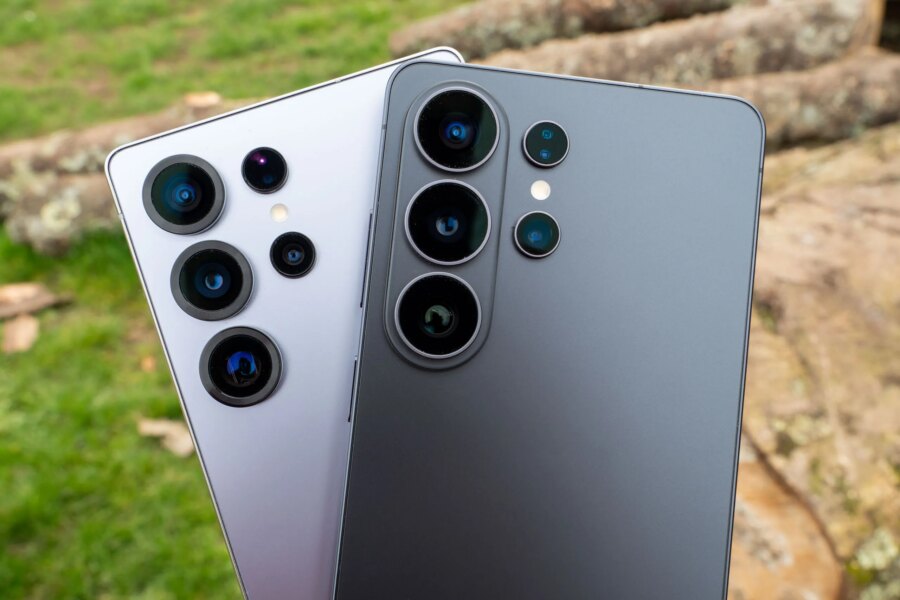






Best smartphones for portrait photography in 2026: the phones with the best Portrait Modes

Home / Buying advice / Best smartphones for portrait photography in 2026: the phones with the best Portrait Modes


Amy Davies

A young adult woman is taking a a photograph of her friend on her smartphone

The best smartphones for portrait photography feature highly capable portrait modes, crisply separating subject from background for perfect people pictures. Nowadays, we expect the best camera phones to have great portrait modes as a matter of course – but the ones I’ve selected for this list are a cut above the rest.

Portrait modes recreate the classic shallow depth of field effect you would normally see when shooting with a standard camera and wide-aperture lens. As phones have improved, so have these, dramatically – but they don’t always get better with every upgrade. As such, I haven’t simply selected the latest flagships for this list, as sometimes slightly older phones offer better functionality or value for money when it comes to portraiture, specifically.

Remember to shop around for various contract deals, and you may also already be able to find some of these models second-hand. All of these phones are ones that the AP technical team and I have tested and reviewed, and you can see samples of our portrait photographs taken with them throughout.

The best smartphones for portrait photography: our quick list

Looking for the best deal on the best smartphones for portraits? Not only will you find the best camera phones for portraits, but also some of the best deals, as our ‘Buy now’ buttons are set to automatically take you to the best prices from trusted retailers. There is also a list of other retailers below each phone, so you can find the right deal for you.

  • Best Android phone for portrait photography: Samsung Galaxy S25 Ultra: Buy now
  • Best iPhone for portrait photography: iPhone 17 Pro: Buy now
  • Best premium phone for portrait photography: Xiaomi 15 Ultra: Buy now
  • Best smaller phone for portrait photography: Google Pixel 10 Pro: Buy now
  • Best cheap phone for portrait photography: OnePlus 12: Buy now

Why you can trust Amateur Photographer

We spend many hours testing every product we recommend, in detail, in a variety of situations and shooting scenarios, and only use experts for our reviews, so you can be sure that you’re getting the best products. Find out more about our expert writers.

Read on to learn more about each of these phones, including key specs and the results of our review team’s testing…


Best smartphones for portrait photography

Best Android

Best Android phone for portrait photography: Samsung Galaxy S25 Ultra

The Samsung Galaxy S25 Ultra in hand
The Samsung Galaxy S25 Ultra in hand. Image: Amy Davies

Amateur Photographer verdict

A fantastic all-rounder with a superb Portrait Mode, the Galaxy S25 Ultra dependably produces perfect people pictures.

Pros

  • Three high-resolution sensors
  • Portrait mode works with Night Mode
  • Advanced AI functionality
Cons

  • Screen only available in one size
  • High price

True to form the Galaxy S25 Ultra tops our best camera phone for 2025. The S25 Ultra features four lenses: a standard 1x lens, an ultrawide, and two telephoto lenses, offering 3x and 5x zoom. An upgrade from the S24 Ultra is that the ultrawide features a 50MP sensor.

With its multiple lenses, comprehensive camera app and excellent screen, the S25 Ultra is a fantastic all-rounder. It has a dedicated Portrait mode that you can use to either take headshots or leave a little more context. It does a good job with portraits here, creating fairly natural outlines and also works well with other non-human subjects such as pets. You can also use the Portrait mode when shooting selfies. It can also be combined with Night mode if you’re shooting portraits in low light. It has a variety of AI editing to alter your shots, including moving objects and people around and removing “photobombers”.

A portrait taken with the Samsung Galaxy S25 Ultra
A portrait taken with the Samsung Galaxy S25 Ultra. Image: Amy Davies
Galaxy S25 Ultra · f/1.7 · 1/120s · 6.3mm · ISO1000

You don’t have to shoot in Portrait mode, as the standard setting also produces excellent results – albeit without the same kind of shallow depth of field effect you might wish for. If you want to shoot in raw format, you can, but again not in Portrait mode – head to the Pro mode and enable DNG recording to do that. Shoot with the 3x telephoto lens in Pro mode to get a typical portrait focal length, while also taking advantage of the flexibility of raw shooting. The best results are from the main 200MP sensor, but the others do a good job, too, including the 50MP ultrawide sensor.

Read our Samsung Galaxy S25 Ultra Review.


Best iPhone

Best iPhone for portrait photography: iPhone 17 Pro

iPhone 17 Pro in hand
iPhone 17 Pro. Image credit: Amy Davies

Amateur Photographer verdict

The iPhone 17 Pro joins the 15 Pro as among the best iPhones for photographers, with the capacity to turn standard Photos into “Portrait” shots after the fact.

Pros

  • Triple high-resolution sensors
  • 48MP main lens, 24MP default output and zooming options
  • Improved selfie camera
Cons

  • Expensive
  • Limited colours
  • Relatively minor upgrade from the 15 Pro

It goes without saying that Apple’s smartphones are incredibly popular. This flagship sees a 3x lens setup, with the main offering a 48 megapixel resolution. It’s available in two sizes, the standard Pro and the larger iPhone 17 Pro Max, without sacrificing on camera quality if you opt for the smaller device. This is something other manufacturers don’t offer, with smaller devices tending to come with a camera sacrifice of some sort. This may mean that the iPhone 17 Pro better suits those with smaller hands or who don’t want a cumbersome smartphone to fit in their pocket.

In terms of portraits, the iPhone 17 Pro/Max has a dedicated Portrait mode which gives you the opportunity to shoot at 1x, 2x or 3x, depending on how you want to frame your shot, while also creating a blurred background. Called “Next generation portrait mode”, the big news here is the ability to automatically recognise portrait subjects (humans and pets) when shooting in the main camera mode. This means you can turn it into a portrait after the fact if you want to – this isn’t possible with the iPhone 14 Pro and older.

iPhone 17 Pro portrait
iPhone 17 Pro portrait mode. Image credit: Amy Davies
iPhone 17 Pro · f/1.78 · 1/372s · 6.7649998656528mm · ISO80

Critics of the iPhone often point to its relatively simple native camera app, with no Pro or Advanced mode available. However, you can shoot in Apple’s ProRAW format if you want some increased flexibility – though as with other smartphones, not in the Portrait mode. Again, shooting with the telephoto lens and raw switched on is a way to get around that somewhat.

Again, we have a Night mode which can be combined with the Portrait mode for good portrait shots after dark, but, it’s the 1x setting which produces the best results in such conditions.

Read our iPhone 17 Pro Review.


Best premium

Best premium phone for portraits: Xiaomi 15 Ultra

The Xiaomi 15 Ultra. Image: Amy Davies

Amateur Photographer verdict

With a 1-inch sensor and Leica-made lenses, the Xiaomi 15 Ultra continues to set itself apart from the competition, photographically speaking.

Pros

  • One-inch main sensor
  • Four high-quality lenses
  • Multiple portrait options
Cons

  • High price
  • Selfie camera still doesn’t have AF
  • Not available everywhere

Xiaomi’s smartphones are made in collaboration with Leica; so they offer some serious chops in photographic terms. The Xiaomi 15 Ultra is the best one yet – its main camera uses a 1-inch type sensor, the same size that you’d find in premium compact cameras, and Xiaomi’s are the only phones on the market to do so. This is paired with an ultra-sharp Leica-made lens, delivering stunning image quality.

As for portraiture, the Xiaomi 15 Ultra offers a flexible range of portrait-shooting modes. It’s a little simplified compared to the previous Xiaomi 14 Ultra – whereas before you used to be able to pick actual focal lengths, now you choose between shooting at 1x, 2x, 3x or 4.3x. You also have the option to fine-tune your bokeh quality for the defocused areas of images.

A selfie taken with the Xiaomi 15 Ultra
A selfie taken with the Xiaomi 15 Ultra. Image: Amy Davies

The selfie camera is decent enough – it still lacks autofocus, which is a shame on a flagship phone like this, but it produces dependably decent results. Back on the main camera, you can take advantage of Pro mode to take control of key settings, or there are also some interesting pre-made shooting modes – we particularly like “Fast Photo”, which recreates the look of a rangefinder for a vintage feel.

This is a stunning phone for photography, and definitely gives the best portrait results. The only reason it’s not our top pick is because it’s not only expensive but also hard to obtain, with limited availability in many territories. If you can get one, we’d unhesitatingly recommend it.

Read our Xiaomi 15 Ultra review


Best small phone

Best smaller phone for portraits: Google Pixel 10 Pro

Google Pixel 10 Pro. Image credit: Joshua Waller

Amateur Photographer verdict

Great build quality and camera features that do a fantastic job in most situations.

Pros

  • Excellent image quality
  • Great selfie results
  • Pleasantly blurred portrait background
  • “Pro Res Zoom” with AI helping improve the detail
Cons

  • Higher price than predecessor
  • Average macro performance
  • Expensive for additional storage options
  • 8K video is only offered as an AI/cloud based feature

Pixel phones were early exponents of excellent portrait modes, with the company working for some time with machine learning to produce fantastic results. It’s worth mentioning that Google has made a point of building its training set with a multitude of nationalities and skin-tones for what it says is better face-recognition and tone-processing than some of its rivals for non-white subjects; something other manufacturers sometimes struggle with.

The Google Pixel 10 Pro has a triple camera setup on the rear of the phone, featuring an ultra-wide angle, wide-angle, and 5x telephoto cameras. The 1x lens offers 2x “optical quality” zoom, while the 5x lens offers a 10x “optical quality” zoom.

This zoom feature uses Google’s hybrid Super Resolution zoom multi-shot technology. As long as you don’t use too much zoom, the results are impressive. The 10 Pro offers up to 100x zoom using “Pro Res Zoom” with AI helping improve the detail.

It should be noted that despite all of these high-resolution sensors, the standard output is 12MP from each, due to pixel binning.

Selfie using the portrait mode. Photo JW

The selfie camera gives good results, with the portrait mode giving a pleasingly blurred background. In addition to all the great AI and computational photography features found on its predecessor, you also get some new ones, including a Camera Coach, designed to help you get better shots.

Read our Google Pixel 10 Pro Review.


Best cheap phone

Best cheap smartphone for portraits: OnePlus 12

The triple lens array on the back of the OnePlus 12. Image: Amy Davies

Amateur Photographer verdict

The OnePlus 12 retains its ‘Hasselblad Portrait Mode’ and is the cheapest model in this list; having undergone all-round improvements to its cameras.

Pros

  • Hasselblad portrait modes
  • Pro mode
  • Good value for a flagship
Cons

  • Short telephoto lens
  • Selfie camera fixed focus only
  • Raw shooting only in Pro mode

The cheapest smartphone in our group, OnePlus prides itself on providing flagship specifications for mid-range pricing. They pride their phones on their cameras, which makes them very appealing to photographers who may be less fussy about other aspects of a smartphone that add to their cost.

The main camera has a 50MP Sony LYT-808 1/1.4” sensor, a sensor which is brand new and used here in the OnePlus 12 for the first time in the smartphone market. It’s fronted by a 23mm equivalent f/1.6 lens, which includes optical image stabilisation. This sensor is bigger than that found in the OnePlus 11 and is therefore said to be better for low-light shooting.

A further two cameras comprise of a 48MP Sony IMX581 1/2” sensor with a 14mm f/2.2 equivalent ultra wide lens, plus a 64MP Omnivision OV64B 1/2” sensor with a 70mm f/2.6 equivalent 3x zoom lens which also has the ability to 6x zoom digitally in-sensor, and 120x digitally overall. This 3x length is longer than the 2x length of the OnePlus 11,

The specific “Hasselblad Portrait Mode” is retained: designed to recreate the look of Hasselblad XCD 30mm and 65mm lenses (1x and 2x, respectively). This creates a shallow depth of field effects; designed to recreate the look from using certain Hasselblad lenses. You can shoot at 1x, 2x or 3x focal lengths, to give the effect of using 30, 65 or 90mm Hasselblad lenses. Consider this an “impression” rather than the real thing and you won’t be disappointed.

OnePlus 11. Portrait mode. 2x camera selected. Image credit: Amy Davies

The lenses in the OnePlus 12 benefit from a special lens coating which is designed to reduce flare. You can also choose to use Portrait mode in selfie orientation if you want a shallower depth of field job.

Read our OnePlus 12 Full Review.


Tips for shooting portraits with your smartphone

Try these ideas with your smartphone next time you’re giving portraits a go

Use portrait mode for non-human subjects

Remember that portrait mode can generally be used for non-human subjects. This is great for photographing pets to really bring out their character. You can also use it to create shallow depth of field effects with other subjects, such as still life too.

But don’t just use the dedicated portrait mode

As mentioned in our round-up, try using other modes, rather than just portrait mode. This way you can achieve other things, such as shooting in raw mode for example.

Try different lighting and blur effects

Lots of Portrait modes have different effects you can experiment with, including different levels of blur, different types of blur/bokeh and different lighting effects. It’s worth getting to know all of these so you can approach your portraits creatively. Digital filters, such as black and white, also come in handy.

Give burst mode a go

When photographing fast-moving people (such as children), activating a burst mode can be a good way to get a candid portrait that occurs in a split second. Usually this involves holding down the shutter button to take several shots in quick succession. Most modern smartphones will even automatically choose the best result for you.

Include some context

Using some of your subject’s background is a good way to show more personality in your portraits rather than just a straightforward headshot. That’s especially true if you can include some kind of environment which means something to the sitter – such as a place of work or favourite location. Be sure to try switching to 1x mode and see what results you get.

Consider accessories such as reflectors and ring lights

There are a number of useful portrait accessories that can work very well with smartphones, including reflectors – to bounce light (including of different tones) back at your subject for more even coverage, and ring lights, which work particularly well for selfies.

Treat the smartphone like any other camera

We can often get hung-up on thinking of a smartphone as not a “proper camera”. Remember it’s you that makes the pictures and approach a portrait sitting just as you would with anything else, remembering composition, direction, and even other elements such as costumes, make-up and props.

How does portrait mode work on a smartphone?

Although you can take portraits with the standard shooting setting on your smartphone, many will choose to use the dedicated Portrait mode (sometimes it will be called something else).

It’s only with these modes that you’ll be able to recreate the effect of shooting with a wide-aperture lens. How this essentially works is the phone will take data from two or more of its lenses to create a depth map and use edge detection to figure out what should be in focus and what shouldn’t.

Machine learning and computational photography helps create the end result, which isn’t as reliably smooth as using real hardware, but can create pretty convincing effects – especially when you’re only viewing images at small sizes or on social media sites such as Instagram. Sometimes fussy outlines can prove to be a problem – such as if someone has fairly fine hair. Sometimes you might also see some features, such as ears, disappear when they shouldn’t.

It tends to work best with humans and animals (pets especially) that smartphones have been trained to recognise easily, while still life subjects can be a bit more hit-and-miss. That said, results have on the whole improved a huge amount since portrait modes were first introduced, with smartphones better able to understand what they’re looking at as time progresses. As technology continues to advance, we can only assume they’ll continue to get even better.

How we test smartphones for photography

We review smartphones from the perspective of choosing a smartphone for its photography and camera performance, so we test every phone by looking at what it offers in terms of the cameras and what features are included for photography and video, and how it performs in real world use in a variety of different shooting situations.

We test each camera on the phone, whether that’s the ultra-wide angle, the main camera, telephoto camera(s), and selfie camera, and use the phone for photography in a range of lighting conditions, including low-light, where camera phones can struggle. We also look at specialist shooting modes on offer, including portrait modes, as well as look at how good the overall phone is, in terms of battery life, screen and build quality.


Read our latest smartphone reviews and find out how to take better smartphone photos. On a budget? Have a look at our best budget camera phones list.

Related reading:


Recent updates:

Follow AP on Facebook, Instagram, YouTube and TikTok.


Share on Pinterest

Share on LinkedIn

Amy Davies

About

Amy is a highly experienced photography and technology journalist who has been working on AP since 2018, having been working in the industry since 2009. She is a graduate of the magazine journalism course at Cardiff University and has written for a wide range of publications and websites. As Features Editor, she is responsible for commissioning an eclectic mix of features connected to general photography, along with interviews. She is also a very experienced reviewer of cameras and associated technology, with her reviews featured on multiple sites including TechRadar, Digital Camera World, Trusted Reviews, ePhotozine, Stuff, Expert Reviews, T3, Photography Blog and more. She is also an expert on smartphone photography and smartphones generally.


Amy Davies

Amy Davies

Stay Updated

Get the latest camera news, reviews and buying guides straight to your inbox.