





Amateur Photographer verdict
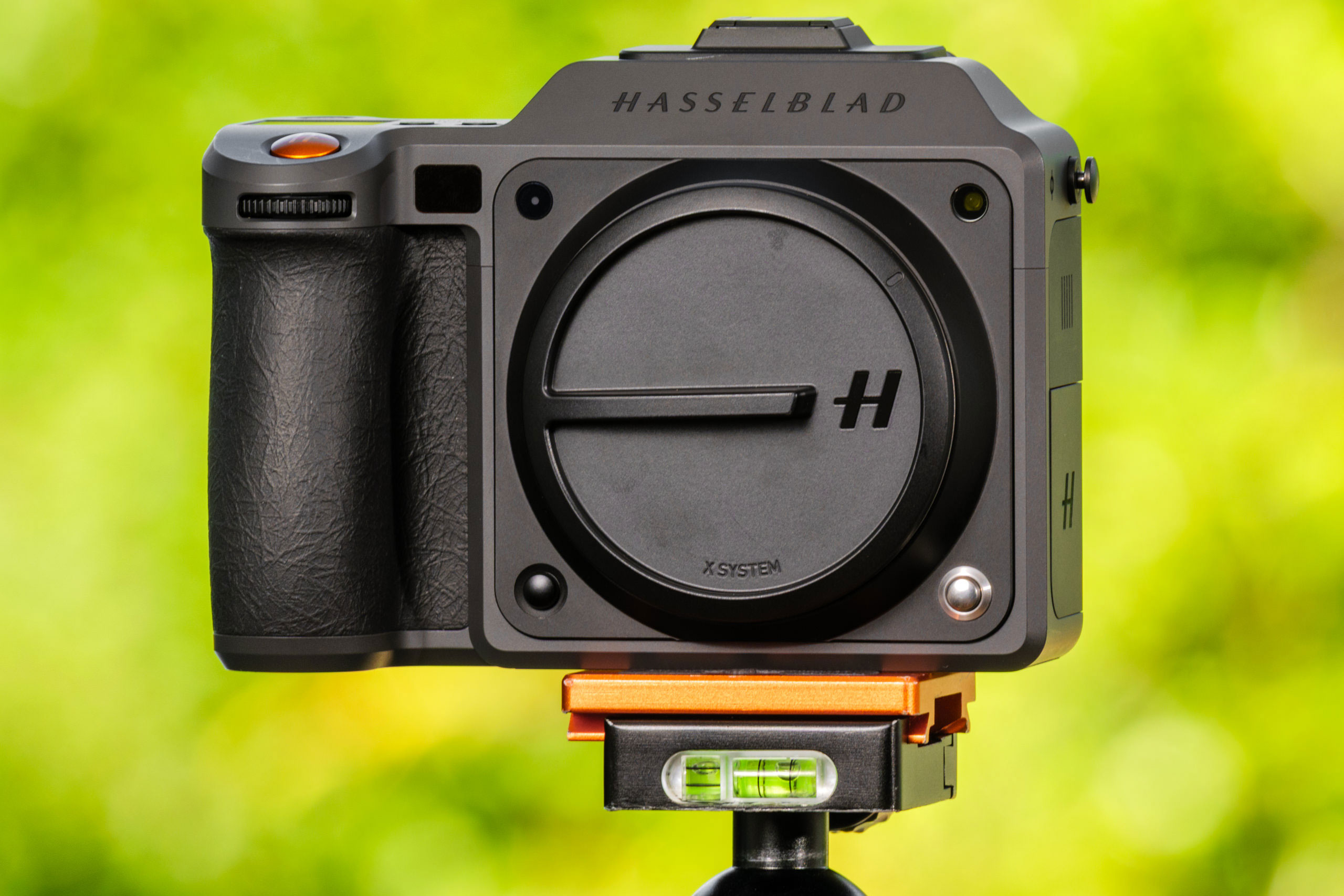
A stills photography beast in its own league, the X2DII 100C brings significant updates to focusing and handling while keeping the price tag well under the last version’s
- Sensor and lens work to produce incredible levels of detail
- Realistic colours and smooth tones that manipulate easily
- Really nice handling with clear menu and good control points
- Bright, clear and detailed rear screen
- The price has dropped quite significantly
- Although the AF is much better, it still has some way to go
- Viewfinder quality isn’t bad, but could certainly be improved
- Camera struggles to deal with its large files in HDR mode
- Quite a heavy body, made heavier by the new 35-100mm lens
Hasselblad X2DII 100C at a glance:
- $7399 / £6,400 body-only
- Medium format mirrorless camera
- 100MP 43.8×32.9mm sensor
- Continuous AF with LiDAR
- HDR Raw, JPEG and HEIF files
- 10-stop in-body stabilisation
Hasselblad has made some seemingly small changes to its hand-held digital mirrorless offering in the X2D ll 100C – changes which both bring it into line with the current world and which take it beyond what its competitors can provide. In some ways this new model is significantly modern, while in others it might leave potential users wondering what Hasselblad was thinking when the engineers decided what to include and what to leave out. But rather than being a ‘mixed bag’ the Hasselblad X2D ll is actually a camera completely dedicated to stills photography, which in 2025 is something of a rarity. Whether you consider that a positive or a negative point will depend on how much you value an ability to shoot video – I suspect the moving image is quite low on the priority list of a lot of Hasselblad customers.
Possibly, though, getting the stills side of life right has been the focus of this new version of the Hasselblad X series. Previous models have had outstanding image quality but a number of operational issues, notably with autofocus and general speed of handling, that have let them down a little. The clue that this is a mark ll version of the X2D rather than an X3D suggests the company’s aim is to get things up to speed rather than to change the world. And, judging by the specification chart, it seems to be doing it with some style.
Focal points
While the X2D II looks much like its predecessor, it gains some significant updates and improvements
- Storage: the camera comes with a massive 1TB of internal storage, which is supplemented by a CFexpress Type B card slot
- Connectors: with no video capability, connectors are limited to USB-C for battery charging and data transfer, and a socket for a wired cable release
- Battery:t he X2D II uses the same battery as before, which slots into the baseplate and is released by a lever. It’s rated for 327 shots per charge in HDR mode
- Flash: the hot shoe is compatible with select Nikon-dedicated flash units, with sync at all shutter speeds thanks to leaf shutters in the lenses
- LCD: the super-bright rear screen can display extended highlight details when the camera is working in HDR mode
- Lenses: Hasselblad now offers 17 XCD lenses, with focal lengths from 20mm to 135mm (equivalent to 16mm to 105mm in full-frame terms)
Hasselblad X2DII 100C – Features
The Hasselblad X2D ll is a ‘medium format’ mirrorless camera that’s fitted with a back-side illuminated 100-million-pixel sensor that measures 43.8×32.9mm. The size of the sensor means that to determine the equivalent focal length in full-frame terms we multiply the marked focal length by 0.78 – so an XCD lens marked 65mm behaves much like a 50mm would on a full frame camera.
The Hasselblad X2D ll 100C shoots images containing 11656×8742 pixels (101,896,752 pixels) which it can save in Hasselblad’s 3FR Raw, JPEG and/or HEIF formats, either to its internal 1TB SSD or to a removable CFexpress Type B card. The HEIF format seems to be becoming popular with new cameras at the moment, as it presents a smaller file size through compression ‘more efficient’ than JPEGs can manage. Adobe has yet to fully support the format though, so they can be viewed in Bridge but Photoshop and Lightroom users won’t get to play with them. Hasselblad’s Phocus software opens them just fine.
Hasselblad claims its 3FR raw files can capture 16 bits of colour and 15.3 stops of dynamic range – which sounds impressive – and with the Hasselblad Natural Colour Solution High Dynamic Range mode activated we can record raw, JPEG and HEIF files in HDR. You’ll need an HDR monitor to view and edit these HDR images of course, but the 3.6in 2.36-million-dot rear screen of the camera can display them perfectly, with its peak brightness of 1400nits and 100% Display P3 colour gamut coverage. The EVF does not have the same colour gamut or brightness specification, but it does offer 5.76-million-dot resolution, a 1x magnification with the standard lens and 100% image coverage.
Of course we have mechanical and electronic shutter options that give us opening times of 68 minutes to 1/4000sec in mechanic mode or 1/6000sec in electronic mode. As the mechanical shutter is built into the XCD lenses we can use flash at all available mechanical shutter speeds, and with modern Nikon-based flash systems we have TTL metering and control too. The camera’s ISO settings range from 25600 at the top end to a new low of ISO 50 – from ISO 64 in the original model.
Hasselblad X2DII 100C – Build and Handling
The idea of the Hasselblad X series was that its cameras should be a small and portable alternative to the company’s H system of SLR bodies that it quietly retired some time ago. This X2D ll measures 148.5x106x75mm and weighs 730g body only. This is practically the same the size of the X2D it replaces, but with 60g lost, presumably from the metal removed for the ‘ll’ inscription on the top plate. As you would expect, the camera feels very sturdy and is very comfortable to hold and operate, and its new lighter weight makes it even easier to carry all day.
One of those small-but-significant changes in this body is the new hinge design for the rear screen. The screen still flips up and down, but now it can be pulled away from the body as well, so when we are looking down on the screen the EVF housing doesn’t block a large part of the view. This is something that bothered me when I reviewed the X2D so I’m very pleased to see it resolved in this model.
Something else that has really pleased me is the micro vibration signal that tells us when the camera is completely level. I’m not a fan of the dual level indicators that mean we have to look at the bottom of the screen to see it the camera is level left-to-right and then look at the right part of the screen to see if the camera is level front-to-back – inevitably when one is level and we are looking at the other, the level one goes out of level. Now though we get a little vibration through the hand grip to tell us when both levels are correct – which makes life a whole lot easier. Having both levels in a place we can see them at the same time would achieve the same result, but this is a pretty neat solution that means the company hasn’t had to alter its design.
More control points are very often a good thing, and in this camera we get three new very useful ones. There is a new custom one on the rear of the camera, as well as a new 5D joystick that can scroll left, right, up and down as well as be pressed. The front finger wheel can also be pressed in now as well, with each of these points giving us a choice of 36 functions to assign – including ‘off’. There’s a minor glitch in the menu system that means when assigning any of the buttons to Focus Point/Subject Detection the text overlaps as there are too many characters – but that’s easy to get over. Of all these new buttons the joystick is surely the most significant and helpful – an import from the DJI Drone controllers. The mode of operation and feature access will take new Hasselblad users a little time to get used to, but in a short time no one can fail to appreciate how well designed it is and how quick it is to use.
As you might expect, the build of the camera is first-class. There’s a greater likelihood of breaking the floor tiles than the camera should you drop it, and even the new additional hinge on the screen doesn’t feel as though it makes the system any less secure. On the right side of the camera we get an enormous grip that I found extremely comfortable and which made the weight of the X2D ll and 35-100mm more than manageable for long periods.
Hasselblad X2DII 100C – Viewfinder and Screen
The Hasselblad X2D ll isn’t especially big or heavy on its own, so shooting at arm’s length and using the rear screen for guidance is quite manageable and comfortable. With the new 35-100mm f/2.8-4 zoom lens attached, though, the weight and balance shifts significantly, so viewfinder use will become order of the day for most photographers – though shooting hand-held is by no means ruled out. I like to think I’m quite strong, so I used a mixture of rear-screen and viewfinder shooting while using this camera/lens combination. And I think for many, a quality experience will be desirable via either method.
The basics of the rear screen we’ve seen before but its appeal never seems to fade. It is big, clear, very easy to use and now capable of a new level of brightness. That it can now be pulled away from the camera when flipped up is a dramatic improvement as the bulky viewfinder housing no longer blocks the top of the image. I’m also a big fan of the button placement on the screen’s frame, as it means when the lens is supported in the left hand and the screen flipped up, the right hand can operate the menu without us having to point the camera down to see the back panel of the body where menu controls are usually positioned. I really like this.
The touch feature of the screen is super-responsive and Hasselblad has arranged things so that almost everything can be controlled directly from the screen.
The viewfinder experience is slightly less thrilling and I battled a little with the eye-sensor to make the EVF come to life. Set on the ‘Short’ range option I really struggled to get my glasses’d eye close enough to trigger it, and even in ‘Normal’ range mode the camera did not always acknowledge my presence. Wearing glasses also meant I couldn’t see all four corners of the EVF screen at the same time – the view is big but the eye-relief is a little short. Some coloured fringing and interference patterns make the EVF feel a lower class option than watching things unfold on the back screen.
Hasselblad X2DII 100C – Autofocus
Autofocus has been a somewhat difficult area for Hasselblad, and the contrast detection systems we’ve seen in the past have been accurate but painfully slow and slightly blind in some instances. Having phase detection in the X2D made a noticeable difference, but this new LiDAR system built-in to the X2D ll has allowed continuous AF for the first time, and a much better AF-S performance than we have seen before from the company. At my desk I rued that the camera doesn’t have video as the AF-C mode worked so well and responded with a speed I honestly hadn’t expected. In the field though, while the autofocusing system displayed immeasurable improvement it still proved itself a little behind the field in terms of subject detection and acquisition. We had a bit of searching in low light too, which surprised me, and while the subject detection modes are good at identifying the specified object in the scene on most occasions, they aren’t infallible.
In good light and with a fair wind, as well as no unreasonable expectations, I think most users will be happy with the X2D ll’s focusing system, but if you are coming from a modern mirrorless camera you will need to learn what is and what isn’t possible. When it works it is very quick and silent, but on the occasions it doesn’t work it is frustrating. The LiDAR-driven AF-C option makes a big difference, and existing Hasselblad users will be delighted. But as a silent shutter fan I was pretty disappointed to find it only works in mechanical shutter mode.
Hasselblad X2DII 100C – Performance
This is not always a slick camera to shoot with. While the operating system is efficient and quick to respond, the camera itself can be a little slow at times. If you decide you need to shoot in HDR and want a post-exposure preview of what you’ve just shot, you’ll find lots of blackout time between frames. After two or three consecutive shots those blackout periods get longer, and shots will be missed.
Turn the HDR mode off however, and things run along a lot more smoothly – there are no blackouts and any preview in progress can be cancelled with a press of the shutter button. Shooting a few frames in quick succession though and the camera still needs time to tidy away the massive files it produces. In continuous shooting we do find the freedom for long bursts and I managed 33 shots before the camera needed quite a long time with its own thoughts. Somehow I could cope with the period the camera takes to save the files, but I found it less easy to accept that during this time we can’t change the majority of settings as the menu is inaccessible while saving takes place. We need an extra processor to solve this frustration. This clearly isn’t an action camera.
From pressing the start-up button to getting a first shot takes about eight seconds.
I was intrigued to try the new ten-stop image stabilisation system that claimed I’d be able to hand-hold the camera for ‘several seconds’, but few will be surprised to find those claims a little exaggerated. The IS system is exceptionally good, and I was able to shoot with long shutters hand-held and achieve good results, but the resolution of the sensor makes camera-shake quickly apparent. So, while operating at a 1/20sec is more than workable – and is very useful – stretching beyond 1/2sec comes with a loss of quality that will be apparent to all who look closely.
Battery life isn’t especially impressive, so you’ll need two or three for a full day’s shooting. Granted you may not shoot as many images with this camera as you might with a speedier model, but probably having the camera on, with that nice big screen, drains the battery as much as saving pictures to the memory. A single light press of the ‘on’ button tells us in a flash how much power we have left, which is very handy, and I found the battery charges in-camera pretty quickly. Hasselblad says we should get 327 shots with HDR on, and 466 when it is off – but I certainly didn’t get that many images per charge. I do agree, though, that the battery can be recharged in about two hours.
Exposure metering is only going to get one sentence, because it will work very well in a wide range of situations without you really having to think too much about it, and exposure compensation is just a thumb-twitch away at all times.
Hasselblad X2DII 100C – Image quality
Now this is what you buy a Hasselblad X2D ll for – the quality of the images it produces. Almost all the inconveniences of the system, its size, weight and its cost will be excused when the final pictures are viewed. You don’t even have to look closely to see the difference the resolution and dynamic range make to the smooth tones and transitions in the images, but if you want to look closely you’ll get to see the incredible amount of detail this sensor, its processor, and the optics in the lens can produce. It’s pretty stunning frankly.
The colours are full, and can also be pushed and pulled a great deal. When left as they are though they are really very nice, and rarely need nothing more than a bit of vibrance and saturation. Foliage, skin and skies all look fantastic.
The camera’s raw files are fully compatible with Adobe Photoshop, of course, but I found the best quality comes with using the Hasselblad Phocus software designed specifically around them. Phocus doesn’t have all the features of Photoshop and can feel a little old-fashioned, but it knows how to treat a .3FR raw file and how to get the best from it. Colours are muted at first but very flexible, and tones can be pushed and pulled all over the place. The out-of-camera HDR images look impressive on-screen, but the limited display options mean they can look wrong quite quickly when shown in a non-HDR environment.
I struggle to understand why anyone would buy this camera and shoot anything other than raw files. I’m not sure how interesting the HEIF format is to Hasselblad users – and the lack of current compatibility makes it irritating – but the file sizes are certainly a lot smaller than the raw files. But they’re only very marginally smaller than the JPEGs: 47MB against 48MB in a direct comparison of a country view. Raw files are a little over 200MB.
I’m quite happy with the camera’s noise performance. It isn’t quite what we expect from modern mirrorless bodies, but it is more than acceptable – and the noise pattern is reasonably attractive. Phocus’s noise reduction does a very nice job in most cases, but it can remove quite a lot of significant detail in the higher settings. I found that shooting at ISO 1600 produced decent enough results for those who don’t mind a bit of texture in their images, and ISO 3200 produces a result that definitely has grain. Beyond that you will encounter disruptive noise and a noticeable loss of information. At ISO 800 and below though, the level is detail is astounding.
Hasselblad X2DII 100C – Verdict
I really liked the Hasselblad X2D when I reviewed it for AP issue 22nd October 2022, but that was exactly three years ago – my deadline for both pieces fell on 22nd September in their respective years. Has Hasselblad given us enough of an update for this amount of time? Well, this isn’t the X3D, so isn’t a completely new camera, but we do have some pretty significant upgrades to make the Hasselblad X2D ll a notably better buy than the original X2D. The LiDAR AF, while not perfect, really does make a big difference and the continuous AF it enables is a very positive addition to the system. The subject detection modes are also useful and make a difference, and the extra phase detection points mean we get a better response in modes where the LiDAR doesn’t operate.
The increase in dynamic range is there but it is a tiny extension of what was already an exceptional performance, but I suppose anything extra is always welcome. On a good display the HDR images do look impressive and while we might be limited in their use it is a feature worth having. In real terms though I’m not sure the jump from 7 stops of image stabilisation to 10 really gives us anything, as handholding for more than half a second just doesn’t work and there are only so many shutter speeds we’ll need to work at with regular lenses. It will be much more useful, and possibly shown off to its best, with super-long telephoto lenses. As the longest XCD lens at the moment is 135mm, so it might be a while before the IS system gets to stretch its legs.
The additional control points really do make a difference and make the handling experience much better, and that 5D joystick is very nice to use.
For me the big attraction of this camera is that we get slightly more outstanding image quality and much better handling for significantly less money than we paid for the last version – and it’s not often we can say that.
Related reading:
- Hasselblad X2D 100C Review
- Hasselblad XCD 25mm F2.5 V Review
- Hasselblad XCD 20-35mm f/3.2-4.5 E review
- Hasselblad 907X CFV 100C Review – the World’s most beautiful camera
Full specifications
| Sensor | 100MP BSI CMOS 43.8×32.9mm |
| Output size | 11656×8742 pixels |
| Focal Length mag | 0.78x |
| Lens mount | Hasselblad XCD |
| Shutter speeds | 68 mins to 1/4000sec mechanical, 68 mins to 1/6000sec electronic |
| Sensitivity | ISO 50-25600 |
| Exposure modes | PASM |
| Metering | Smart, spot, centre weighted, centre spot |
| Exposure comp | +/-5EV |
| Screen | 3.6in OLED 2.36-million-dot, 1400 nits peak |
| Viewfinder | 5.76-million-dot 100% view, 1x mag |
| AF Points | 425 phase detect points, LiDAR assist |
| Video | No |
| Storage | 1TB internal SSD/CFexpress Type B to 512GB |
| Power | Li-ion 7.27V 3400mAh battery |
| Battery Life | Up to 466 shots |
| Dimensions | 148.5x106x75mm |
| Weight | 840g including battery |
Follow AP on Facebook, Instagram, YouTube and TikTok.